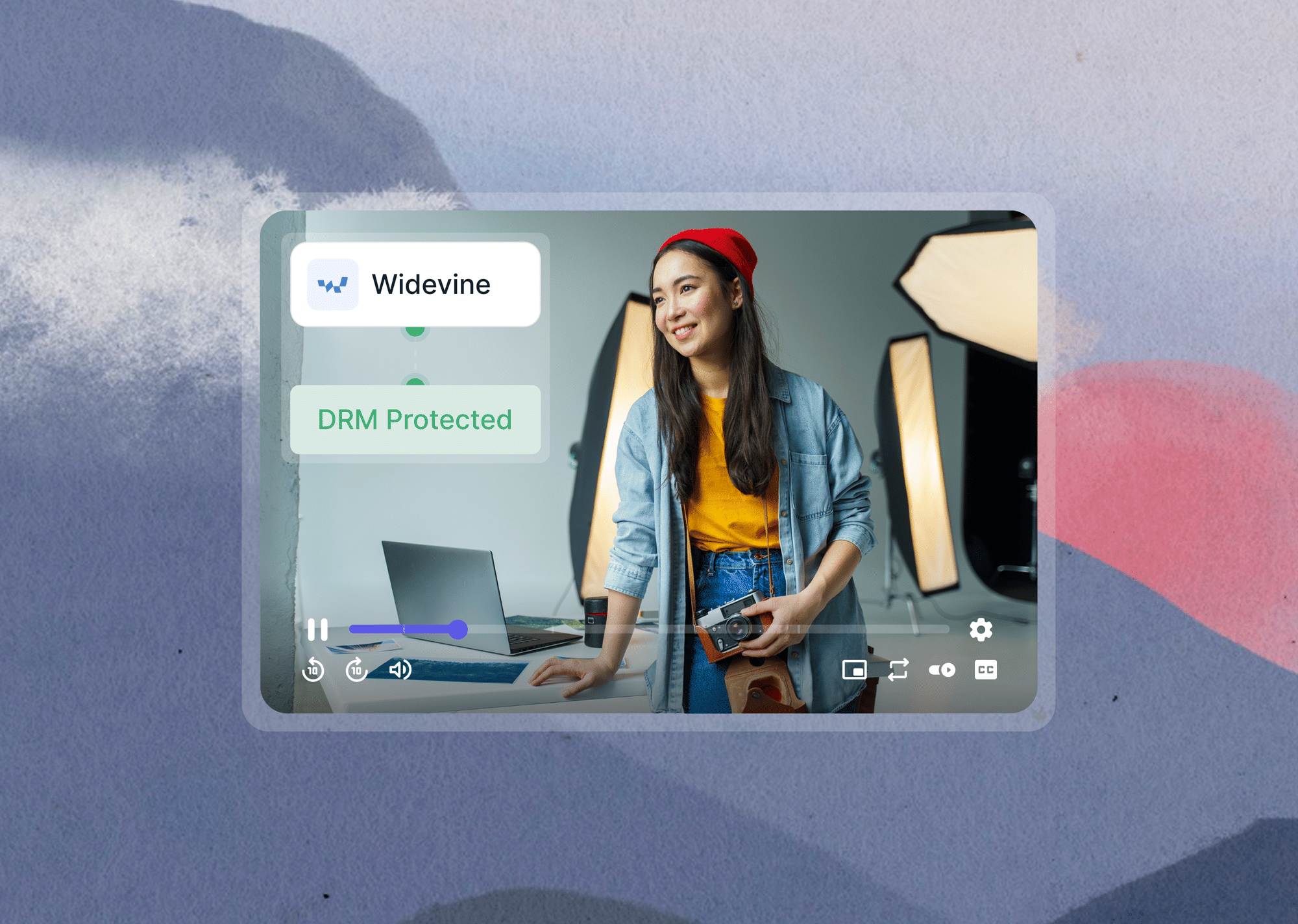
To add Widevine DRM to your video platform without building a license server, use a managed video hosting platform like Gumlet or a DRM-as-a-Service vendor like EZDRM or castLabs.
Both paths handle CWIP certification and license server operation for you. The only component you always build yourself is the access control token that tells the license server whether a given user is authorized to play a given asset.
Running your own Widevine license server doesn't give you a stronger DRM than a managed platform. It gives you more infrastructure to protect.
The security guarantee of Widevine comes from Google's Content Decryption Module and the MPEG-CENC encryption standard, not from who operates the license server. A self-hosted license endpoint is an attack surface. A well-resourced Certified Widevine Implementation Partner has dedicated security investment to harden that surface.
For most teams, the security posture of a properly configured managed deployment is equal to or better than what an in-house build delivers.
This article breaks down three practical paths to production Widevine DRM, with a framework for choosing between them. You will leave with a clear picture of which path fits your team's scale, the one component you always own regardless of path, and what enabling Widevine DRM in a dashboard actually produces in code. If you arrived here trying to get Widevine working in your own browser rather than on a platform you operate, the Widevine DRM overview covers playback-side setup instead.
TL;DR
- Widevine DRM has three required components: encrypted video packaging, a license server, and player configuration. A managed DRM platform handles the first two entirely.
- The only piece no platform can own for you is access control: your backend decides who can watch which content and generates the signed authorization token.
- Three real implementation paths exist: full self-host (3–6 months, requires Google CWIP certification), DRM-as-a-Service vendors like EZDRM or castLabs (2–4 weeks, you still own packaging), and all-in-one platforms like Gumlet (hours, dashboard activation, no certificate negotiation on your end).
- Google requires Certified Widevine Implementation Partner (CWIP) status for production L1 access. You cannot get production-grade Widevine keys by standing up your own server and calling an API.
- Google is retiring its Widevine Cloud License Service on April 13, 2027. Self-hosters relying on it must migrate before that date.
- Most teams at the SaaS, EdTech, and membership platform scale are better served by the managed path. The infrastructure math only shifts at roughly 50M+ monthly streams with a dedicated media security engineer.
🔒 Gumlet Multi-DRM just got more accessible
DRM protection is now free for your first 5 videos on any plan, including free accounts. No enterprise contract, no vendor requests. Just one-click, no-code setup with both Widevine & Fairplay included.
Need more than 5 videos? Add unlimited Multi-DRM for $99/month on any paid plan.
What Widevine DRM Actually Requires: The 3-Component Stack
Widevine needs three things working together before a protected video plays: encrypted content packaging, a license server, and player DRM configuration. Understanding which of these can be delegated is the entire decision.
Gumlet operates the video infrastructure used by SaaS, EdTech, and media companies that rely on DRM-protected content delivery, so the implementation details and effort estimates below come directly from what the platform manages in production.
The three-component framing holds across all DRM approaches, managed or self-hosted, and the outside benchmarks below confirm the same direction.
Component 1: Encrypted Content Packaging
Your video must be encrypted using MPEG-CENC (Common Encryption), and your DASH or HLS manifest must contain PSSH (Protection System Specific Header) boxes that identify the DRM system and content key ID. This is done by a packager: Shaka Packager, an FFmpeg CENC plugin, or a managed platform's transcoding pipeline that handles it automatically on upload.
Component 2: License Server
When a player encounters DRM-encrypted content, the browser or OS-level CDM (Content Decryption Module) generates a license challenge. The player sends that challenge to a license server, which validates it and responds with the decryption key inside an encrypted message only the CDM can read. The player never touches the raw key. The mechanics of that exchange, including how the CDM builds the challenge and what the license response contains, are covered in how Widevine license acquisition works.
Component 3: Player DRM Configuration
Your video player: Shaka Player on web, ExoPlayer on Android, AVPlayer on iOS, needs to know the license server URL. It handles the CDM handshake from there. FairPlay additionally requires a certificate URL.
Of these three components, a secure video hosting platform owns the first two entirely. Your packaging happens automatically at upload. The license server is operated by the platform. What you own is exactly one thing: the logic in your backend that determines who gets an authorized license request.
3 Paths to Widevine DRM: Effort, Skills, and the Real Crossover Point
The choice between paths is a resource allocation question, not a capability question. All three paths deliver production Widevine. They differ in what your team builds and maintains for the life of your product.
| Path A: Full Self-Host | Path B: DRM-as-a-Service | Path C: All-in-One DRM Platform | |
|---|---|---|---|
| Setup time | 3 to 6 months | 2 to 4 weeks | Hours to days |
| CWIP certification required | Yes (direct L1) | Vendor handles | Platform handles |
| You own packaging | Yes | Yes | No |
| You own license server | Yes | No | No |
| Affected by CLS retirement | Yes, if built on CLS | Vendor dependent, confirm with vendor | No |
| You own player config | Yes | Yes (simpler) | Yes (minimal) |
| Ongoing maintenance | High | Medium | Low |
| Practical crossover | 50M+ streams/month | 5–50M streams/month | 0–5M streams/month |
What Does Each Path Actually Cost?
Path costs are often what force the decision. Here are the working estimates:
For a self-hosted build (Path A), you are looking at 3 to 6 months of engineering time plus ongoing ops and DevOps costs for the license server infrastructure. If you value engineering hours at $150/hour, a 6-month build is a $120,000 to $180,000 investment before you stream a single video in production.
DRM-as-a-Service vendors (Path B) typically charge a per-stream or per-title license fee on top of a monthly platform fee. EZDRM, castLabs, and PallyCon all publish pricing on request. Expect $200 to $500 per month at low volume, scaling with stream counts.
Managed DRM platforms handle it as a subscription add-on rather than a build. On Gumlet, Multi-DRM covering both Widevine and FairPlay is free for your first 5 videos on any plan, including free accounts, and unlimited Multi-DRM is $99 per month on any paid plan. There are no setup fees, and CWIP certification, license server infrastructure, packaging pipeline, and CDM detection are all covered in that figure. For comparison, published entry pricing from dedicated DRM vendors generally starts in the low hundreds per month before you add a separate video host.
For context, running a DRM-as-a-Service vendor at comparable volume plus a separate video host typically costs more than a DRM add-on, as offered by Gumlet. The math tightens further when you factor in that Path B still requires you to build and maintain your own content packaging pipeline. For a full breakdown of what each path costs across volume tiers, see our video DRM cost analysis.
Path A: Full Self-Host (3 to 6 Months, CWIP Certification Required)
Building your own stack means owning the packager configuration, the license server application, and the certificate management layer.
The Widevine Server SDK is the starting point. You write the license request handler, build the policy engine (which devices get which security level), and manage key rotation as an ongoing operations responsibility.
The part teams consistently underestimate is the access barrier. Building a license server application is the part engineers can plan for. Getting Google to trust that server with production L1 keys is the part they can't. That access runs through the Certified Widevine Implementation Partner (CWIP) program.
Moving from the test environment to a production endpoint that issues real L1 keys requires a proven, certified implementation through this program. Teams that budget 4 weeks for "building a license server" and then discover the CWIP requirement are the ones who end up at 6 months.
There is also a forward-looking infrastructure change to factor in: Google announced the retirement of its free Widevine Cloud License Service (CLS) on April 13, 2027. If your Path A plan assumes continued access to Google's own hosted service, that dependency has a fixed expiry. Migration options are covered in full in the CLS section below.
Path A makes sense at scale: Roughly 50M+ monthly streams with a dedicated infrastructure engineer and a specific reason to control DRM policy at the SDK level, including custom offline licensing rules, device security level enforcement, or compliance requirements that mandate owning the key infrastructure directly.
Path B: DRM-as-a-Service Vendors (2 to 4 Weeks, You Still Own Packaging)
Vendors like EZDRM, castLabs, BuyDRM, PallyCon, and Axinom are CWIP-certified. They operate the license server. You supply your content's encryption keys, and they issue licenses to your players. You bypass the CWIP certification process by contracting with a vendor that has already completed it.
What you still build on Path B: your content packaging pipeline (CENC encryption and PSSH box injection happen on your side before upload), the player DRM configuration, and the access control token you pass with each license request to tell the vendor's server whether a user is authorized.
For a developer with prior CDN or video infrastructure experience, 2 to 4 weeks is realistic. Without that background, 6 to 8 weeks is more honest. Path B fits platforms at meaningful volume that want license server control without the CWIP overhead.
Path C: All-in-One Video Hosting with DRM Included (Hours)
Platforms like Gumlet abstract all three components. DRM is offered as an add-on feature, applicable for all Gumlet plans, and is activated from the processing settings in your workspace dashboard. Gumlet handles CENC packaging during transcoding, operates the Widevine and FairPlay license servers, and manages CDM detection across browsers and devices. The player integration reduces to a configuration pointing to Gumlet's license endpoint.
Most customers go live with DRM-protected content within 15 days of account setup, and Widevine activation itself is immediate.
The trade-off is: you work within the platform's API surface for DRM policy customization. Offline licensing, hardware security level enforcement, and rental and playback duration controls are all configurable through Gumlet's license server parameters, but you are not writing the policy engine yourself.
For most SaaS and EdTech deployments, the platform API covers everything needed. For the exceptions, read the crossover section below.
Google Is Retiring the Widevine Cloud License Service on 13 April 2027
Google will cease operations of the Widevine Cloud License Service on 13 April 2027, as stated on the Widevine program site. If your license delivery depends on CLS, you need an alternative in place before that date or protected playback stops working.
The part teams miss is that the dependency is often indirect. Google's Proxy SDK exists specifically to communicate with the Cloud License Service, so any setup built on it inherits the dependency, as does any vendor that has not moved to the Widevine License Server SDK. Before you assume you are clear, ask your DRM vendor directly whether their license issuance touches CLS at any point.
Three migration destinations exist, and the right one depends on where the dependency sits:
| Your current setup | Migration path | What it costs you |
|---|---|---|
| Self-hosted license server calling CLS | Move to the Widevine License Server SDK and run issuance yourself | Full CWIP certification and the timeline that comes with it |
| DRM-as-a-Service vendor that still uses CLS | Move to a vendor already on the License Server SDK | Vendor switch, but you keep owning packaging and player config |
| CLS chosen specifically to avoid running infrastructure | Move to an all-in-one platform | Nothing to certify, nothing to operate |
That last row is where most CLS users actually sit. If you originally chose CLS because you did not want to run a license server, migrating to a raw CWIP vendor recreates the problem: you still own packaging, player configuration, and token logic. A platform that handles the license server alongside packaging and delivery removes the dependency in one move rather than relocating it.
Book a migration call with Gumlet's team
The Widevine Ownership Line: The One Piece You Always Build
The Widevine Ownership Line is the boundary between what the DRM infrastructure handles and what your application logic handles.
On the infrastructure side of the line sits everything that touches the DRM protocol: CENC encryption, CDM handshake, key issuance, certificate management, and device detection.
On your side sits one thing: the question of whether this specific person has paid for this specific content. Your subscription state, your course access logic, your tier rules. That check belongs to you because you're the only one who knows what your users have purchased. No DRM stack can know that, and you wouldn't want them to.
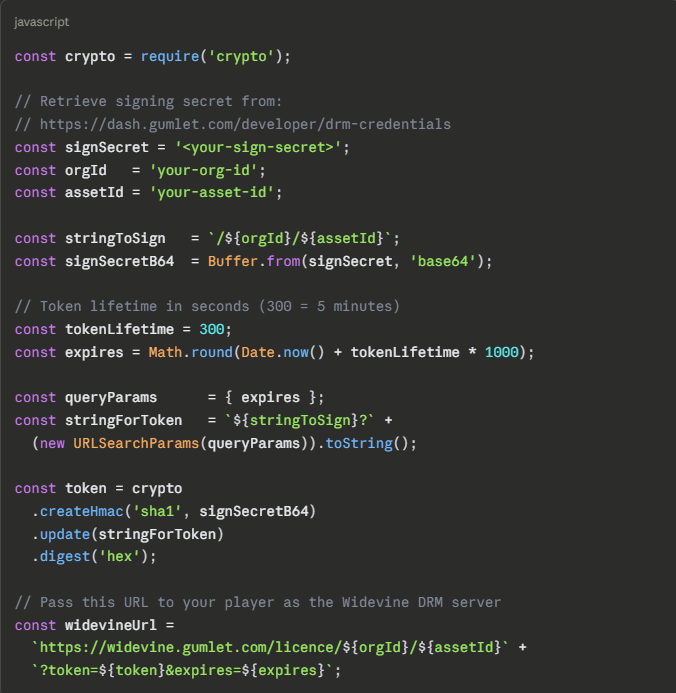
On Gumlet's platform, the access control integration works through a signed token appended to the license server URL. Your backend generates the token using HMAC-SHA1 against your signing secret, with a time-bound expiry. Gumlet's license server validates the token signature and issues the decryption key only if valid. Here is the token generation code drawn directly from Gumlet's license server documentation:
const crypto = require('crypto');
// Retrieve signing secret from:
// https://dash.gumlet.com/developer/drm-credentials
const signSecret = '<your-sign-secret>';
const orgId = 'your-org-id';
const assetId = 'your-asset-id';
const stringToSign = `/${orgId}/${assetId}`;
const signSecretB64 = Buffer.from(signSecret, 'base64');
// Token lifetime in seconds (300 = 5 minutes)
const tokenLifetime = 300;
const expires = Math.round(Date.now() + tokenLifetime * 1000);
const queryParams = { expires };
const stringForToken = `${stringToSign}?` +
(new URLSearchParams(queryParams)).toString();
const token = crypto
.createHmac('sha1', signSecretB64)
.update(stringForToken)
.digest('hex');
// Pass this URL to your player as the Widevine DRM server
const widevineUrl =
`https://widevine.gumlet.com/licence/${orgId}/${assetId}` +
`?token=${token}&expires=${expires}`;
Always generate this token server-side. Never expose the signing secret in client-facing code.
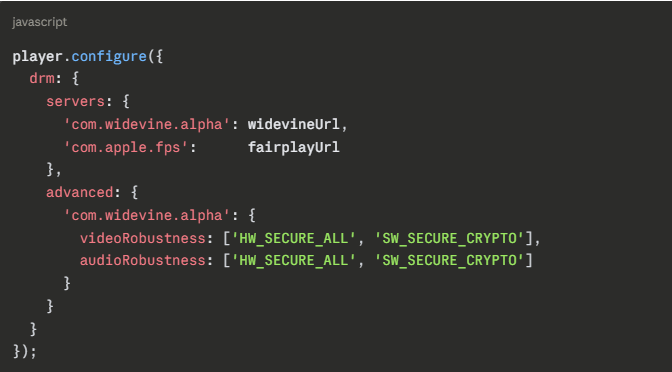
With that URL generated, the Shaka Player configuration on the client looks like this:
player.configure({
drm: {
servers: {
'com.widevine.alpha': widevineUrl,
'com.apple.fps': fairplayUrl
},
advanced: {
'com.widevine.alpha': {
videoRobustness: ['HW_SECURE_ALL', 'SW_SECURE_CRYPTO'],
audioRobustness: ['HW_SECURE_ALL', 'SW_SECURE_CRYPTO']
}
}
}
});
That is the totality of code a developer writes to add Widevine to a Gumlet-hosted video. The license infrastructure behind that URL is fully managed.
Your entitlement check, your token generation logic, and your token lifetime are yours. Everything between the token validation and the decrypted frame reaching the player is Gumlet's.
For teams evaluating Gumlet's video protection features, DRM integrates with tokenized delivery and dynamic watermarking on the same platform, which means you get traceability on top of access control in the same workflow.
The CWIP Barrier: What Certified Widevine Implementation Partner Status Actually Requires
"You cannot bootstrap your way into production Widevine L1. Google controls the gate, and the gate is CWIP certification."
This is the fact that turns 4-week estimates into 6-month timelines on Path A.
Google's own position is more specific than most write-ups suggest. A Master Licensing Agreement covers SDK access and the test environment. Production access runs through the Certified Widevine Implementation Partner program, and Google's CWIP FAQ is explicit that you have two routes: become a CWIP yourself, or contract with an existing one. In both cases you execute a Master Licensing Agreement directly with Google. There is no third route where you stand up a server, call an API, and get production keys. The certification exists because hardware-level content security, including TEE-based decryption on L1 Android devices that blocks screen capture at the OS level, requires Google to audit your security posture before trusting your infrastructure with production keys.
The practical implication: Widevine L3 is accessible for development and testing without CWIP. L3 is software-based, meaning decryption happens in software and a determined attacker can capture decrypted frames in memory. L1 hardware security, which major streaming platforms require for HD content, sits firmly behind the CWIP requirement.
Warning: If your Path A plan doesn't include a concrete CWIP certification strategy or a named CWIP partner relationship, your timeline is not 4 weeks. It is 4 weeks of building plus whatever the certification process takes, which varies and is outside your control. Write down that assumption before committing an engineering budget to it.
The Number: According to Google's Widevine developer documentation, even companies that complete the CWIP process still require approval of their specific implementations before receiving production key access. The CWIP program evaluates both your security posture and your integration design,not just your intent to comply.
What Becoming a CWIP Actually Involves
If you take the first route, Google's CWIP program page sets out what your company signs up for:
- Three agreements before you can register: a Non-Disclosure Agreement, a Master Licensing Agreement, and a Certified Widevine Implementation Partner Agreement with an Order Form. Your engineers cannot register for training until all three are executed.
- An in-person 3-day training session covering the Widevine overview, the License Server SDK, and Chrome and Android integration, with hands-on lab time and presentations by Widevine engineers.
- An online exam requiring 90% or better. Google's own material notes the class is difficult and the pass mark is deliberately high. One retake is granted.
- Two certified individuals on staff, permanently. Certification lapses if you drop below that.
- Ongoing obligations: annual CWIP fees, and passing Widevine audits of end-user sites if Widevine chooses to conduct them.
Google also publishes prerequisites for the engineers you send: intermediate Ubuntu and command-line experience, Python and XML, and a working knowledge of video encoding standards including DASH, HLS, GOP structure, encoding profiles, and muxing.
The reason this turns 4-week estimates into 6-month timelines is scheduling, not difficulty. Training runs as scheduled in-person sessions at Google offices, and Widevine's public schedule typically lists only one upcoming session at a time, with a registration deadline about a month ahead of the class. If your build finishes in week four and the next session is months out, your production date is set by Google's calendar, not yours.
In 2026, the Self-Hosting Calculus Has Changed
Three years ago, recommending a managed DRM platform to a mid-size streaming team would have invited pushback.
The assumption was that any team above a certain volume needed to own their own license infrastructure to get real control over security levels, key rotation, and policy enforcement. That assumption is now wrong in most cases, and it's worth examining what changed.
As of 2026, managed video security platforms expose DRM policy controls that previously required direct SDK access: hardware security level specification per asset, per-user rental duration, playback duration windows, offline license persistence via rental_duration and playback_duration parameters, and multi-DRM support across Widevine and FairPlay in a single integration.
The gap between what a well-built managed API exposes and what a self-hosted implementation can do has narrowed to a set of edge cases that matter primarily to large OTT operators with specific regulatory constraints.
The more pressing 2026 consideration is the infrastructure migration that Google's CLS retirement is forcing. Teams that built self-hosted pipelines relying on Google's Cloud License Service as a backend need to re-architect before April 2027. That migration pressure is a useful forcing function: it is an opportunity to re-examine whether the infrastructure overhead still earns its keep.
Insider Take: Before committing to a self-hosted Widevine build, map your requirements against these three controls that Gumlet's license server API exposes directly:
- hardware_secure: enforces L1 hardware-level decryption per asset
- rental_duration: controls how long an offline license remains valid
- playback_duration: limits playback window within a valid license period
These three parameters cover the protection requirements of roughly 90 percent of SaaS and EdTech deployments. The one edge case where Path A genuinely earns its cost is when your compliance mandate requires owning and rotating encryption keys inside your own hardware security module, typically FedRAMP High, FIPS 140-2 Level 3, or similar, or when you need to enforce playback policy at the SDK level with logic no managed API exposes.
Outside those requirements, the "we need full control" argument rarely survives a line-by-line comparison with what a managed API already covers.
What Gumlet's DRM Covers: Widevine, FairPlay, and the Full Video Protection Stack
Gumlet's video DRM offering covers two of the three major DRM systems: Widevine for Chrome, Firefox, Edge, Android devices, and Android TV, and FairPlay for Safari and iOS native players.
The protection holds at scale. Elmonsf, an EdTech platform serving over 2 million learners across the MENA region, processes more than 200,000 unique DRM-secured plays every day on Gumlet. Before switching, the platform experienced recurring piracy incidents despite having DRM from their previous provider. After moving to Gumlet, their DRM implementation has not been breached.
"Moving to Gumlet allowed us to push our performance further than we thought possible. Achieving nearly 36% optimization on top of what we had was the edge we needed to scale our courses efficiently."
Ahmed Khan, Software Engineer, Elmonsf
For most web and mobile audiences, Widevine plus FairPlay covers the substantial majority of real-world playback environments, which is why building a multi-DRM setup across Widevine and FairPlay is the standard configuration rather than picking one. Chrome, Firefox, Edge, Android, iOS, Safari, and Chromecast are all covered. The coverage gap is Windows Edge users expecting PlayReady enforcement and certain Smart TV environments.
PlayReady, Microsoft's DRM system used primarily on Windows Edge and certain Smart TV environments, is not part of Gumlet's current offering. If your audience includes a significant share of Windows users who expect PlayReady enforcement in Edge specifically, factor that gap into your evaluation before committing.
DRM is available as an add-on video protection feature for all Gumlet tiers. You can review what each tier includes on Gumlet's pricing page. Enterprise accounts also unlock the FairPlay credential approval process for iOS native player delivery, which typically takes 7 to 10 working days from the point of application.
What the Platform Manages for You
When DRM is active on a Gumlet workspace, the following components run on Gumlet's infrastructure, with no configuration required beyond activating the setting in your dashboard:
- CENC encryption and PSSH box injection during transcoding, applied automatically to both DASH and HLS manifests
- Widevine license server: CWIP-certified, production L1 access included
- FairPlay license server with a hosted certificate URL
- CDM detection across browsers and device types, serving the correct DRM scheme per playback environment
- Per-asset policy controls including hardware_secure, rental_duration, and playback_duration parameters, configurable at the license request level
Which Integration Method Requires What
Not every Gumlet DRM integration requires the same engineering investment. The two paths are:
- Gumlet iFrame embed or WebView SDK (Android and iOS): DRM is handled entirely within the embed. No token generation, no license URL management, no player configuration. This is the fastest path to protected playback.
- Custom player (Shaka Player on web, ExoPlayer on Android, AVPlayer on iOS): The license server setup described earlier in this article applies. You generate the signed token server-side, pass the license URL to your player, and Gumlet handles the rest. Most custom player integrations take 1 to 3 days of engineering time.
DRM as One Layer in a Complete Protection Architecture
DRM controls who can decrypt the video stream. For most paid content platforms, it is one layer in a wider protection architecture, not the entire stack. Gumlet's video protection adds two complementary layers on the same platform:
Tokenized delivery generates viewer-specific, time-limited URLs so that a shared or stolen link expires before it can be replayed. Dynamic watermarking embeds invisible, viewer-specific identifiers directly into the video frames, so any screen-recorded copy can be traced back to the source account regardless of how it was captured.
For teams building private video hosting for paid courses, membership communities, or enterprise training libraries, combining DRM with tokenized delivery and watermarking gives you prevention, access control, and traceability on a single platform.
Gumlet's video hosting infrastructure handles everything underneath: multi-CDN routing, adaptive bitrate streaming, and GPU-parallel transcoding.
Frequently Asked Questions
1. Can I use Widevine without running my own license server?
Yes, and for most teams this is the right approach. Widevine requires a license server to issue decryption keys to authorized players, but that server doesn't have to be yours. Managed platforms like Gumlet operate Widevine license servers that handle the full CDM handshake, certificate management, and key issuance.
Your responsibility is generating a signed authorization token server-side that tells the license server whether a specific user is authorized to play a specific asset. The platform validates the signature and does the rest. If you are not streaming at 50M+ monthly plays with a dedicated infrastructure team, owning the license server adds operational cost and maintenance burden without adding content security.
2. What is the difference between a Widevine CWIP and a DRM-as-a-Service vendor?
A Certified Widevine Implementation Partner (CWIP) is a company Google has certified to operate production Widevine license infrastructure. A DRM-as-a-Service vendor is typically a CWIP that sells that certified infrastructure to customers as a service.
The distinction matters because you cannot operate a production Widevine L1 license server without either becoming a CWIP yourself or contracting with one.
When you use EZDRM, castLabs, or Axinom, you're using their CWIP certification as a managed service. When you use an all-in-one platform like Gumlet, you're using the platform's CWIP relationship bundled with hosting, packaging, and delivery. The one thing you cannot do is operate your own production L1 license server without going through the CWIP program directly.
3. Do I need Google certification to use Widevine in production?
For L1 hardware security, yes. Google's CWIP program is the pathway for production-grade license server access that issues L1 keys to end-user devices. Without CWIP certification or a CWIP partner relationship, your license server is limited to the test environment and L3 software-based DRM, which does not block screen recording or enforce hardware-level content protection.
If your content security requirements include L1 enforcement, which most premium video platforms require for HD content, the CWIP requirement is not optional. Check that any platform on your shortlist has confirmed CWIP status before assuming L1 delivery is production-ready on their infrastructure.
4. What is Widevine L1 vs L3, and does it matter for my use case?
Widevine L1 uses a Trusted Execution Environment (TEE) to perform all video decryption and decoding entirely inside secure hardware. Decryption keys and decrypted content never reach the host CPU. L3 is software-only: decryption happens in software, which means a determined attacker can capture decrypted frames from memory.
For most SaaS product videos, onboarding content, and marketing assets, L3 is adequate deterrence against casual piracy. For paid course content, premium OTT, or any content where a single leak materially damages revenue, L1 enforcement is worth the additional integration requirements. The practical rule: if your content is the primary reason users pay, L1 enforcement belongs in your security requirements.
5. How long does it take to add Widevine DRM with a managed platform?
Based on Gumlet's platform data, most customers go live with DRM-protected video within 15 days of account setup. For Widevine specifically, activation is immediate. The 15-day window accounts for FairPlay credential approval for iOS delivery on enterprise accounts.
If you're integrating with a custom player rather than using the Gumlet iFrame embed, the token generation and Shaka Player configuration adds 1–3 days of engineering time. Compare that to 2 to 4 weeks for a DRM-as-a-Service vendor integration where you still own packaging, or 3 to 6 months for a self-hosted build that includes the CWIP certification timeline.
6. What does a video platform handle vs. what do I still need to build for Widevine?
Gumlet handles every component listed under what the platform manages: CENC encryption, PSSH injection, both license servers, CDM detection, and certificate management.
What you build is the access control logic in your backend: checking whether a user has a valid subscription or entitlement, generating a signed HMAC-SHA1 token using your signing secret, and passing the resulting license URL to your player. Gumlet validates the token signature; you define what makes a user authorized. This is the Widevine Ownership Line, and it is the only code you write.
7. How do I connect my own user authentication to Widevine license delivery?
Your backend intercepts the playback request before the player loads, checks your user database or subscription service to confirm entitlement, then generates a signed license URL using your Gumlet signing secret. The URL carries an HMAC-SHA1 token with a short expiry (300 seconds is a standard window).
Your frontend passes this URL to the player as the DRM server endpoint. The player sends license requests to that URL, Gumlet validates the token, and issues the decryption key if valid. Your authentication system and the DRM infrastructure never communicate directly.
Treat each signed license URL as a session-scoped credential: it authorizes this user to play this asset during this window, and it expires before it can be meaningfully reshared.
8. Does Widevine DRM prevent screen recording on desktop browsers?
On desktop Chromium browsers (Chrome and Edge), Widevine operates at L3, which means screen recording is not blocked at the OS level. DRM deters casual copying and prevents automated download tools from extracting the encrypted stream, but a user running screen capture software can record the playback output. Full screen recording prevention on desktop is not achievable through DRM alone.
For platforms where screen recording is a real threat, dynamic watermarking is the complementary layer: rather than blocking the capture, it embeds viewer-specific data invisibly into the video so any leaked copy can be traced back to the source account. L1-capable Android devices do block screen recording of DRM-protected content at the OS level.
9. Is Gumlet a Certified Widevine Implementation Partner (CWIP)?
Yes. Gumlet is listed on Google's public register of Certified Widevine Implementation Partners at widevine.com/training, certified for Widevine Modular DRM. That certification is what enables production L1 access for customers on the DRM add-on. When you activate DRM on a Gumlet workspace, you are using Gumlet's CWIP status rather than obtaining your own.
This is the key distinction between an all-in-one platform and a pure DRM-as-a-Service vendor: on Gumlet, the certification is bundled with the hosting and packaging pipeline.
Conclusion
The Widevine stack has a clear ownership boundary, and the only side you always own is access control.
The infrastructure side: CENC packaging, license server, CDM handling, can be delegated entirely. Most teams that spend months building Widevine infrastructure are building the delegatable part. The entitlement check and signed token generation, the piece specific to your product, is a 50-line function on your backend.
If you want to see the managed path in action, book a demo with Gumlet's team. They can walk you through the DRM setup end-to-end. If you want to explore the platform first, Gumlet's free plan gives you access to the dashboard before any commitment.