If you sell courses, share premium webinars, host customer-only demos, or publish internal training, a plain video link is a liability.
The real exposure isn't the public internet; it's the person who paid for your course and immediately forwarded the lesson link to a group chat. Signed URLs exist to make that problem much smaller, and understanding how they work is the starting point for any serious video access control strategy.
The short answer is yes, in many cases, they are the smartest place to start. Signed URLs give you a secure video URL that can expire, validate the viewer, and limit where or how playback happens.
For most businesses handling paid courses, gated webinars, or private customer content, they offer the right balance of security and usability, strong enough to stop casual abuse, light enough not to break the viewer experience.
Platforms like Gumlet’s video protection features handle that entire layer natively: token generation, expiry rules, access validation, so teams can get signed URL protection without writing a single line of token logic.
Key Takeaways
- A signed URL is a video link that includes a cryptographic token proving the request is authorized.
- Signed URLs usually include an expiry time and can also support IP binding, domain restrictions, or viewer-specific access rules.
- Signed URLs are stronger than simple password protection for video access control, but they do not replace DRM.
- If your content is high-value, licensed, or frequently targeted for piracy, signed URLs work best as part of a layered security model that may also include DRM, watermarking, and domain locks.
- Platforms like Gumlet implement signed URL delivery natively, which means configuring expiry times, domain restrictions, and access rules through a dashboard rather than a custom backend.
What is a Signed URL for Video?
A signed URL is a playback link that includes a cryptographic signature proving the viewer is allowed to access a video for a limited time or under specific conditions. In simple terms, it is not just a URL. It is a URL plus proof of permission.
That distinction matters. A public video link says, “Here is the file.” A tokenized video URL says, “Here is the file, but only if this request matches the rules.”
Those rules can include:
- an expiration timestamp
- a specific path or asset
- an allowed IP address or IP range
- a specific user session
- an approved domain or referrer
- a signed playback token, often built with JWT or a similar signing method
Think of signed URLs as expiring tickets for video playback. If the ticket is valid, the player gets access. If the ticket is expired, modified, copied into the wrong context, or presented by an unauthorized viewer, playback fails.
Under the hood, the signature is typically generated using HMAC-SHA256 or RSA, where the server combines the URL path, expiry timestamp, and a private signing key into a hash. That hash travels with the URL.
When the request arrives at the CDN, the delivery layer recomputes the hash using the same key. If the two match, playback is allowed. If the URL was copied, altered, or the token has expired, the hash won't match and the request is rejected at the edge, before a single video byte is served.
How Do Signed URLs Work for Video?
Signed URLs work by attaching authorization data to the video request itself. When the player asks for a stream, the server or CDN checks whether the token is valid before allowing playback.
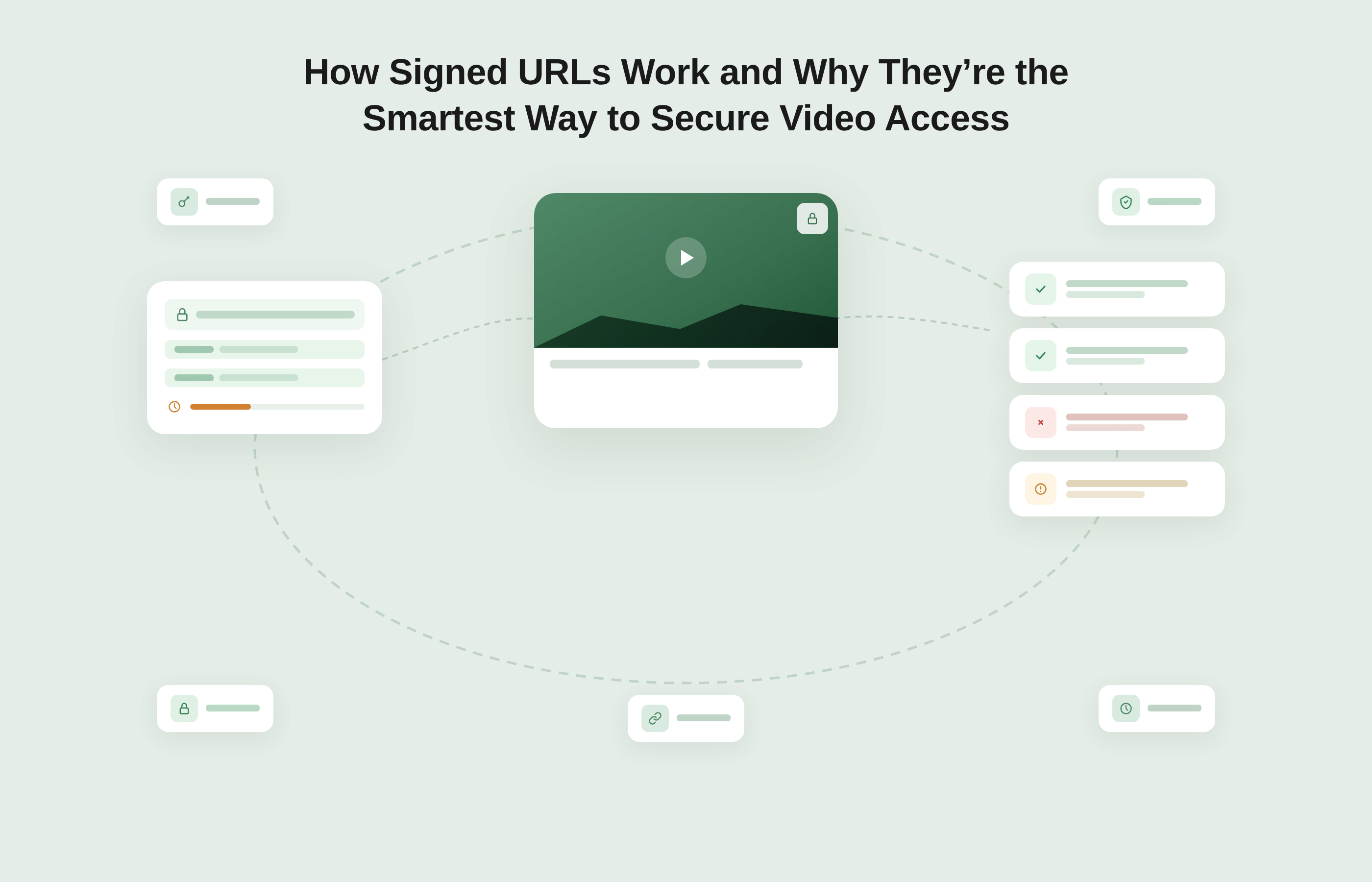
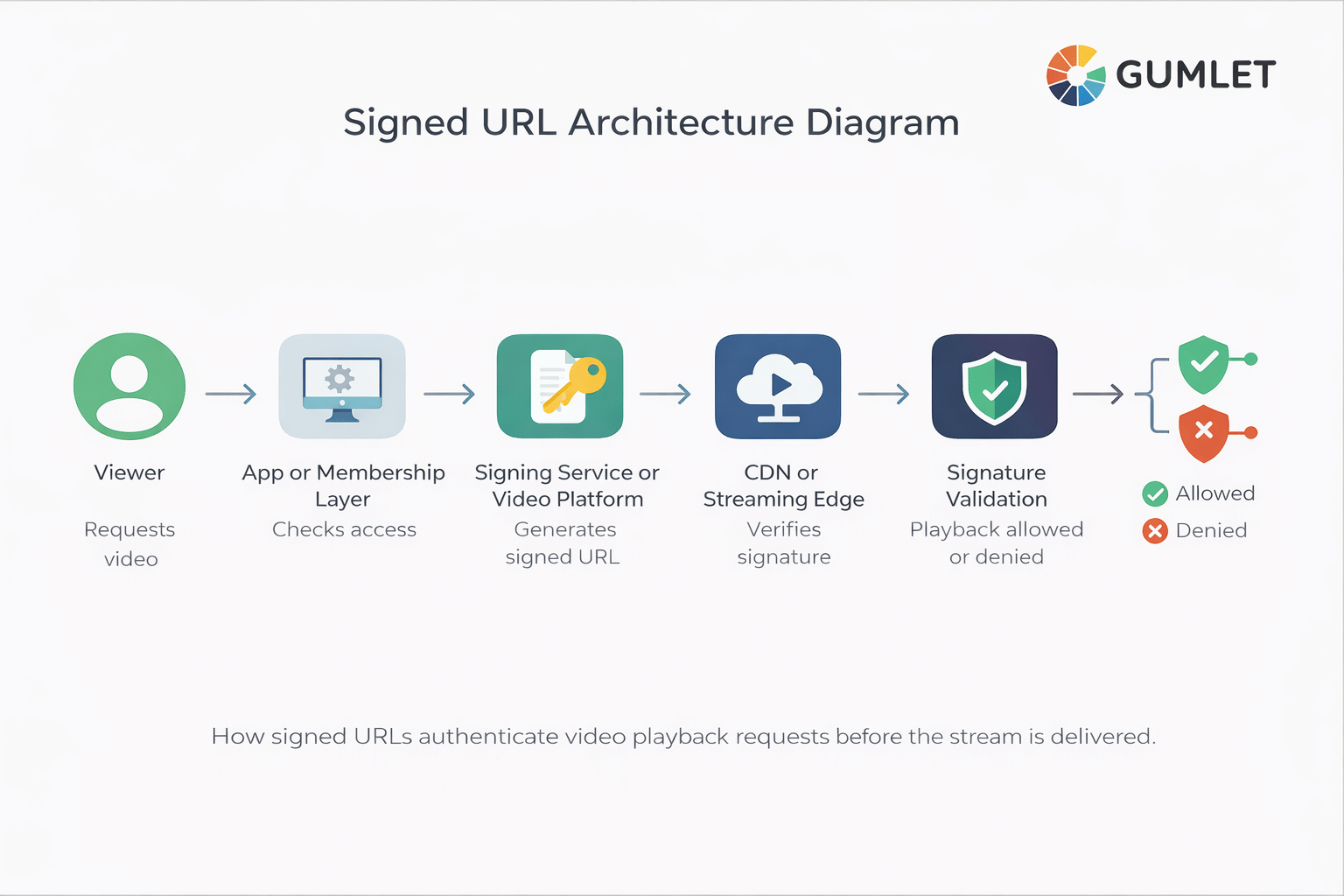
Here is the typical flow for signed URL video streaming:
- A viewer tries to watch a protected video.
- Your app, backend, or video platform checks whether that viewer should have access.
- A signed playback URL is generated for that viewer or session.
- The signed URL includes rules such as expiration, asset path, and sometimes IP or domain restrictions.
- The video player requests the stream using that secure video URL.
- The CDN or media service validates the signature.
- If the signature is valid, the video plays.
- If the signature is invalid or expired, access is denied.
What makes this different from simple authentication is where validation happens. With most login-gated pages, the server checks your session once at the door and then hands you a permanent video URL. Anyone who extracts that URL, via browser DevTools, a network inspector, or just right-clicking the player, can take it anywhere.
Signed URL validation happens at the CDN edge, on every request, for the stream itself. There's no door to bypass, making it useful for video access control. They move protection closer to the playback layer. Instead of trusting that a page is private, they verify that the video request itself is authorized.
This is how AWS CloudFront, Cloudflare, and Fastly, the CDNs behind most professional video delivery, implement signed URL enforcement at the edge.
What is Inside a Signed Video URL?
A signed video URL usually contains the asset location plus a token and policy data that tell the delivery system how to handle access. The exact format varies, but the idea stays the same: the URL carries verifiable playback rules.
A typical signed URL may include:
- the path to the video manifest or asset
- an expiry value
- a signature or token
- optional viewer claims
- optional IP restrictions
- optional domain or referrer checks
For example, a signed playback URL might look something like this:
https://video.example.com/stream/course-lesson-4.m3u8?expires=1776125400&token=abc123signedtoken
The token portion is often a JWT, a JSON Web Token, which has three base64-encoded parts separated by dots: a header declaring the signing algorithm, a payload containing the actual claims, and a cryptographic signature.
The payload is what carries the policy. JWT is an open standard, RFC 7519 ,maintained by the IETF, with implementations in virtually every major programming language.
It might look something like this:
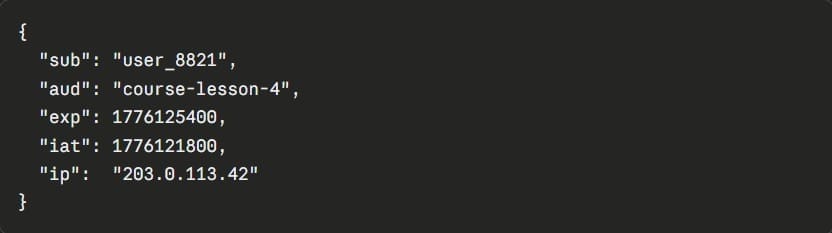
sub is the subscriber or viewer ID. aud is the specific asset this token is valid for. exp is the Unix timestamp when it expires. iat is when it was issued. ip optionally binds the token to a single IP address.
When that token arrives at the CDN, none of these fields can be changed, the signature will break if anything is modified. That's what makes it verifiable rather than just obscure.
This is also where a lot of confusion begins. A signed URL is not just “a hidden link.” It is a link that can be validated.
Why Signed URLs Are the Smartest Baseline for Secure Video Access
Signed URLs are the smartest baseline for secure video access because they improve control at the playback layer without forcing every team into the cost and complexity of a full DRM deployment from day one.
Signed URLs are hence, a strong fit for businesses that need more than “unlisted video,” but are not yet ready for the heaviest possible security stack.
They Make Shared Links Less Useful
A public HLS manifest URL shared in a Discord server stays valid indefinitely. A signed playback URL generated for that session is typically dead within minutes.
The student who screenshotted their lesson URL and dropped it in a group chat just shared a link that will reject everyone who tries it, because the token was issued for their session, not theirs to give.
They Support Viewer-Specific Access
Instead of a single shared URL for every enrollee, each viewer gets a token tied to their session.
That means when two students from the same household try to watch simultaneously using a shared link, only the session that generated the token can play.
The other gets a 403. Token-based video authentication at this level is what separates real access control from security theater.
They Work Well With Modern Streaming Delivery
Signed URLs fit neatly into HLS and DASH workflows, secure CDN delivery, and authenticated streaming pipelines, making it a practical security layer for online course platforms, SaaS onboarding hubs, media sites, and gated communities.
They Create Less Friction Than Heavier Controls
Passwords, login walls, and device-bound protection all have their place. But signed URLs often feel invisible to the end user. The viewer simply presses play. The authentication happens under the hood.
They Are Flexible Enough to Layer With Other Controls
A signed URL can be combined with:
- domain restrictions
- geo-blocking
- IP binding
- referrer whitelisting
- watermarking
- DRM
That is where the real power shows up. Signed URLs are not trying to be the whole security story. They are the foundation.
They are excellent at access control. They are not content rights enforcement. Someone with valid access can still hold up their phone and record the screen.
That distinction matters when you're deciding whether signed URLs alone are enough, or whether your content value demands DRM on top.
Signed URLs vs Password Protection
Password protection secures entry to a page or area. Signed URLs secure the actual video request. Signed URLs are usually the stronger option for real video access control.
A password can protect a landing page, course portal, or membership area. But once the player receives a reusable video source URL, the real security question becomes: can that playback URL be copied, reused, embedded elsewhere, or accessed after it should have expired?
Here's the failure mode password protection almost always misses: open any browser DevTools on a password-protected video page, go to the Network tab, start playback, and filter for .m3u8.
You'll see the HLS manifest URL sitting there in plain text, no token, no expiry, perfectly copyable. Password protection secured the door. The video itself was never behind it.
| Method | What it protects | Strengths | Limitations | Best fit |
|---|---|---|---|---|
| Password protection | Page or portal access | Simple to understand and deploy | Does not necessarily protect the playback URL itself | Basic members-only content |
| Signed URLs | Video playback request | Expiring access, token validation, viewer-level control | Does not stop screen recording or fully replace DRM | Private video streaming, course content, demos |
| DRM | Playback and content rights enforcement | Strongest content protection layer | More complex to implement and manage | Premium media, high-value IP, licensed content |
Password protection still has value. It is just a different layer. If your real concern is protecting the stream itself, signed playback URLs are usually the more precise mechanism.
Signed URLs vs DRM
Signed URLs and DRM solve different problems. Signed URLs decide who can access the stream. DRM decides what happens to the content once playback is allowed.
Comparing them as if one replaces the other leads teams in the wrong direction.
Signed URLs control the gate. DRM controls what happens once someone walks through it. A signed URL decides whether a viewer is allowed to request the stream at all. It can expire, validate the source, or reject the session.
DRM operates at the playback and rendering layer: it governs whether the video can be downloaded, screenshotted, copied to another device, or played outside a licensed player.
You can have one without the other, but they protect against different things. Stripping a signed URL bypasses access control. Bypassing DRM requires attacking the playback system itself, which is a substantially higher bar for an attacker.
If you are protecting internal training, gated customer education, webinar libraries, or paid course access, signed URLs may be enough to get you much closer to where you need to be.
If you are protecting premium entertainment content, licensed material, certification content, or video libraries where leaks directly damage revenue, you will probably need DRM as well.
For teams evaluating that next layer, this is where a deeper guide to DRM video hosting platforms becomes useful.
When Signed URLs Are Enough, and When You Need More
Signed URLs are enough when the main goal is controlling who can reach the stream and reducing casual sharing. There are not enough when the cost of content theft is high enough that you need stronger enforcement during playback.
The decision comes down to content value and threat model, not technical preference.
Signed URLs alone are the right starting point when you're protecting course lessons, webinar replays, SaaS onboarding videos, or partner training libraries.
The threat here is casual leakage: people forwarding links they shouldn't. Short-lived tokens disrupt that without adding friction for legitimate viewers.
- Add domain restrictions the moment your video is embedded anywhere. Even with signed tokens, a video player that will load on any domain gives attackers a simple path: extract the signed URL, embed it in their own page. Domain locks close that gap.
- Add geo-blocking when distribution rights are geographically bounded: licensed content, regional compliance, territory-specific publishing. This is less about piracy deterrence and more about rights management.
- Add watermarking when you need leak traceability. A visible or invisible watermark tied to the viewer session means that even if valid content leaks, you know exactly whose session it came from.
- Add DRM when the content is premium enough that a leak directly damages revenue: licensed OTT content, high-ticket certification programmes, or any video where a determined attacker would find it worth attacking the playback layer itself.
This is what a mature video security stack actually looks like in practice. Each layer solves a specific problem. Signed URLs are the foundation on which everything else builds.
The Video Access Control Stack: a framework worth having in mind:
| Layer | What it controls | When to add it |
|---|---|---|
| Signed URLs | Who can request the stream | Always |
| Domain restrictions | Where the player can load | Any embedded video |
| Geo-blocking | Which regions can access | Licensed/regional content |
| Watermarking | Leak attribution | Paid or premium content |
| DRM | What happens during playback | High-value or licensed IP |
Common Implementation Patterns for Signed Video URLs
There is no single way to implement a signed playback URL. Most teams choose one of three patterns based on their engineering resources, risk tolerance, and the level of control they want over the authorization flow.
Backend-Generated Expiring URLs
This is the classic approach. Your backend checks whether the user is entitled to watch, then signs a secure video URL with an expiration time and optional policy rules.
It works well when your app already has a backend auth layer, as an entitlement check before you issue the token is natural.
The tradeoff is maintenance: you own key generation, rotation, expiry logic, signature validation, player edge cases, and revocation handling. None of that is difficult in isolation. All of it adds up over time.
The downside is maintenance. You need to handle key management, token generation, expiration logic, testing, and edge cases across devices and players.
JWT Video Authentication
Some teams use JWT-based playback authorization to pass viewer claims or session information in a signed token. This is still tokenized video access, but with a more structured payload.
A JWT carries three base64-encoded sections: header, payload, signature, and the payload can include custom claims like the viewer's user ID, their subscription tier, the specific asset they're authorised to watch, and an expiry timestamp. Because the whole thing is signed, any tampering invalidates the token at the CDN.
The advantage over a simple query-string token is that you can pass richer viewer context without an extra database lookup at the edge.
It's the right choice when your architecture already uses JWT for authentication elsewhere, or when you need session-aware rules, for instance, serving SD quality to free users and HD to paid subscribers from the same token.
The tradeoff is the same: flexibility comes with implementation responsibility.
Platform-Managed Signed Playback
This is the easiest path for most non-specialist teams. A secure video platform handles signed URL generation, access control settings, and validation at the delivery layer.
It's the right path when your team needs the security outcome without owning the cryptography. The platform generates tokens, handles expiry, validates at the edge, and abstracts away every operational decision about key rotation and edge cases.
For most course platforms, SaaS products, and media businesses, this is the implementation pattern that actually ships.
If your goal is to control access without building and maintaining a signing service yourself, this is where a platform approach becomes attractive.
Are Signed URLs Hard to Set Up?
Signed URLs are not conceptually hard, but custom implementation can become messy faster than most teams expect. The idea is simple. The surrounding operational work is not.
A DIY setup means taking ownership of key generation and rotation, token creation logic, signature validation at the delivery layer, integration with your auth or billing system, and every edge case across devices, players, and interrupted sessions. Most teams underestimate the last two.
The cryptography is the easy part. Handling a mobile viewer who loses cell signal mid-lesson, restarts the app, and now holds a link the CDN will reject, that's where the real operational work lives.
Many teams delay implementation. Not because signed URLs are a bad idea, but because they assume they need to build a mini security system to get them.
The honest calculation: if your team has a backend engineer with time to spare and a preference for owning the security layer, build it. If your team is trying to ship video protection without it becoming a two-sprint project, use a platform that already solved these problems.
Gumlet's video protection features handle this entire layer: token generation, expiry rules, domain and IP restrictions, through a dashboard. No backend engineering required.
Best Practices for Using Signed URLs in Video Streaming
Signed URLs work best when the policy is realistic, not just theoretically secure. A token that is too permissive is weak. A token that is too strict can break legitimate playback.
- Set expiry windows by use case, not instinct. For live events and on-demand plays, 5–15 minutes is enough, short enough that a forwarded link is useless, long enough that a viewer on a slow connection still gets in. For subscription libraries where a viewer might watch several episodes in one sitting, a few hours is more realistic. The goal is friction for attackers, not friction for viewers.
- Sign the playback asset, not just the page.Protect the stream request itself. Page-level privacy without playback-level validation is not enough.
- Protect manifests and critical endpoints.In HLS and DASH workflows, the manifest is often the key control point. Do not leave the most important request exposed.
- Use domain restrictions for embedded players.If your videos are meant to play only on approved sites, add domain locks to reduce misuse.
- Consider IP binding where it makes sense.IP-based video access control can add strength, but it should be used carefully because mobile networks and shared environments can introduce friction.
- Rotate signing keys on a schedule, not just after incidents. Key rotation should be routine, quarterly at minimum, immediately if a key is exposed. When you rotate, old tokens signed with the previous key should fail gracefully, not silently extend their validity.
- Be honest about the limits.Signed URLs are for access control. If the content is premium enough, pair them with video encryption, DRM, or watermarking.
- Test the failure paths deliberately. What happens when a token expires mid-playback on a mobile device? What does the viewer see? A graceful expiry message and a refresh prompt is a product decision. Silent failure is a support ticket. Log rejected token requests separately; patterns in failed validation attempts will tell you exactly where your sharing or embedding leaks are.
- Design security around the business model.A free webinar replay, a premium cohort-based course, and a licensed OTT stream should not all use the same policy.
A Real-World Way to Think About Signed URL Security
A student pays $400 for a 12-week video course. On week two, they drop the lesson URL into their cohort's WhatsApp group with a "save yourself the money" message.
With a static video link, all 23 people in that chat now have permanent access to your paid content. With a signed URL set to a 15-minute expiry, everyone who clicks that link gets a playback error. The token was issued for one session. It is already dead.
Now imagine you add:
- Domain restrictions so the stream only works inside your course site
- Geo rules for licensed content
- Watermarking for leak traceability
- DRM for your most valuable modules
That is no longer “just a private video link.” That is a layered, modern video security model.
What Signed URLs Do Not Solve, and Why That Matters
Signed URLs are sometimes framed as a piracy solution. That framing sets the wrong expectation. They stop unauthorized access. They do not stop what an authorized viewer does after pressing play.
But that honesty does not make them less valuable. It makes them easier to trust.
The smartest security decisions come from matching the control to the threat:
- If the problem is open access, use signed URLs
- If the problem is uncontrolled embedding, add domain restrictions
- If the problem is regional licensing, add geo-blocking
- If the problem is premium content theft, add DRM and watermarking
- If the problem is “our current links are basically public,” signed URLs are the cleanest first fix
Why Gumlet is a Practical Way to Implement Signed URLs
At this point, the real decision is not whether signed URLs make sense. For most serious video workflows, they do. The real decision is whether you want to build, maintain, and troubleshoot the entire access-control layer yourself.
Gumlet's Video Protection suite implements signed URL delivery natively. Tokenized playback URLs are time-limited and viewer-specific by default: you configure the expiry window, the access rules, and any domain or IP restrictions through a dashboard. The platform handles token generation and CDN-layer validation. There's no signing service to build or maintain.
If your content demands more, the layers are already there. Gumlet supports DRM for device-level playback protection, dynamic watermarking for leak traceability, and geo-blocking for regional access rules. Each layer is additive, you turn on what your content value actually requires.
The practical result: a course platform, SaaS product, or media business can go from open video links to properly signed, expiring, domain-locked playback without a backend engineering sprint. For most teams, that's the difference between "we should fix this" staying on the backlog for six months, and actually shipping it.
For the technical setup, Gumlet's guide to signed URLs walks through configuration step by step.
If you're close to implementation, explore Gumlet's video protection features and pricing to see which configuration fits your workflow. Or book a demo to see the access control stack in action.
FAQs About Signed URLs for Video
1. Do Signed URLs Stop Video Downloads?
Not completely. Signed URLs reduce unauthorized access and make casual sharing harder, but they do not fully stop downloads or screen recording after valid playback begins. For stronger protection, combine them with encryption, DRM, and watermarking.
2. Can a Signed Video URL Be Shared?
Yes, it can be shared, but that does not mean it will remain useful. If the URL expires quickly, is bound to a specific context, or includes stronger validation rules, sharing becomes much less effective.
3. Are JWTs and Signed URLs the Same Thing?
Not exactly. JWTs are one way to package signed claims for authorization. Signed URLs are the broader mechanism for secure, time-limited access to a resource. In video workflows, JWT video authentication is often one implementation pattern for tokenized playback.
4. Are Signed URLs Enough for Online Courses?
Often, yes, especially for controlling access to course lessons and reducing casual leakage. But if your courses are high-ticket, widely pirated, or include premium licensed content, signed URLs should usually be part of a broader security stack.
5. What Happens If a Signed URL Expires During Playback?
That depends on the platform and player behavior. In many setups, playback that has already started may continue until the next protected request is needed, while fresh requests fail after expiry. This is one reason token policy and playback testing matter.
6. Can Signed URLs Work With HLS and DASH Streaming?
Yes, and the manifest is specifically what you want to protect. In HLS, the .m3u8 manifest file is the entry point; it lists every segment the player needs to fetch. If the manifest is unprotected, an attacker can extract the full segment list regardless of what else you lock down. Signed URL validation on the manifest, enforced at the CDN edge, is the correct control point for adaptive streaming workflows.
7. Does implementing signed URLs affect video SEO?
Not negatively, when implemented correctly. Search engines crawl HTML, not authenticated video streams; Googlebot isn't requesting your HLS manifest. What matters for video SEO is your page-level metadata, VideoObject schema markup, and the accessibility of your video landing pages, none of which signed URL protection affects.
If anything, keeping premium content behind signed URLs and using public landing pages with proper schema is the cleanest setup: the page is indexable, the stream is protected.
Final Takeaway
If you remember only one thing, make it this: signed URLs are the smartest first layer of modern video security because they protect access where it matters most, at the playback request itself.
They are stronger than page-level privacy. They are more precise than password protection. They are lighter than going all-in on DRM before you need it. And they fit naturally into a broader secure video streaming strategy.
If your current setup still depends on unlisted links, reusable embeds, or weak page-level locks, this is the moment to level up. Start with signed URLs. Then layer on the controls your content value actually requires.
If you want to test it before committing to a full implementation, Gumlet's free plan includes signed URL support. You can have a protected video live in minutes.