You recorded a client presentation, edited it down, uploaded it to Vimeo, and set a password. Done. Protected. In 2026, most people sharing sensitive videos will still stop here.
Except three weeks later, a contact who was never on your list pings you saying they loved the video. Someone forwarded the link and the password in the same message, and Vimeo had no way to stop it, detect it, or even tell you it happened.
This is not a Vimeo problem specifically. It is the default behavior of every platform that only puts a password on the page without protecting the file behind it. And it is why most people who think their videos are secure are actually operating with a false sense of protection.
Password-protecting a video is not one thing. It is a spectrum. On one end, you have a basic credential gate that stops a casual visitor. On the other, you have an encrypted stream tied to a viewer-specific session that expires the moment someone tries to copy it.
Where you fall on that spectrum determines whether your content is actually protected or just mildly inconvenient to access.
This article starts with the fastest paths to protected video, including how to host and protect a video on Gumlet in under five minutes if you have a file and no platform yet. It then covers Google Drive, Vimeo, YouTube, Loom, Peony, and Wistia, with a side-by-side comparison of what each platform actually protects and where each one falls short.
Key Takeaways
- Password protection is not the same across platforms. Most only gate the page, not the video file itself. A direct URL to the file can still be accessible.
- YouTube has no video password protection at all. Unlisted and Private are not the same thing as a password gate.
- Vimeo offers a real password gate but no per-viewer tracking, no DRM on standard plans, and no way to revoke access once the password has been shared.
- Google Drive does not support password-protected video links. Access is tied to Google accounts, which is a fundamentally different control model.
- Gumlet layers password protection on top of encrypted HLS streaming, signed URLs, DRM, and per-viewer analytics so the protection works at the file level, not just the page level.
- The right platform depends on what you are protecting against: link forwarding, unauthorized downloads, content piracy, or simply needing to know if someone watched.
- For paid courses, client deliverables, or any sensitive video, a basic page-level password is not enough. You need token-based access controls or DRM depending on the threat level.
Can You Password-Protect a Video on YouTube?
No. YouTube does not offer video password protection in any form. This is one of the most common misconceptions among people setting up their first online course or client-facing content, and it matters enough to state clearly before anything else.
What YouTube offers is three visibility modes. None of them are password protection. They control who can discover or access a video based on link access and Google account permissions, not a password credential.
What YouTube Actually Offers Instead
Public means the video appears in search, in your channel, and in recommendations. Anyone can find it and watch it.
Unlisted means the video does not appear in search or on your channel, but anyone who has the link can watch it. No password, no login required.
If you share an unlisted video with five people and one of them shares the link in a Slack channel, everyone in that Slack channel can now watch it. You will not know. YouTube will not tell you.
Private means only specific Google accounts you invite can watch the video. Viewers must be logged in to their Google account to access it. This is closer to real access control, but it requires your viewers to have Google accounts, and you still get no per-viewer analytics showing who watched what and for how long.
How to Put a Password on a Video That Is Already on YouTube
You cannot add a password inside YouTube, so the only route is to move the file to a platform that supports one. The whole process takes about ten minutes for a single video.
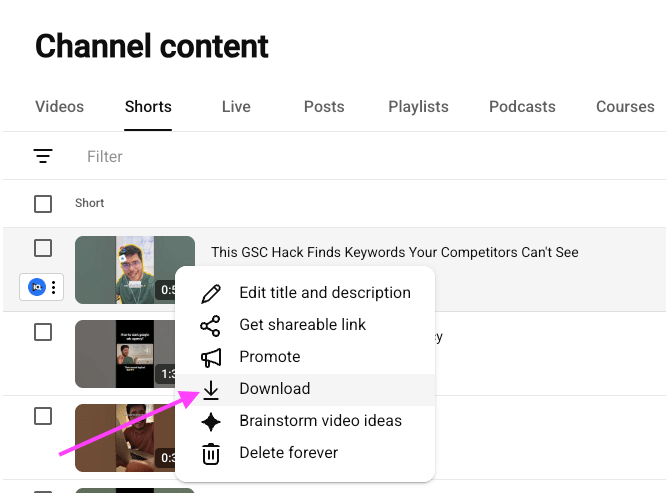
- Open YouTube Studio, find the video, and use the three-dot menu to download the original file. If you no longer have download access because the upload came from a different account, you will need the source file from wherever it was edited.
- Upload that file to a platform with a real password gate. Gumlet, Vimeo on a paid plan, Wistia, Vidyard, and Loom on Business plans all qualify.
- Set the privacy mode to password-protected and save.
- Replace the YouTube embed on your site or in your LMS with the new embed code.
- Set the YouTube version to Private rather than deleting it, so any existing link stops working while your view history stays intact.
One caveat worth knowing before you start: if the video has been public or unlisted for any length of time, assume a copy already exists somewhere. Moving it behind a password controls future access, not past access. If the content is genuinely sensitive and has been sitting on an unlisted link, treat re-recording as the safer option.
YouTube is genuinely useful for public content, team updates shared within a Google Workspace org, or draft reviews among people who all have Google accounts.
It is not a suitable option for paid course content, external client deliverables, or anything you would not want forwarded to a stranger.
How to Password-Protect a Video with Gumlet
Gumlet is the recommended starting point if you have a video file and need it protected, hosted, and shareable today, without relying on a shared password that can be forwarded.
Instead of offering password protection as a standalone toggle, it is one layer in a multi-tier video security architecture. That architecture means the protection applies to the stream itself, not just the page in front of it.
This matters for a specific reason: a video hosted on Gumlet and set to password-protected cannot be accessed by extracting the direct URL.
The HLS stream is encrypted with AES-128 encryption, meaning that even if someone pulls the video URL from the network tab of their browser after entering the correct password, the extracted URL will not play outside the authenticated session. The protection travels with the file, not just the page.
Setting a Password on Gumlet (Step-by-Step)
- Upload your video to Gumlet's Video Library and wait for transcoding to complete.
- Open the video's Settings panel from the dashboard.
- Under Privacy, select "Password-Protected."
- Enter your password and save.
- Share the Gumlet video link with your viewers. They will be prompted to enter the password directly within the embedded player, whether viewed on Gumlet's domain or embedded on your own site.
- If you upload programmatically, set the same privacy mode through the Gumlet API when you create the asset, so protection is applied at upload rather than added later from the dashboard.
curl -X POST "<https://api.gumlet.com/v1/video/workspaces/$WORKSPACE_ID>" -H "Authorization: Bearer $GUMLET_API_KEY" -H "Content-Type: application/json" \ -d '{"channel_settings":{"active":true,"privacy_type":"password-protected","password":"your-channel-password"}}'
To automate this across a library, or to switch a whole collection to password-protected in one pass, see Gumlet's video protection settings documentation.
What Gumlet Adds Beyond the Password Gate
The password step is just the entry point. What sits behind it is what separates Gumlet's model from a basic page-level credential system.
AES-128 encrypted HLS streaming means the video stream cannot be extracted and played outside of an authenticated Gumlet session. Unlike platforms that only gate the page, the stream itself is encrypted, so pulling the URL accomplishes nothing.
Signed URLs and tokenized playback links issue a unique, time-limited link per viewer session. These links expire after a set duration and are tied to the originating session, making them non-transferable. There is no shared password to forward. For deeper implementation details, see how signed URLs work in Gumlet's infrastructure.
Domain restriction limits embed playback to approved domains. A video embedded on your course platform will not play if someone hotlinks it from an unauthorized site. The allowed-referrer list accepts wildcards for subdomains and Android app bundle names, so a single rule can cover a web app and a mobile app together.
Dynamic watermarking embeds the viewer's email address or IP address as a semi-visible overlay directly in the video frame. Each viewing session produces a uniquely watermarked version. If the content leaks, the watermark identifies exactly who watched it and shared it.
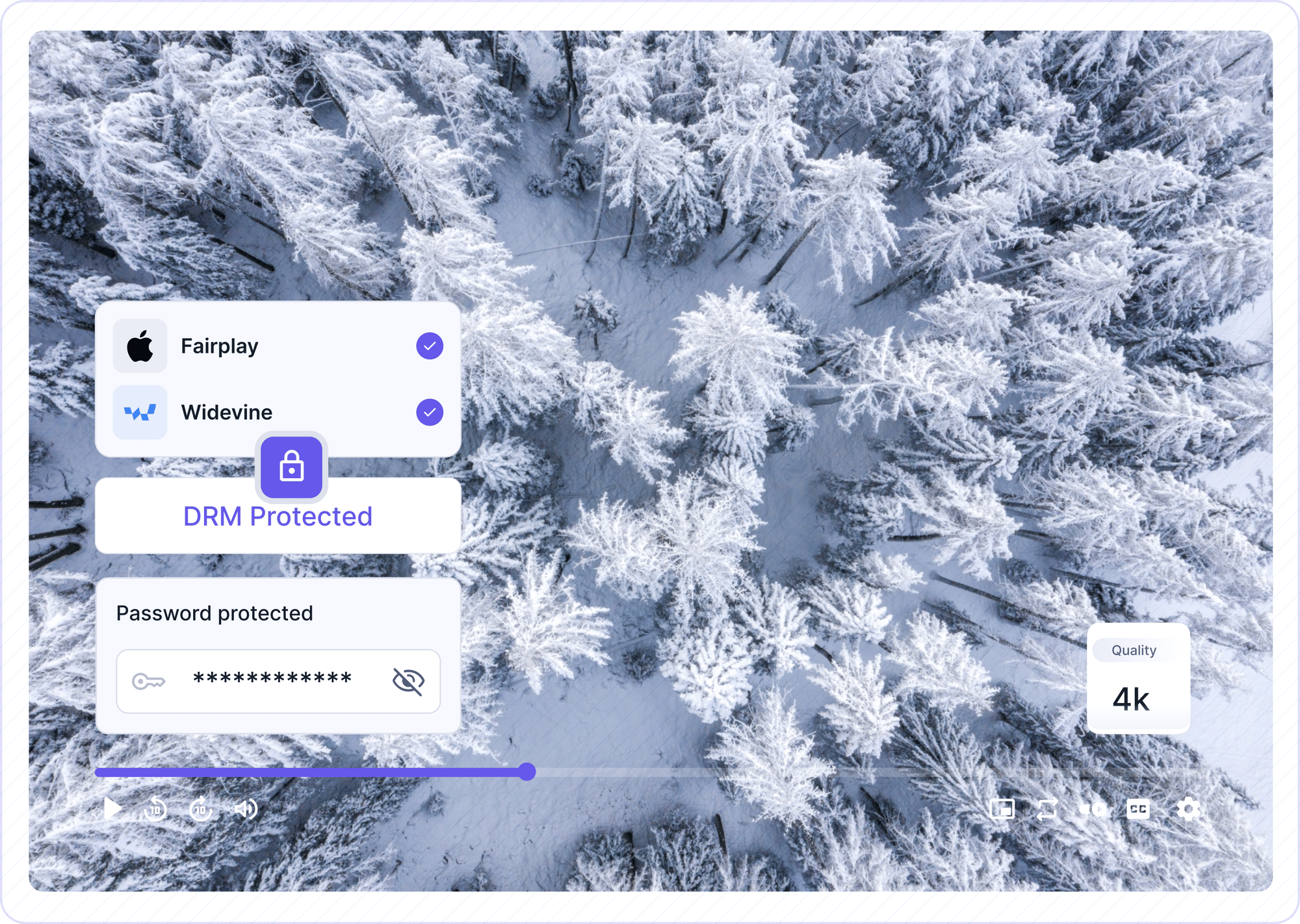
DRM support via Google Widevine and Apple FairPlay means Gumlet can enforce playback restrictions at the device level, preventing downloads through any known tool. This is the same DRM standard used by major streaming services, and it is available without custom engineering.
Per-viewer analytics show who watched, when, how much they watched, and where they dropped off, across your entire video library.
This is what Gumlet's video protection features look like in practice. It is the difference between a door with a lock and a room where you control every key, who holds it, and when it stops working.
How to Password-Protect a Video on Google Drive
Many people assume Google Drive supports password-protected video links because it is a commonly used file-sharing tool and it has robust privacy settings. It does not. Google Drive's access control is account-based, not password-based.
What this means in practice: you can restrict a video in Google Drive to specific Google accounts, to anyone with a link, or to people within your Google Workspace. But you cannot set a password that a viewer enters to unlock playback. The credential mechanism is Google's own login system, not a custom password you define.
What Google Drive Offers Instead
Google Drive's "Restricted" sharing mode limits access to specific Google accounts you have approved.
This is useful for internal team sharing when everyone is on the same Google Workspace. If your team uses GSuite and you need to share a draft recording internally, Google Drive works fine.
Where it falls apart: sharing with external clients or customers who may not have Google accounts, any scenario where you need to track whether someone watched, paid content, and any situation where you want to set an expiration on access. Google Drive does not support any of these natively.
If someone recommends "just put it in Google Drive and restrict access," that advice assumes all your viewers have Google accounts, will stay logged in, and that you are comfortable with Google having full access to the video file. For many professional sharing scenarios, those assumptions do not hold.
How to Password-Protect a Video on Vimeo
Vimeo is the most widely used platform for password-protected video sharing, and for good reason. It offers a clean, professional player, a real credential prompt before playback, and a straightforward setup that takes less than two minutes. For many use cases, it is the right call.
The most important thing to understand before using it is where Vimeo's protection begins and where it stops. Vimeo gates the page. The video stream is not encrypted at the file level on standard plans.
Someone determined enough to inspect a Vimeo page after entering the password can, in many cases, extract the video URL. Once the password is shared, there is no per-viewer access control and no revocation mechanism for individual viewers.
Step-by-Step: Adding a Password on Vimeo
- Upload your video to Vimeo and wait for processing to complete.
- Open the video's settings and navigate to the Privacy tab.
- Under "Who can watch this video," select "Only people with a password."
- Enter your chosen password and save the settings.
- Share the Vimeo link and the password with your intended viewers. Send them through separate messages if possible, so a forwarded link alone is not enough to unlock the content.
What Vimeo's Password Protection Does and Does Not Do
Vimeo's password protection does several things well. It gates playback behind a credential, delivers video through a professional and brandable player, allows domain-level embed restrictions on paid plans, and provides aggregate analytics including total plays and average watch time.
What it does not do: track individual viewers by identity, prevent link forwarding once the password is out, offer DRM on standard plans, or prevent downloads via browser extensions. The free plan does not include password protection at all. A paid plan is required, starting at approximately $20 per month on the Starter tier.
The core limitation is this: Vimeo's password protection controls who can start watching, but once the password is shared, there is no per-viewer access revocation. Anyone who knows the password can share it. You will not be notified if they do.
For polished client demos, creative portfolio reviews, or event replays where aggregate view data is sufficient, Vimeo is a solid choice. For paid content or anything with genuine IP value, the gap matters, and this is where opting for a Vimeo alternative with strong video access controls matter.
Not all platforms offering password protection are protecting the same thing. Most gate the page, meaning the password unlocks the player, but the underlying video file URL remains accessible to anyone who inspects the page source.
A smaller number protects the file itself, encrypting the stream so that even an extracted URL is useless outside an authenticated session. The comparison below maps exactly which category each platform falls into.
Platform Comparison: Password Protection at a Glance
Not all platforms are offering the same thing when they say "password protection." The differences are significant, and they become critical as soon as the content has real value attached to it. The table below maps the main features across the six most commonly used platforms.
| Platform | Password Gate | Viewer Identity Tracking | DRM | Signed / Tokenized URLs | Download Prevention | Analytics Depth | Starting Price (billed monthly) |
|---|---|---|---|---|---|---|---|
| Gumlet | Yes | Yes | Yes (Widevine + FairPlay) | Yes | Yes | Per-viewer + heatmaps | $6/user/month (Free plan available) |
| Vimeo | Yes | No (aggregate only) | No (standard plans) | No | No | Aggregate | $20/month |
| YouTube | No | No | No | No | No | Aggregate | Free |
| Google Drive | No (account-gated only) | No | No | No | No | None | Free with Google |
| Loom | Yes (Business+) | No | No | No | No | Basic | $18/user/month |
| Wistia | Yes | Limited | No (standard plans) | No | No | Good | $99/month |
| Peony | Yes | Yes (identity-bound) | No | No (link expiry only) | Yes (screenshot blocking) | Per-viewer | $30/admin/month (Free plan available) |
Pricing verified September 2026.
What Happens After the Password Is Forwarded
Every platform in the table above can set a password. They differ enormously in what happens next, which is the part that decides whether the protection holds. The comparison below is drawn from each vendor's own documentation as of September 2026.
| Platform | Passwords per video | Password expiry or use limits | Domain lock | Once the password is forwarded |
|---|---|---|---|---|
| Gumlet | One, plus signed URLs per session | Session tokens carry an expiry window | Yes, allowed referrers with subdomain wildcards and app bundles | Signed-URL playback links expire independently of the password, so a forwarded link stops working |
| Vidyard | Up to 100 unique passwords | Yes, per-password expiry and use-count limits | Yes, embed restrictions by domain | Revoke the one password that leaked without disturbing the other 99 recipients |
| Wistia | One | Not documented | Yes, referrer-based allowlist | Everyone who receives it can watch until you change the password for all viewers |
| Vimeo | One | Not documented | Yes, on paid plans | Everyone who receives it can watch until you change the password for all viewers |
| Loom | One, Business plans and above | Not documented | Not documented | Everyone who receives it can watch until you disable the password |
The pattern is worth naming. Vidyard solves forwarding by issuing many passwords and letting you kill the one that leaked. Gumlet solves it by removing the shared credential from the playback path entirely, so there is nothing durable to forward. Everyone else solves it by asking you to change the password and re-notify every legitimate viewer.
How to Choose the Right Platform to Password-Protect Your Videos
Choosing the right platform is not about finding the most secure option in the abstract. It is about matching the platform's protection model to the specific risk you are managing. A mismatched choice either leaves real gaps or introduces more friction than your use case needs.
The framework below organizes this by who you are and what you are actually trying to prevent.
Start With the Risk, Not the Feature List
The fastest way to choose is to name the one thing you are trying to prevent, then pick the control that actually prevents it. A password stops none of the risks below except the first one.
| What you are trying to prevent | The control that actually prevents it | Platforms that offer it |
|---|---|---|
| A stranger stumbling onto the video | Password gate | Gumlet, Vimeo (paid), Wistia, Vidyard, Loom (Business+), Peony |
| The link and password being forwarded to people you did not invite | Signed URLs with per-session expiry | Gumlet |
| Your embed code being lifted and used on someone else's site | Domain restriction (allowed referrers) | Gumlet, Vimeo (paid), Wistia, Vidyard |
| The file being downloaded with a browser extension or stream ripper | DRM (Widevine and FairPlay) or encrypted HLS | Gumlet |
| A viewer screen-recording and reposting the content | Dynamic per-viewer watermarking plus DRM | Gumlet, Peony (watermarking and screenshot blocking, no DRM) |
| Not knowing whether the person you sent it to actually watched | Per-viewer analytics tied to identified access | Gumlet, Peony, Vidyard, Wistia (higher plans) |
Two things follow from this table. First, most people arriving at a password setting are actually trying to prevent row two, which a password cannot do. Second, if your risk sits in rows two through five, the platform question is settled before you compare pricing, because very few platforms offer those controls at all.
For Freelancers and Agencies Sharing Client Work
If you regularly share project review videos, client presentations, or proposal recordings, the primary risk is the client forwarding the link to a stakeholder you were not expecting, or the video surfacing somewhere public.
Vimeo handles this adequately for most agencies. The password gate stops casual access, the player looks professional, and the setup takes two minutes.
What Vimeo cannot tell you is whether the client actually watched the video. If that visibility matters to your workflow (and for most agency relationships, it does), Gumlet's per-viewer analytics let you see exact watch time per session.
Knowing your client watched 80% of the proposal video before the pitch meeting changes how you walk into that room.
For Course Creators Selling Access to Video Content
Paid content deserves more than a shared password. The threat model for a course creator is specific: a paying student shares the course password in a Discord server or a Facebook study group.
Within 48 hours, dozens of non-paying viewers have access. You have no way to detect it, no way to revoke that specific person's access, and no forensic trail to identify who started the chain.
This is the scenario that makes tokenized access and DRM non-negotiable for premium content. Each enrolled student should receive a session-specific playback link, not a shared password. If they share the link, it expires. If they record and redistribute the video, dynamic watermarking traces the recording back to the original session.
For a deeper look at what this setup looks like in practice, see best private video hosting for course creators and what GrowthSchool achieved after making a similar decision: 52% increase in video completion rate across 50,000+ videos, with DRM-secured playback as a core part of their infrastructure on Gumlet.
For Businesses Sharing Internal or Sensitive Video
For HR communications, partner enablement videos, sales training, or internal briefings, the appropriate level of security depends on who the audience is.
Internal-only content shared with a team on the same Google Workspace is often well-handled by Google Drive's account-based access. The familiarity and zero-setup overhead outweigh the lack of a password gate.
For external-facing sensitive content shared with partners, contractors, or clients who are not on your internal systems, a dedicated secure video streaming setup with audit trails and access controls becomes important. This is particularly true in regulated industries where access logs are a compliance requirement.
The same setup covers webinar replays, launch previews shared under embargo, and prototype footage sent to a research panel.
For Video Content at Scale
If you are running an OTT platform, a large e-learning library, or a subscription video-on-demand service, password protection is a baseline feature, not a complete strategy.
Elmonsf, an EdTech platform serving over 2 million students across the MENA region, handled 200,000+ DRM-secured plays every single day on Gumlet with zero security breaches after migration, while also cutting cloud spend by 43%.
At that scale, a shared password is not a viable access control model. You need viewer-level session management, DRM, and operational visibility into every play event.
If that scope resonates with where you are headed, the guide on how creators can protect their videos covers the full architecture in detail.
Beyond Password Protection: What Actually Stops Video Theft
Password protection stops casual access. It does not stop a determined bad actor, a motivated competitor, or a student who decides their course investment was enough to justify sharing the curriculum with their entire cohort.
The Verizon 2025 Data Breach Investigations Report found that roughly 60% of breaches still involve a human element, misdirected sharing, misconfigured access settings, or forwarded credentials. Password gates alone do not close this gap. That figure is for breaches overall, not video specifically, and it is included here as context for why credential sharing is the common failure mode rather than as a measure of video piracy.
Once the password is out, a basic page-level gate offers no further resistance. Understanding the next two layers closes that gap.
A useful analogy here: a shared password is like a physical key that anyone can copy. You hand it to five people and you have no idea how many copies exist. A signed URL is a ticket with a timestamp and a name on it, valid once, for one session, and worthless after it expires.
The Video Access Control Stack: Four Controls, Ranked by What They Stop
The platforms covered in this article operate at different points on what you can think of as a Video Access Control Stack. Understanding these three layers will help you match a platform to your actual threat level.
Each control stops a different failure, and they stack rather than substitute.
| Control | What it checks | What it stops | Where it fails |
|---|---|---|---|
| Password gate | A shared credential entered before playback | Casual and accidental access | The credential is durable and forwardable. Nothing detects or revokes a leak |
| Domain restriction | The referrer of the page hosting the embed | Your embed code working on someone else's site | Depends on the browser sending a referrer, so it is a deterrent rather than a lock. It does not stop a link shared to a person, only a player embedded on a site |
| Signed or tokenized URL | A cryptographic signature and an expiry timestamp, per session | Forwarding, because the link is dead before the recipient opens it | Requires your application to issue tokens, so it fits authenticated products better than ad-hoc sharing |
| DRM (Widevine, FairPlay, PlayReady) | A device-level licence issued at playback | Downloads, stream ripping, and capture on protected paths | Adds a licence round trip, and enabling it disables casting on most setups |
Match the control to the failure you actually fear. A password plus a domain restriction covers a marketing library. A signed URL is the minimum for anything a customer paid for. DRM is for content where a single leak has a real revenue number attached to it.
How to Lock a Video to Your Own Domain
Domain restriction, sometimes called an allowed-referrer list or domain whitelisting, tells the video player to load only when the page requesting it belongs to a domain you approved. Add your domains to the list, and the same embed code pasted onto any other site returns nothing.
The qualification matters more than the feature. Domain restriction works by reading the referrer header the browser sends with the playback request. If the embedding page sets a restrictive referrer policy, or a privacy extension strips the header, the check has nothing to read. Wistia documents that its domain restrictions are incompatible with some referrer policies. Synthesia states plainly in its own help documentation that restricting embed domains is a safeguard rather than a fully secure method. Dacast notes that its domain control applies to JavaScript embeds and not iframe embeds. Treat all of these as accurate descriptions of how the mechanism works everywhere, including on Gumlet.
So domain locking answers a narrower question than most people think it does. It stops your player being republished on another website. It does not stop a person forwarding the link to another person, because that viewer arrives on your approved domain and passes the check. If the risk you are managing is re-sharing between people rather than embed theft, the control you need is a signed URL, and domain restriction is the layer you add on top of it.
On Gumlet, the allowed-referrer list lives in the video protection settings and accepts wildcards for subdomains and Android app bundle names, so one rule can cover a web property and a mobile app. Enabling domain whitelisting, DRM, or dynamic watermarking also turns off casting, which is worth checking against your viewers' habits before you switch it on. The full setup, including geo-blocking, is covered in Gumlet's guide to geo-blocking, domain locks, and access control.
Signed URLs for Time-Limited, Viewer-Specific Access
A signed URL is a video playback link that carries an embedded cryptographic signature and an expiration timestamp, making it unique to each viewer session.
When a student clicks their course video link, they receive a URL that is valid for the duration of their session and expires automatically after a defined time window.
If they copy that URL and share it with someone else, it either will not work (wrong session signature) or it will have already expired by the time the other person clicks it.
This model eliminates the concept of a shareable credential. There is nothing to forward because there is no persistent password.
Gumlet's implementation of signed URLs lets you define expiration windows per video and integrate session tokens with your existing authentication system via API.
DRM for Maximum Protection on Premium Content
DRM (Digital Rights Management) encrypts the video stream and only allows playback under specific conditions: approved devices, valid credentials, within a defined time window.
The encryption is enforced at the hardware or OS level on the viewer's device, meaning that even if someone installs a screen-capture tool or tries to rip the stream, the DRM license system will either block playback on that device or render the capture unusable.
Gumlet supports both Google Widevine (Chrome, Android, most desktop browsers) and Apple FairPlay (Safari, iOS). These are the same DRM systems used by Netflix, Disney+, and Amazon Prime Video.
Enabling DRM on Gumlet does not require custom engineering. It is available as a one-click setting at the video or workspace level, with the encrypted stream delivered through Gumlet's multi-CDN infrastructure.
Dynamic Watermarking as a Leak-Tracing Tool
If content leaks despite the protections above, dynamic watermarking identifies exactly where the leak originated.
Gumlet embeds viewer-specific information, such as email address, user ID, or IP address, as a visible or semi-visible overlay directly in the video frame. The watermark is unique per viewing session and generated dynamically, meaning every viewer sees a slightly different version of the video.
If a screen recording surfaces online, the watermark in the recording identifies the viewer whose session produced it. This creates both a forensic trail and a significant deterrent. Most viewers who would consider sharing protected content think twice when they know the video itself contains a traceable signature tied to their identity.
Loom and Other Screen-Recording Tools
Loom sits in a slightly different category from video hosting platforms. It is primarily a screen-recording and asynchronous communication tool, not a video library or content hosting platform.
That distinction matters when evaluating its password-protection features, because the security model is built around quick sharing rather than content access control at scale.
That said, Loom does offer password protection on Business plans and above, and for the use cases it is built for, it works adequately.
When Loom's Password Protection is Enough
Loom's password gate is appropriate for async team communications, internal product demos, client project updates, and any scenario where you know your recipient and are sharing a single recording rather than managing a library of protected content.
The setup is fast, the player is clean, and it integrates naturally into tools like Slack and Notion.
The limitations are consistent with what you saw in Vimeo's Layer 1 model: no DRM, no per-viewer identity tracking, no download prevention, and no way to detect or stop forwarding once the link and password are shared.
Wistia for Marketing and Sales Video
Wistia sits between Vimeo and enterprise-grade platforms in terms of security depth. It offers password protection and meaningfully better analytics than Vimeo, including individual viewer heatmaps on higher plans.
DRM is not available on standard plans, and pricing begins significantly higher (around $99 per month and up when billed monthly). For marketing and sales video, Wistia is a strong choice. For content with serious piracy risk, it still does not close the encryption gap.
Peony and Data-Room-Style Tools
Peony earns a mention here because it is currently among the most visible results when you search for how to password-protect a video.
Understanding what it actually is, and is not, saves you from choosing the wrong tool. Peony is a data room platform. It is built for confidential document and video sharing with a small, identifiable group of recipients, not for hosting embeddable video at scale.
Its strengths are real: identity-bound access, password gates, per-viewer time-on-page tracking, screenshot blocking, and dynamic watermarking. These features start on the free plan, which is genuinely useful for specific scenarios.
Those scenarios are narrow: investor pitch recordings, board update videos, M&A due diligence materials, or any confidential asset where you know exactly who the audience is and you need to verify that each person actually opened it.
Where Peony does not fit: embedding video on a course platform or product page, branded video players, SEO-indexed content, DRM-secured delivery at any real scale, or anything requiring playback analytics across thousands of viewers. Peony's own documentation states this clearly; it is not a video hosting service and does not position itself as one.
If your use case is "send this recording to three executives and know if they watched it," Peony works. If your use case is anything this article otherwise covers: course creators, agencies, businesses hosting video libraries, it is the wrong category of tool.
Frequently Asked Questions
1. Does password-protecting a video on Vimeo stop downloads?
No. Vimeo's password protection controls access to the video player page, but it does not prevent a viewer from downloading the video using browser extensions, screen recording software, or other capture tools.
If preventing downloads is a hard requirement, you need a platform with DRM encryption or an encrypted HLS stream. Vimeo's standard plans do not include either.
2. Can I embed a password-protected video on my website?
Yes. Both Vimeo (on paid plans) and Gumlet allow you to embed password-protected videos on external websites. The password prompt appears directly inside the embedded player, so viewers do not need to navigate to an external platform to authenticate.
Gumlet also supports domain restriction, which means the embedded video will only play on domains you have explicitly approved, adding a second layer of protection beyond the password itself.
3. How do I password-protect an MP4 file on my computer?
There is no password field inside an MP4 file, so the only way to lock the file itself is to wrap it in something that has one. Compress it into a 7-Zip or WinRAR archive with AES-256 encryption and set a password on the archive, or on macOS create an encrypted disk image in Disk Utility and place the file inside.
This genuinely protects the file at rest, which is the right answer if you are handing over a drive or emailing a deliverable that must not be readable in transit. It is the wrong answer for anything else. The recipient has to download the whole file and decrypt it before watching, there is no streaming, no playback on a phone without extra software, and no way to find out whether they ever opened it. Once they extract it, you have handed over an unprotected MP4 with no further controls.
If the video needs to be watched rather than delivered, host it and gate the playback instead. That is what the rest of this guide covers.
4. Is there a free way to password protect a video?
Free options are limited. Vimeo's free plan does not include password protection. YouTube does not offer password protection in any form. Google Drive does not support password-gated video playback.
Gumlet offers a free trial that includes password-protected video hosting with encrypted HLS streaming. For a completely free option, the only viable workaround is delivering the video file inside an encrypted zip archive, which is impractical for streaming and offers no way to track whether the recipient watched it.
5. What is the difference between password protection and a signed URL?
A password is a shared credential. Everyone you give it to has the same key, and there is no mechanism to stop any of them from sharing it further. A signed URL is unique to each viewer session and expires automatically.
If someone copies and shares a signed URL, it stops working once the session expires or when accessed outside its valid parameters. Signed URLs remove the concept of a shared credential entirely. There is nothing to forward because the access token is non-transferable and time-limited.
6. Can I track who watched my password-protected video?
Most platforms with basic password protection, including Vimeo and Loom, provide only aggregate analytics: total plays, average watch time, geographic distribution. They do not identify which specific person watched or how much of the video they viewed.
Gumlet provides per-viewer analytics when viewers are identified through tokenized or signed URL access. This means you can see exactly who watched, when they watched, which sections they skipped, and where they stopped, at the individual viewer level across your entire video library.
Ready to Actually Protect Your Videos?
A shared password gets the job done for low-stakes content. For anything you would not want forwarded to a stranger or shared in a Discord server, a basic page-level gate is a starting point, not a solution.
The platforms that protect only the page are not doing anything wrong. They are built for broad use cases where a credential prompt is sufficient. The gap becomes visible when the content has real value: a paid course, a confidential client presentation, a product demo with unreleased features, or a training library that took months to build.
Gumlet's private video hosting is built for the cases where the content actually matters. Password protection is the front door. Behind it: AES-128 encrypted streaming, signed playback URLs, Widevine and FairPlay DRM, dynamic watermarking, and per-viewer analytics. You can be running fully protected, tracked video delivery in under 20 minutes.
If you are evaluating whether the upgrade is worth it, Gumlet's free trial includes the full security stack with no engineering setup required. Review what’s included with password-protected video hosting on Gumlet and decide from there.