When you first picked a video hosting provider, the decision probably felt straightforward.
You needed somewhere to upload files, grab an embed code, and move on. At that stage, switching your video platform felt like unnecessary pain.
Once you scale, that changes. Video is no longer a side asset on a few landing pages. It powers onboarding, in-app education, gated courses, investor updates, livestream archives, and internal training.
According to Wix’s Video Marketing Statistics Report, nearly 89% of businesses now use video marketing, and 95% say it is an important part of their strategy, which means your video stack quietly becomes part of your core revenue engine.
The problem is that most of the issues that justify a switch do not show up when you are small. They appear later: when you run a big launch and get flooded with buffering complaints, when finance pushes back on unpredictable bandwidth bills, when legal starts asking about DRM, or when marketing realizes they cannot tie views to pipeline. By then, your library, embeds, and workflows are deeply entangled with your current provider.
That is why it helps to reframe what you are actually choosing. A video hosting platform is not just a place to upload files; it is the delivery, security, analytics, and integration layer that sits between your content and your audience.
At scale, that layer determines whether your videos start fast, stay secure, remain compliant, and plug cleanly into your product, CRM, and revenue reporting.
Quality of experience is not a soft concern either. Large-scale studies of internet video have shown that the percentage of time spent buffering has the single biggest impact on user engagement, and that even a 1% increase in buffering ratio during a 90-minute event can cut viewing time by more than three minutes.
When your product tours, courses, or customer training rely on uninterrupted playback, that drop directly hits activation, retention, and conversion.
This article is written for teams at that inflection point. You already use a video host. You suspect it might be holding you back, but you are not sure whether the pain of migration outweighs the risk of staying.
We will keep this practical: six concrete triggers, tied to metrics and real user complaints, plus a clear selection and migration playbook.
Along the way, we will look at what a modern, infrastructure-grade platform, like Gumlet, should provide as a scalable video hosting platform built for the video-first world.
Key Takeaways
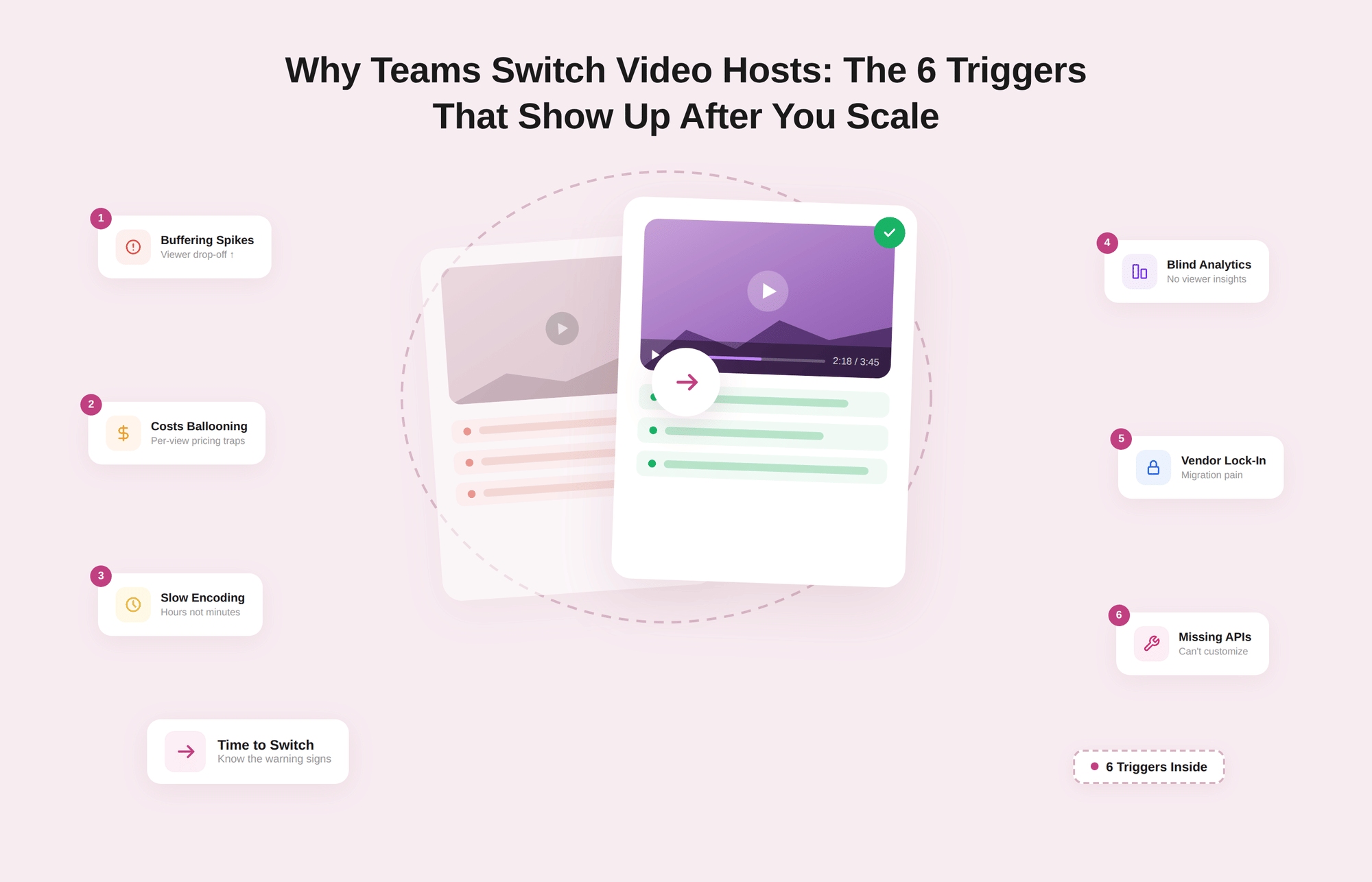
- Teams usually switch video hosts only after they scale and hidden weaknesses become obvious: buffering under load, surprise bandwidth bills, piracy, weak analytics, brittle integrations, and poor support.
- Trigger 1: Performance issues arise during launches and in global usage. Startup delays, high rebuffering, and playback errors directly hurt activation, completion, and revenue.
- Trigger 2: Pricing and limits stop making sense. Overages, bandwidth caps, per-seat licensing, and feature paywalls push the total cost of ownership higher than the value you get from video.
- Trigger 3: Security and compliance needs increase. Paid courses, internal training, and confidential updates need DRM, encrypted HLS, signed URLs, domain or geo restrictions, watermarking, and strong identity controls.
- Trigger 4: Simple “views” metrics are not enough. Marketing, product, and RevOps need viewer-level journeys, drop-off insights, and event streams that connect video engagement to pipeline and product outcomes.
- Trigger 5: Copy-paste embeds do not scale. Product teams need API-first video infrastructure: lifecycle APIs, webhooks, staging environments, SSO, and RBAC so video behaves like any other core service.
- Trigger 6: Vendor stability becomes a risk. Slow support, sudden price hikes, strategic pivots, or uncertain ownership turn your video host into a single point of failure for content and workflows.
- The right next step is a structured evaluation and a partial migration test, not an instant full switch. Inventory content mirrors the structure on the new host, preserves URLs and schema, dual-track analytics, and then decommissions the old platform.
- Infrastructure-grade platforms like Gumlet are built to address these issues by default: fast HLS streaming on the global edge, transparent pricing, strong security and access control, deep analytics, and robust APIs for integration and migration.
Who This Article is For
This article is written for teams that already treat video as part of the product or revenue engine, not just an occasional asset on a landing page.
If you run a SaaS product where feature tours, onboarding flows, and in-app help videos decide activation and expansion, you are the primary audience. The same applies if your company has a customer academy, webinar library, or knowledge base that depends on reliable, high-quality streaming and private video hosting.
It is also relevant if you operate an EdTech or training platform where lesson completion and certificate eligibility depend on smooth playback and strict access control, or if you run an OTT, streaming, or media brand with a large catalog that must load quickly on every device.
Marketing and RevOps teams that live inside CRMs and marketing automation tools, and need video analytics to tie directly into pipeline and revenue reporting, will see their daily frustrations reflected here.
On the other hand, this article is not aimed at solo creators choosing between YouTube and a free video site, or at teams whose main concern is a nicer-looking player skin. The focus here is on companies that already have a commercial video hosting provider in place and are starting to see performance, cost, security, or workflow issues that only become visible at scale.
When Should You Switch Video Hosting Platforms?
Most teams wait too long to switch.
The trigger is rarely something small, like not liking the player skin or admin UI. A change is forced when the video host starts creating measurable drag on performance, revenue, or compliance.
By that point, your library is large, your embeds are everywhere, and switching feels risky, which creates a tendency to tolerate problems for another quarter.
A more practical approach is to look for structural signals rather than cosmetic annoyances. Structural signals show up in metrics and cross-functional complaints.
For example, customer success hears about buffering on key FAQ pages; finance flags bandwidth bills that spike unpredictably after every campaign; marketing cannot see which accounts actually watched the product tour; or security is uncomfortable with how easily unlisted URLs can be shared outside contracts.
When multiple teams are building workarounds to cope with the platform, it is usually not a “training issue”; it is a sign that the platform no longer fits your scaled use case.
A simple way to gauge whether you are close to a switch is to run through a quick checklist. If two or more of these feel familiar, you are already in the risk zone:
- Users or customers periodically complain about buffering, slow video start, or videos failing to play, especially during launches or for viewers outside your home region.
- Your finance team raises questions about unpredictable streaming or storage bills, or you are already negotiating usage caps and overages every few months.
- Legal, security, or key clients are asking for DRM, domain restrictions, or stronger access controls than your current platform can provide.
- Marketing and product teams cannot see where viewers drop off, which accounts actually watched key content, or how video engagement ties into conversions and revenue.
- Engineers and content ops are maintaining custom scripts, manual workflows, or brittle workarounds just to keep uploads, embeds, and permissions in sync.
- Support experiences slow, ticket-based responses from the vendor for issues that directly impact live customer experiences or critical content.
Switching video hosts is rarely about chasing the latest feature. It is about acknowledging that the assumptions you made when you chose your current platform no longer hold, now that video traffic, security needs, and integration requirements have grown.
The rest of this article breaks these structural problems into six concrete triggers so your team can decide, with evidence, whether it is time to move.
The 6 Primary Triggers That Show up as You Scale
Trigger 1: Playback and Performance Break Under Real Traffic
When traffic is low and local, almost any video host looks fine. Problems appear when you run big launches, onboard users from new regions, or publish high-stakes content such as core lessons or release walkthroughs.
That is when buffering, slow start times, and random playback failures begin to hurt activation, course completion, and revenue.
How This Shows Up
- Complaints about videos “buffering forever” or feeling laggy on mobile or in certain countries.
- Support tickets are piling up after campaigns that drive many people to the same video at once.
- Recordings of events or all-hands take hours to process, so replays are not ready when people expect them.
- Key pages with embedded videos show higher exit or bounce rates than comparable non-video pages.
If you only see high-level metrics like total views and watch time, these issues are easy to underestimate or miss entirely.
The Minimum Metrics You Should Track
A scaled video stack needs a clear view of three core playback indicators:
1. Startup time (time to first frame)
How long from clicking play to seeing motion? For product and marketing videos, consistently above about 2 seconds on decent connections is a warning sign.
2. Rebuffering ratio
The percentage of viewing time spent watching a spinner instead of content. Higher ratios reliably correlate with lower completion rates and higher abandonment rates, especially on mobile and unstable networks.
3. Playback failure rate
Share of sessions where the player never starts or errors out. Even low single-digit percentages are serious if the videos sit on signup, upgrade, or purchase flows.
If your current provider cannot expose these by video, region, and device, you are effectively operating blind on performance.
Why Many Teams Outgrow Their First Host
Most teams start on platforms built around simple web embeds or creator use cases, not as infrastructure for product-level video. Common structural limits:
- Delivery from a single CDN or a weak global edge footprint, which hurts viewers far from core regions.
- Basic or poorly tuned adaptive bitrate streaming, so viewers on fluctuating networks either overbuffer or get unusably low quality.
- Slow, batch-oriented transcoding pipelines that delay time to publish for new or edited content.
- Little or no quality-of-experience analytics, so problems only surface through user complaints.
These constraints are survivable when you have a small library and local traffic. Once you depend on video for onboarding, training, or customer education, it becomes a systemic risk.
What to Require From Your Next Platform
When you evaluate a new video host, treat playback like you would any other core piece of infrastructure:
- Modern HLS with fine-grained adaptive bitrate ladders.
- Delivery through a strong global edge or multi-CDN setup.
- Fast, parallel transcoding so uploads are “ready to stream” quickly at all qualities.
- Built-in QoE analytics (startup time, rebuffering, errors) broken down by region and device.
- Clear uptime and support expectations written into SLAs.
Infrastructure-grade platforms such as Gumlet are designed around these requirements from day one, so teams can trust video performance during launches and peak usage instead of hoping the legacy stack holds up.
Trigger 2: Pricing and Limits Stop Making Economic Sense
At a small scale, a flat subscription for "unlimited" video feels simple.
Once your traffic and team grow, the real pricing model shows up: bandwidth caps, storage limits, seat-based pricing, and vague fair use clauses. Finance starts asking why the video line item spikes after every campaign, and you realize your cost-per-engaged-viewer is drifting in the wrong direction.
Industry guides now call out storage, bandwidth, concurrency, support, and feature add-ons as the main cost drivers for business video hosting, not just the list price on the plan page. That is exactly where many teams realize they have outgrown creator-oriented platforms.
How This Shows Up in Your Numbers
Typical signals that pricing has become a problem:
- Bandwidth overage emails or unexpected invoices when a campaign performs better than forecast.
- Hard caps on monthly transfer or storage that force you to shuffle or delete content to stay under limits.
- Per-seat pricing that makes it expensive to give access to support, success, and partner teams.
- Annual renewal conversations that come with significant price hikes or stricter fair use interpretations.
Public complaints highlight the pain. Vimeo users, for example, frequently mention feeling "held at ransom" with hundreds of videos locked behind a subscription they can no longer afford, and worry that content will be deleted if they do not pay to renew. That is a pricing and data ownership problem, not just a UX complaint.
Why Simple Plans Break at Scale
Most starter plans are built around two ideas: predictable low usage and a small team. Once you add real volume and more stakeholders, the structure works against you:
- Bandwidth is billed in steep tiers or with soft caps that trigger manual reviews and warnings when you have a successful launch.
- Storage and library limits that nudge you to remove older but still valuable training or campaign content.
- Seat-based pricing that keeps access restricted to a few "power users", forcing others to rely on screenshots and side channels.
- Hidden costs around advanced features, API usage, or HD/4K delivery that are only visible once you are deep into the contract.
The result is a noisy cost structure that scales faster than the value you extract from video.
How Infrastructure-style Pricing is Different
When teams switch to an infrastructure-first platform, they usually aim for three things: predictability, fairness as they grow, and no lock-in to their own content. A good way to evaluate options is to compare the pricing logic, not just the headline number.
Here is a compact way to look at it:
| Dimension | Typical legacy/creator host | Infrastructure-oriented video platform (what to look for) |
|---|---|---|
| Main pricing driver | Plan tier plus vague "fair use" on bandwidth | Clear per GB or tiered bandwidth + storage, documented openly |
| Bandwidth policy | Soft caps, risk of warnings or overage surprises | Published limits and overage rates, alerts before you exceed thresholds |
| Seats and teams | Per-user pricing discourages broad access | Reasonable seat bundles or role-based access without sharp per-seat fees |
| Storage | Plan-based storage ceilings | Storage that scales with usage, with archive options for cold content |
| Feature access | Key features (DRM, analytics, API) in higher tiers | Core infra features included at business tiers, not hidden behind upsells |
| Lock-in risk | Hard to export or bulk download your full library | Clear export paths and explicit data ownership terms |
Infrastructure-grade providers like Gumlet lean into this model: transparent bandwidth and storage pricing, predictable tiers, and the ability to involve more teams without multiplying license costs.
Quick Test: A Simple TCO Calculation
Before renewing or signing a new contract, run a quick total cost of ownership check for the next 12 months:
- Estimate total monthly plays, average minutes per view, and expected growth.
- Convert that into an estimate of bandwidth usage at your target resolutions.
- Add the number of internal users who need access (not just marketing, but support, success, product, and training).
- Layer in any must-have features such as DRM, API, or detailed analytics that might push you into higher tiers.
Then compare:
- What your current provider will charge under realistic growth, including overages and seats.
- What an infra-first platform would charge under the same assumptions, with clearer pricing for bandwidth and features.
If the legacy plan looks cheaper at a glance but explodes once you factor in overages, extra users, or required add-ons, that is a strong sign you need to switch before growth makes the problem unmanageable.
Trigger 3: Security, Privacy, and Compliance Requirements Level Up
As long as your videos are mostly public explainers or top-of-funnel content, simple “unlisted” or password-protected links are fine. That changes the moment you put real money, compliance, or sensitive information behind your streams: paid courses, premium communities, internal training, customer-only academies, investor updates, or licensed content.
Streaming piracy and unauthorized sharing are no longer abstract problems. If your whole course or onboarding flow can be ripped once and shared forever, you are effectively subsidising non-customers.
How This Shows Up
Typical signs that you have outgrown basic privacy settings:
- Customers share “private” lesson URLs in forums or Telegram groups, and non-paying users can watch without friction.
- You discover your content embedded on sites you do not control, or on subdomains that were never meant to host playback.
- Enterprise clients ask for DRM, audit logs, and stricter access control during security reviews, and your current host cannot check those boxes.
- Legal or compliance teams are raising concerns about where videos are stored, how access is logged, and whether user data related to playback is properly protected.
None of these are solved by toggling links to “unlisted”.
Why Basic Privacy Controls Are Not Enough
Traditional video hosts tend to offer options such as public, private, unlisted, and password-protected. They make it harder to stumble upon a video, but they do very little to prevent:
- Downloading, screen-recording, and reuploading your content elsewhere.
- Sharing direct playback URLs or embed codes in private groups.
- Playing your videos on unauthorized domains, apps, or regions.
- Proving which account leaked content in the first place.
Once you start selling access to knowledge, or handling anything that might be confidential, you need controls that treat every playback as an access-controlled event, not just a public file behind a pretty URL.
What Modern Video Security Actually Looks Like
A modern secure video hosting platform should offer multiple layers that work together:
1. Encrypted HLS and DRM for Serious Content Protection
AES-encrypted HLS (Advanced Encryption Standard-encrypted HTTP Live Streaming) at minimum, with Widevine or FairPlay DRM for high-value content, so even if someone inspects network traffic, they cannot easily extract a usable file.
2. Tokenized or Signed URLs
Time-bound, user-specific URLs so that a copied link stops working after a defined period or outside certain conditions. Platforms such as Gumlet implement signed URLs and expiring tokens for this reason.
3. Domain, IP, and Geo Restrictions
Ability to limit playback to your LMS or app domains, specific IP ranges, or approved regions, which is critical for licensed content and territory-specific contracts.
4. Dynamic Watermarking
Viewer-specific watermarks (name, email, or user ID) overlaid on the video, making leaks traceable and discouraging casual redistribution.
5. Role-based Access and SSO
Fine-grained roles, SSO, and audit logs so you can prove who had which level of access internally and revoke it cleanly when people change teams or leave.
6. Security Posture and Compliance
Evidence of SOC 2, GDPR alignment, encryption at rest, 2FA, and documented incident response. When your platform holds customer-facing and internal video, it effectively becomes another system of record.
Gumlet is a concrete example of this security-first model: multi-layer video protection with DRM, signed URLs, referrer and geo restrictions, dynamic watermarking, and secure private hosting are exposed as first-class features rather than add-ons.
Security and Compliance Checklist For Your Next Host
When you evaluate whether to stay or switch, you can keep the security conversation grounded with a simple checklist:
- Can we enable DRM and encrypted streaming for high-value videos?
- Can we restrict playback to specific domains, apps, or regions?
- Can we issue signed, expiring links for one-time or time-limited access?
- Can we watermark content per-viewer for paid or sensitive material?
- Do we have role-based access, SSO, and audit logs for internal control?
- Does the vendor meet our minimum bar for certifications and encryption?
If your current provider cannot answer most of these with a straightforward “yes”, and your business increasingly relies on gated or sensitive video, that is a strong trigger to switch.
If you are already fighting performance issues, unpredictable pricing, and security or piracy risk on top of it, it is worth testing a platform designed for secure, infrastructure-grade video from the start. Exploring secure video hosting with Gumlet on a subset of your library is an easy way to validate whether you can get stronger protection and smoother playback without rebuilding your entire stack.
Trigger 4: Marketing and Product Teams Cannot Get the Analytics They Need
When the video is small, “views” and “watch time” feel like enough. Once video is baked into onboarding, webinars, customer education, and product UX, those vanity metrics stop answering practical questions such as:
- Which accounts actually watched the product tour before talking to sales?
- Where do users drop off in a key onboarding video?
- Which lessons correlate with higher feature adoption or retention?
At that point, your current host is not just a player; it is a data bottleneck.
How This Shows Up For Teams
Common signals that you have hit the analytics ceiling:
- Marketing cannot tell whether a webinar recording is attracting the right ICP (Ideal Customer Profile) accounts or just anonymous traffic.
- Product managers see high “view counts” on in-app videos but no insight into per-user progress or feature usage after viewing.
- RevOps cannot connect video engagement into CRM or MAP in a structured way, so video never shows up in influence or attribution models.
- Leadership asks, “Which videos actually move the pipeline or expansion?” and the answer is guesswork and screenshots.
Industry surveys back this gap. A 2024 Wyzowl report found that 87 percent of video marketers say video has helped them directly increase sales, yet many still track success primarily through views and engagement rather than revenue-linked metrics, because their tooling makes deeper analysis difficult.
The Analytics You Actually Need at Scale
Once video affects revenue and product success, your analytics stack should, at a minimum, give you:
1. Engagement depth, not just play counts
Play rate, average watch time, completion rate, drop-off points, and heatmaps across the video timeline, so you can see where attention fades and optimize content instead of guessing.
2. Viewer or account-level tracking
Ability to know which user or account watched which video, how far, and how often, without breaking privacy rules. This is what powers lifecycle triggers such as “watched 80 percent of demo, notify sales”.
3. Attribution-friendly events
Clean events for plays, quartiles, completions, and in-player actions that can be pushed into tools such as GA4, HubSpot, Salesforce, or Segment for reporting and automation.
4. Cohort breakdowns
Device, browser, region, and traffic source views, so you can spot issues like low completion on mobile or weak engagement from certain campaigns.
5. Content and channel comparison
Side-by-side views of how different videos and placement types (in-app, landing page, knowledge base, LMS) perform against the same metrics.
If your current provider cannot produce this data with reasonable effort, teams will default to manual spreadsheets and screenshots, which do not scale.
Why General Purpose Hosts Fall Short
Creator-focused or legacy platforms tend to optimize for basic audience stats and public views. For a scaled B2B or product team, that leads to predictable friction:
- Limited or no viewer-level reporting for privacy or architectural reasons.
- Events that cannot be easily joined to CRM records or product analytics.
- “Engagement” reported in aggregate hides key differences by account or cohort.
- No clean way to trigger lifecycle actions based on video activity.
The result is that video remains a black box inside funnels that are otherwise instrumented in detail.
What to Look For in Your Next Platform
When you evaluate a new video host, treat analytics as a first-class requirement rather than a bonus:
- Check that you can see detailed engagement per video and per viewer or session.
- Confirm that core events can be streamed or synced to your analytics, CRM, and marketing tools.
- Look for native integrations with GA4, HubSpot, Salesforce, Segment or similar systems your team already uses.
- Verify that data is available via API, not only through dashboards, so you can feed it into internal reporting and models.
Gumlet is a good reference point for this analytics-first approach: its video analytics are built around detailed engagement and quality-of-experience metrics, and export or integration options that help teams connect viewing behavior to product and revenue outcomes, rather than trapping insights in a separate reporting silo.
Trigger 5: You Need Deeper Integration With Your Product and Stack
When the video is only on marketing pages, copy-paste embed codes feel fine. Once video lives inside your app, LMS, support flows, or customer portal, you need it to behave like any other core service. That means automated uploads, environment-aware configuration, role-based access, monitoring, and clean interaction with the rest of your stack. At that point, a “nice embed” is not enough.
How This Shows Up
You are probably hitting this trigger if:
- Engineers are manually uploading files and pasting embeds into CMS, app templates, or help center articles.
- Content teams use spreadsheets to track which videos live where because the platform does not offer usable search or APIs.
- You have different staging and production environments, but video configurations do not map cleanly between them.
- SSO, SAML, or role-based permissions for the video admin area are missing or limited, so access control is improvised.
- Product teams want to ship new video-driven features and workflows, but every idea hits platform limitations or requires fragile workarounds.
In short, you spend more time managing the host than using video to ship value.
Why First-generation Hosts Get in the Way
Most general-purpose or creator-centric platforms were not built to sit inside a product stack. Typical constraints:
- Limited or inconsistent REST APIs that only cover basic upload and listing, not the full lifecycle from upload to analytics and deletion.
- Weak or nonexistent webhook support, so your systems cannot react in real time to events such as “video processed” or “encoding failed”.
- No clean separation between environments, so teams have to share one workspace for testing and production.
- Limited RBAC and no SSO, which makes it harder to onboard or offboard internal users securely.
You can ship around these problems with scripts and custom tooling, but every workaround adds tech debt.
What to Look For in a Product-ready Video Platform
When you choose your next host, evaluate it as you would any other core API product. At a minimum, expect:
1. Coverage-focused APIs
Endpoints for upload, replace, delete, update metadata, manage collections/playlists, and query analytics, not just “upload and list videos”.
2. Webhooks for key lifecycle events
Events such as upload complete, transcoding finished, error states, and significant engagement milestones, so you can trigger workflows and notifications.
3. Environmental awareness
Staging and production workspaces or environments that let you test configurations, players, and integrations without touching live content.
4. Strong identity and access control
SSO (SAML, OAuth), role-based permissions, and audit logs for changes in settings, content, and sharing rules.
5. Client libraries and SDKs
Official libraries for common languages and front-end frameworks to simplify integration work, along with clear rate limits and reliability guarantees.
Gumlet is built around this integration-first model: it exposes video management, delivery, and analytics through APIs and webhooks, is designed to be embedded into products and workflows, and supports enterprise-grade identity and access control rather than treating video as an isolated tool.
Quick Integration Checklist
A simple way to compare providers is to turn integration features into questions your engineering team can answer:
| Capability | Questions to ask the provider |
|---|---|
| Upload and lifecycle APIs | Can we fully manage videos (create, update, archive, delete) via API? |
| Analytics access | Can we query engagement and QoE data programmatically, not just via UI? |
| Webhooks | Do we get reliable webhooks for upload, encoding, errors, and key events? |
| Environments | Is there a clear staging vs. production setup for safe testing? |
| Identity and access | Do you support SSO and granular roles with audit logs? |
| Client libraries and docs | Are the SDKs, API docs, and example integrations up to date and complete? |
If your current provider struggles to answer these questions clearly, and you find yourself building one-off scripts to cover gaps, that is a strong sign it is time to move to an infrastructure-grade platform that treats video as a first-class API, not just an embed code.
Trigger 6: Vendor Stability and Support Becomes a Risk
At a small scale, you mostly notice UI quirks and the occasional slow reply from support. Once a video is tied to revenue, onboarding, or contractual obligations, vendor stability becomes a real risk vector.
You are no longer just buying a tool; you are depending on another company’s roadmap, infrastructure, and support culture every time someone presses play.
How This Shows Up
You are likely hitting this trigger if any of the following feel familiar:
- Support tickets about playback issues, encoding failures, or billing discrepancies sit unanswered for days.
- You see pricing or plan changes with little notice, and renewals feel like negotiations rather than partnerships.
- The product direction appears unfocused, with frequent UI changes and features that favor creators over product or enterprise teams.
- You are hearing about layoffs, acquisitions, or leadership shifts and are unsure what it means for enterprise support.
These are not “soft” concerns. They determine how quickly you recover from incidents, how predictable your costs are, and how safe it is to keep critical content on that platform.
Recent reviews highlight how this feels from the customer side. On Trustpilot, some Vimeo users report submitting multiple tickets without any response and describe customer service as “an absolute nightmare” with “no phone number” and “no live chat.” ComplaintsBoard lists Vimeo at 1.0 out of 5 based on user complaints, with creators warning others to have a backup plan if their issues are not addressed.
That is exactly the kind of support risk that is tolerable for hobby projects but not for SaaS products, EdTech platforms, or media businesses.
On top of that, Vimeo’s recent layoffs and acquisition by Bending Spoons have raised explicit questions in the market about the future of its enterprise support and focus. Even large consumer platforms are not immune.
In February 2026, a major YouTube outage affected hundreds of thousands of users worldwide, generating immediate public backlash and highlighting how fragile customer trust becomes when a core video service goes dark.
Separate research on downtime and outages is blunt about the impact. Analyses of service downtime consistently show not just direct revenue loss but long-term erosion of trust and loyalty, with repeated incidents prompting customers to question a provider’s overall reliability and risk management.
When your own product depends on someone else’s video stack, their instability becomes your brand problem.
Why This Matters More After You Scale
At scale, vendor instability hits you in three ways:
1. Operational risk
If incidents take hours or days to acknowledge and resolve, you carry the reputational damage with your customers, not your vendor. For platforms used in training, healthcare, or financial services, that is not acceptable.
2. Strategic risk
A provider that keeps shifting focus between creators, ads, and enterprise upsells can deprioritize features your teams rely on. You have little leverage if your use case no longer matches their strategic direction.
3. Migration risk
The bigger your library and the deeper your integrations, the harder it is to leave on short notice. That asymmetry is exactly why you need to assess vendor health before you are forced into an emergency migration.
What to Look For in Your Next Platform
When you evaluate alternatives, treat vendor stability and support as part of the technical due diligence, not an afterthought:
1. Clear focus and roadmap
Prefer vendors that position themselves clearly as infrastructure for SaaS, EdTech, and media companies, not general-purpose creator platforms that might pivot again.
2. Transparent SLAs and support structure
Documented SLAs for uptime and response times, named support channels, and evidence that enterprise tickets are handled by a skilled team, not a generic queue.
3. Status and incident transparency
A public status page, incident history, and clear communication patterns during outages. This is a small but strong signal of operational maturity.
4. Data portability and migration help
Ability to export your content and metadata in bulk, APIs that make migration practical, and a clear stance that you own your data.
5. Financial and organizational signals
Reasonable pricing evolution, no pattern of sudden aggressive hikes, and evidence that the vendor is investing in infrastructure and support rather than stripping them back.
Gumlet positions itself deliberately as an infrastructure-grade video layer for product-led and content-heavy businesses, with a roadmap centered on performance, security, analytics, and developer experience, backed by migration tooling and documented SLAs. That focus reduces the strategic and operational risks of relying on a platform whose priorities might shift away from your needs.
How to Choose Your Next Video Hosting Platform
Once you see one or more of the six triggers, the question is no longer "should we switch at some point" but "what do we switch to and why". The safest way to answer that is to treat video hosting like any other critical infrastructure and evaluate it against a few clear pillars rather than chasing individual features.
1. Start From the Six Triggers, Not a Feature Checklist
Each trigger maps to a decision area:
- Trigger 1: Playback and reliability
- Trigger 2: Pricing and total cost of ownership
- Trigger 3: Security, privacy, and compliance
- Trigger 4: Analytics and revenue impact
- Trigger 5: APIs and integration depth
- Trigger 6: Vendor stability and support
A platform that looks good only on one or two of these will not solve your real problem. You want a provider that is consistently strong across all of them, even if it is not the cheapest on paper.
2. Use a Simple Comparison Grid
Instead of generic pros and cons, score each candidate against the pillars that matter for your use case. A lightweight version looks like this:
| Pillar | Key questions | Red flags to watch for |
|---|---|---|
| Playback and Reliability | Do we get HLS, adaptive bitrate, global edge delivery, and QoE metrics? | Single CDN, no QoE metrics, vague uptime claims |
| Pricing and TCO | Are bandwidth, storage, seats, and add-ons priced transparently? | Soft caps, frequent overages, sharp jumps between plan tiers |
| Security and Compliance | Do we have DRM, encrypted HLS, signed URLs, domain/geo restrictions? | Only "unlisted" links and passwords, weak answers to security reviews |
| Analytics and Attribution | Can we see per-video and per-viewer engagement and export events? | Views only, no clean integrations with CRM or product analytics |
| APIs and Integration | Can we fully manage video lifecycle and analytics via API and webhooks? | Partial APIs, no webhooks, no staging vs. production separation |
| Vendor Stability and Support | Are SLAs, status, roadmap, and data ownership policies clear? | Slow or opaque support, unclear focus, no migration guarantees |
You do not need a complex scoring model. If any provider fails on more than one pillar that is critical for your business, they are not a safe long-term choice.
3. Weight Pillars by Your Primary Use Case
Not every company needs the same balance. For example:
- A SaaS product that embeds video deeply into onboarding and the UI should place greater emphasis on playback reliability, APIs, and analytics.
- An EdTech or training platform should prioritize security, access control, and analytics, since revenue depends on gated content and completion.
- A media or OTT brand might put most weight on playback, pricing at scale, and vendor stability.
Make that weighting explicit. A platform that is slightly more expensive but much stronger in your top two pillars is often the smarter decision than a cheaper provider that is weak where it matters most.
4. Ask for Proof, Not Promises
For each short-listed vendor, you should be able to get concrete proof instead of generic assurances:
- Live examples or benchmarks of startup time, rebuffering, and error rates in regions that matter to you.
- Clear sample invoices or pricing breakdowns that show how bandwidth, storage, and seats scale.
- Documentation for DRM, signed URLs, access control, and security posture.
- Screenshots or live demos of engagement analytics and integrations with your existing tools.
- API documentation, SDKs, and webhook event lists that your engineers can review in detail.
- SLAs, status pages, and example incident reports that show how issues are handled.
Infrastructure-grade providers such as Gumlet generally make this material public or readily available because performance, security, and integration depth are their core products, not add-ons. That transparency is part of the evaluation signal.
5. Run a Proof-of-concept on Real Traffic
Finally, do not switch everything at once based only on sales demos. Run a proof-of-concept with a subset of your library and real users:
- Pick a handful of high-impact videos, such as onboarding flows, a flagship course, or a key webinar.
- Serve them from the new platform to a limited audience or a beta segment.
- Compare playback metrics, engagement, and operational experience side by side over a few weeks.
- Collect input from marketing, product, support, and finance on what changed and what issues disappeared.
If the new platform measurably improves performance, analytics, and workflows on a small scale, you can plan a full migration with confidence rather than guessing.
How to Migrate Video Hosts Without Losing SEO or Analytics
Once you decide to switch, the main fear is losing search visibility, breaking embeds, or resetting analytics. A structured migration removes most of that risk. The goal is to keep URLs and page structure as stable as possible, carefully swap the underlying player, and run both analytics streams in parallel until you trust the new setup.
You can treat the project as five clear steps.
1. Inventory What You Already Have
Start by getting a complete picture of where video lives today.
- Export a list of all videos from your current host with IDs, titles, durations, and thumbnails.
- Crawl or export your site, app, LMS, and help center to find every page that embeds a video.
- Mark high-value assets such as onboarding flows, paid lessons, webinar replays, and key landing pages.
- Note any existing SEO elements tied to video, such as VideoObject schema, XML video sitemaps, and custom thumbnails.
This becomes your migration map and helps you decide which content to move first.
2. Prepare the New Platform and Structure
Before you move a single viewer, set up the new host to mirror your logical structure.
- Create collections or folders that match how your teams think about content: by product area, course, customer segment, or funnel stage.
- Upload a first batch of videos, ideally starting with a few high-importance but low-risk assets, so you can learn the workflow.
- Configure defaults such as player branding, captions, security settings, and analytics integrations with GA4, CRM, or MAP.
- For gated or paid content, apply the right security model from the start: signed URLs, domain restrictions, and DRM if required.
Treat this as a dry run for the rest of the library. If basic operations are painful at this stage, it is better to know now.
3. Swap Embeds in a Way That Preserves SEO
SEO risk is mostly about how pages change, not where the video is stored. Search engines care about page URLs, markup, load performance, and user behaviour. When you update embeds:
- Keep the page URLs and core copy identical where possible. Only the embed code should change.
- Recreate or update your VideoObject schema to reference the new video URLs, thumbnail URLs, duration, and upload dates.
- Regenerate video sitemaps if you use them, and point entries to the new video player or file URLs.
- If you previously used iframes with specific attributes, make sure the new player matches or improves on those, including “lazy loading” where appropriate.
If you are moving from a host that also handles preview images or open graph tags, check that your new setup still produces good thumbnails in link shares.
4. Dual Track Analytics and Run QA
For a period, you want both old and new analytics in place so you can compare them.
- Keep tracking from the old host in place for a few weeks, where feasible, while the new host’s analytics collect data in parallel.
- Validate that plays, completion rates, and key events on the new player correlate reasonably with what you saw before, adjusting for normal variation.
- Have QA or internal users run through critical user journeys, such as sign-up flows, first-run onboarding, course progression, and webinar registration, to confirm that nothing broke silently.
- Check performance metrics on the new host’s side as well: startup time, rebuffering, and error rates in key regions and devices.
Once you are confident that metrics look sane and user complaints have not increased, you can plan to remove the old tracking.
5. Decommission the Old Platform Safely
Only after you are satisfied that the new host works as expected should you shut down the old one. Before cancelling:
- Confirm that every high-value page and flow uses the new embeds, including edge cases such as archived campaigns and internal tools.
- Export any historical analytics you care about so that you do not lose long-term benchmarks.
- Take a final backup of your video files and metadata from the old host.
- Set a clear internal cut-off date for when the old platform will be inaccessible, and communicate it to all teams.
This avoids last-minute surprises when someone discovers that a critical page still points to the old player after the account is disabled.
Using Migration Support Instead of Starting From Scratch
Good infrastructure providers understand that migration is their biggest adoption blocker, so they invest in tools and guides that make the process repeatable.
If you are coming from a major legacy host such as Vimeo, you can follow a ready-made path rather than inventing your own. Gumlet, for example, offers a Vimeo-to-Gumlet migration guide that covers export, bulk upload, embed replacement, and verification; the same pattern applies if you are moving from similar platforms.
If you already know your current host is failing in performance, security, or analytics, using a migration-friendly platform like Gumlet lets you quickly test a subset of your library without committing to an all-or-nothing switch on day one. That lowers the perceived risk and gives you real data on whether the new stack improves user experience and visibility before you move everything.
Real-world Frustrations From Reddit and User Reviews
It is easy to talk about “triggers” in abstract terms. It is more useful to see how they show up in real teams’ stories. Here are a few patterns that recur in Reddit threads, public reviews, and complaint summaries.
1. Legitimately Licensed Content Still Gets Blocked
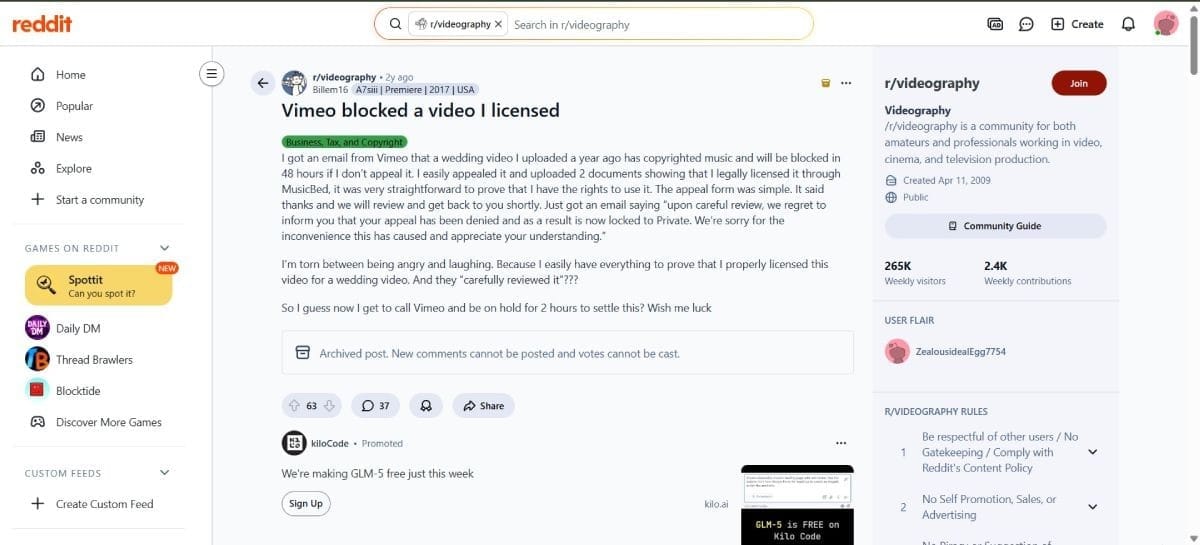
One videographer on Reddit described how a wedding film on Vimeo was suddenly flagged for copyright nearly a year after upload, even though the music had been properly licensed. They submitted proof, waited for a manual review, and still faced the risk of the video being blocked with only 48 hours’ notice.
For small creative projects, this is frustrating. For paid courses, investor updates, or contractual content, it is a serious operational risk, directly tied to Trigger 3 (security and compliance) and Trigger 6 (vendor risk and policy enforcement).
2. “They are Holding my Hundreds of Videos at Ransom”
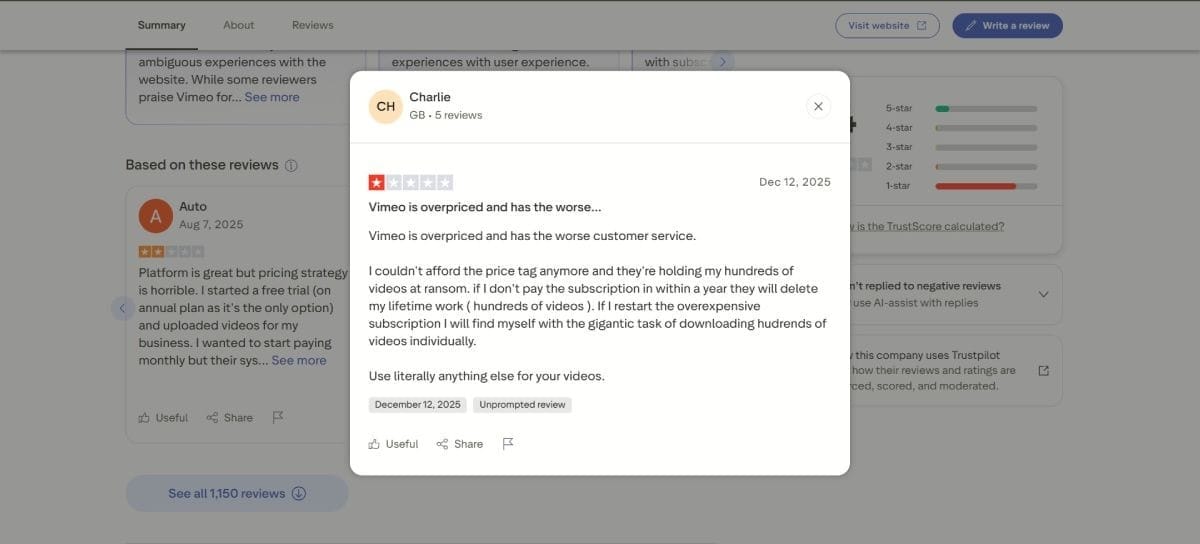
On Trustpilot, one business user describes Vimeo as “overpriced” with “the worst customer service,” saying they could not afford the renewed plan and felt the company was “holding my hundreds of videos at ransom” because access to content depended on paying the new subscription.
Others complain about auto-renewals and unexpected upgrades from free to paid plans, combined with bandwidth and storage constraints that only become visible at higher usage levels. This is exactly Trigger 2 (pricing no longer makes economic sense) and Trigger 6 (trust in the vendor erodes).
3. Bandwidth Limits and Vague “Top 1 Percent” Policies
Swarmify’s analyses of Vimeo’s terms and pricing show how a 2 TB bandwidth threshold and “top 1 percent” clauses catch course creators off guard. At typical 1080p consumption, a hundred students watching a few hours of course content a month can push you toward that limit, after which accounts risk warnings, overages, or forced plan changes.
From the creator or platform side, this looks like success being punished. It maps cleanly to Trigger 2: the pricing logic that seemed fine early becomes misaligned with how your business actually uses video.
These stories are not unique to Vimeo, but they are concrete examples of what “outgrowing your first host” feels like from the inside: content blocked or at risk despite licenses, pricing that punishes growth, bandwidth rules that only show up at scale, shallow analytics, and support that does not move at the speed your business needs.
Switching Video Hosts is a Big Decision, But Staying on the Wrong One is Riskier
Most teams choose their first video host when the stakes are low.
A basic player, a simple embed, and a predictable subscription look fine when you have a small library and local traffic. The trouble is that your usage changes faster than your provider.
Once video becomes central to onboarding, training, and revenue, small weaknesses in performance, pricing, security, analytics, integrations, or vendor stability turn into structural problems.
The six triggers in this article are signals that your assumptions no longer hold. If playback breaks under real traffic, if bills spike whenever a campaign lands, if piracy or access control gaps worry you, if marketing and product cannot get usable analytics, if engineers are constantly building around the host, or if support and strategy from your vendor feel shaky, then the platform is not keeping up with your business. Waiting another year will not fix that.
A good replacement is not simply “another place to upload videos”. It is an infrastructure-grade video platform: HLS with adaptive bitrate, global CDN delivery, strong DRM and access control, deep engagement analytics, and APIs that make video part of your product and data stack.
That is the role Gumlet is designed to play, particularly for SaaS, EdTech, and media teams that need reliable private video hosting with trustworthy analytics. You still need to validate it against your own traffic and requirements, but at least you are choosing from tools built for your stage, not your starting point.
If you recognise two or more of the triggers described here, treat that as a concrete threshold. Run a focused pilot on a modern video infrastructure platform, compare real metrics and workflows, then decide. The real risk is not switching, it is staying locked into a host that quietly limits performance, visibility, and growth while your reliance on video keeps increasing.
FAQ:
1. How do I know my video host is holding us back?
Look at outcomes instead of UI. If you see recurring buffering complaints, slow starts during big launches, unpredictable bandwidth or storage bills, weak access control for paid or internal content, shallow analytics that never make it into CRM or product reports, or engineers building workarounds around your video platform, the host is already a constraint. If more than two of those are true at the same time, you are overdue for a change.
2. When should you switch video hosting platforms?
The best time is before a crisis forces you to rush a migration. In practice, you should start evaluating alternatives when you see any of the six triggers: performance issues under real-world traffic, pricing that spikes as you grow, stronger security requirements, analytics that stall, integration limits, or clear vendor risk. You can run a proof of concept on a subset of videos, compare real metrics, then plan a controlled migration instead of waiting for an outage or contract dispute.
3. Is switching video hosts risky for SEO?
It does not have to be. Search engines care about page URLs, markup, load performance, and behaviour on page, not which vendor hosts the stream. If you keep page URLs stable, update VideoObject schema and sitemaps to your new player URLs, replicate or improve thumbnails and structured data, and avoid slowing pages with heavier embeds, you can migrate with minimal SEO impact. Many teams see improved engagement and core web vitals after switching to a faster video CDN and player, which is beneficial for organic performance.
4. What is the best video hosting platform for a growing SaaS or EdTech product?
There is no single universal “best” platform, only options that are better or worse for product-led use cases. For SaaS and EdTech, you should prioritise adaptive HLS streaming, global delivery, granular security for private and paid content, deep engagement analytics, and API first integration with your app, LMS, CRM, and data stack. Gumlet is a strong fit for that profile because it is designed as infrastructure-grade video hosting rather than a creator network, but you should still validate it with a focused proof of concept on your own traffic and content.
5. What is the difference between public and private video hosting?
Public video hosting is optimised for reach and discovery. Platforms like YouTube are built to surface content to broad audiences, monetise via ads, and prioritise their own recommendation algorithms. Private or enterprise video hosting is optimised for controlled access, performance guarantees, security, and integration with your systems. You decide who can watch, from where, under which conditions, and how playback data flows into your analytics and revenue reporting. At scale, most businesses end up using both: public platforms for awareness, private hosting for product, training, and gated content.
6. How long does a typical video hosting migration take?
For most mid-sized teams, a structured migration takes a few weeks of part-time work, not months, especially if your new platform has bulk import and API support. The longest parts are usually inventorying existing content, coordinating with teams that own different properties, and validating embeds and analytics after the switch. Large libraries and complex apps take longer, but you can still phase the project by moving critical flows first and long tail archives later. The important factor is not the calendar duration; it is whether you follow a clear process so you do not lose SEO, data, or access.