
Most teams only scrutinize video infrastructure when something goes wrong.
A flagship webinar buffers, a paid course leaks outside the paywall, or finance flags a streaming bill that quietly doubles. By the time that happens, your enterprise video hosting platform is already wired into your product and workflows, so the cost of fixing a bad decision is high.
That decision matters because video is now central to how digital businesses operate. Video consistently dominates internet traffic. For mobile networks, Ericsson projects that video will account for about 76% of all mobile data traffic by the end of 2025. This means your streaming stack is part of your core user experience, not just a marketing channel.
Wyzowl’s 2024 State of Video Marketing report found 91% of businesses use video as a marketing tool.
When that much communication, onboarding, and training runs through video, picking the wrong platform quietly affects revenue, support load, and customer satisfaction.
On pricing pages, enterprise video hosting looks straightforward. You compare plans, storage quotas, and basic feature lists, then pick something that fits this quarter’s budget.
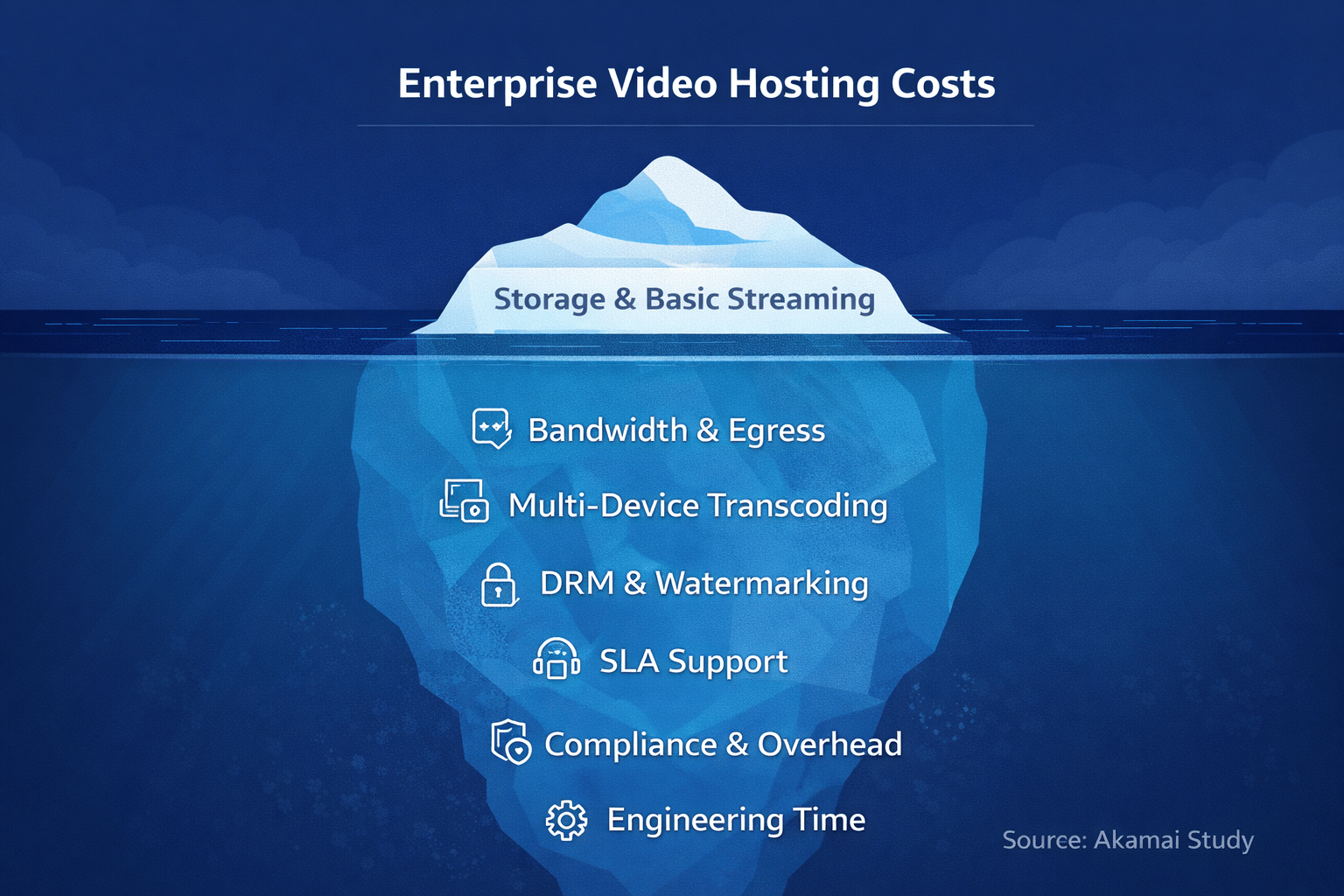
In reality, the subscription is usually the smallest and most predictable part of your total cost of ownership. The real spend comes from storage growth, bandwidth, CDN egress, transcoding, security controls, support, and the internal time your teams spend working around platform limits or debugging playback. Those are the costs that never sit clearly on a comparison grid.
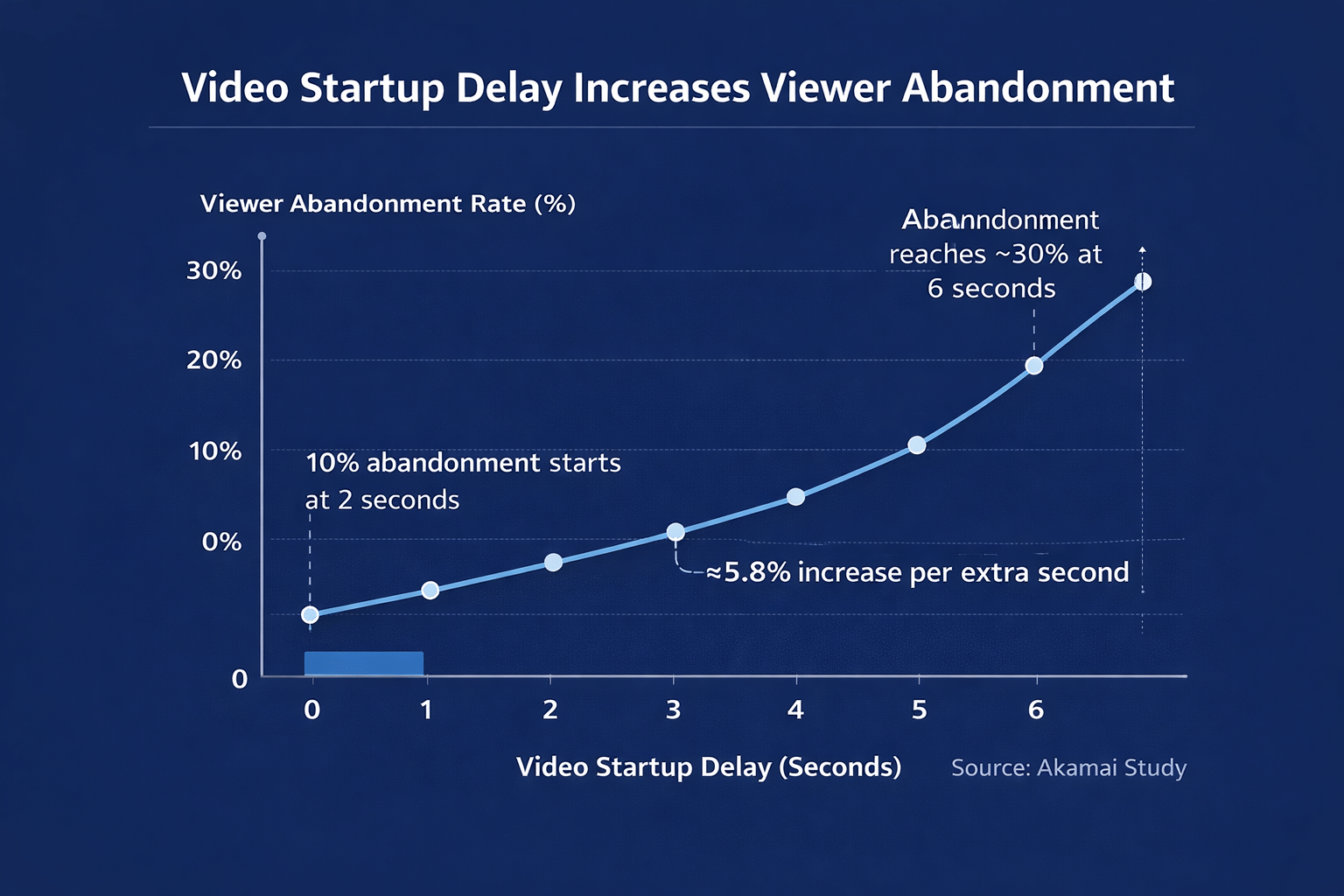
Quality of experience (QoE) should be included in the cost discussion. A study using 23 million viewing sessions from Akamai’s network found that viewers start abandoning a video once startup time exceeds 2 seconds, and that each additional second of delay increases abandonment by about 5.8 %.
Those failures do not appear as separate lines on your hosting invoice; instead, they are recorded as lost conversions, incomplete training, and churn. If you are paying enterprise rates while viewers quietly drop off due to slow or unreliable playback, your effective cost-per-completed-view is much higher than it appears.
This guide is designed to give you a practical, finance-friendly view of enterprise video hosting costs before you sign anything. We will unpack how platforms really price their services, where hidden fees usually sit, how to think about all-in-one portals versus DIY cloud stacks versus infrastructure-first providers, and a simple TCO model you can plug in your own numbers. You will also see what a cost-efficient platform should look like and where an infra-first solution, such as Gumlet, fits in that landscape.
If you want a higher-level view of how infrastructure-grade video delivery should work before you get into numbers, start by understanding Gumlet’s enterprise video hosting, then come back to this guide to map those capabilities to the real storage, bandwidth, security, and operations costs you will actually pay.
Who This Is For (And When Enterprise Video Hosting Actually Makes Sense)
This guide is written for teams where video is already a core part of the business, not a side project. In practice, that means:
- SaaS products that use video for onboarding, in-app help, demos, and customer education
- EdTech platforms and course creators with paid or gated content
- OTT and media services that run subscription or ad-supported video
- Membership sites, B2B academies, and communities with private libraries
- Larger companies that rely on internal training, town halls, and recorded sessions
If most of your video is a handful of public marketing clips on a website or social platforms, a simple or free hosting solution can be enough. The complexity and cost patterns in this article become relevant once at least some of the following are true:
- You need private video hosting behind logins or paywalls, not just public embeds.
- You care about DRM, tokenized links, watermarking, or strict domain and geo controls.
- You need control over branding and player behavior rather than sending users to a third-party site.
- You want analytics that tie video to activation, revenue, or training completion, not just view counts.
- You have real scale in hours of content or monthly viewers, or know that is coming.
If that sounds like your situation, you are dealing with enterprise video hosting, whether you call it that or not.
How Enterprise Video Hosting Is Really Priced
Pricing pages make enterprise video hosting look like any other SaaS product: a few plans, a per-month price, and some checkboxes. Underneath that, almost every platform is monetizing the same things: storage, bandwidth, processing, and risk.
The Pricing Structures You Will See
Vendors use different labels, but almost every offer falls into one of these patterns:
- Flat subscription with usage caps baked in
- Usage-based pricing, where you pay per GB stored and delivered, plus processing
- Hybrid commits, where you pay a base minimum and then overages once you cross it
Whatever the structure, your real cost is always a function of how much you store, how much you deliver, how much you process, and which security, analytics, and support layers you actually use.
The Core Cost Drivers Behind The Invoice
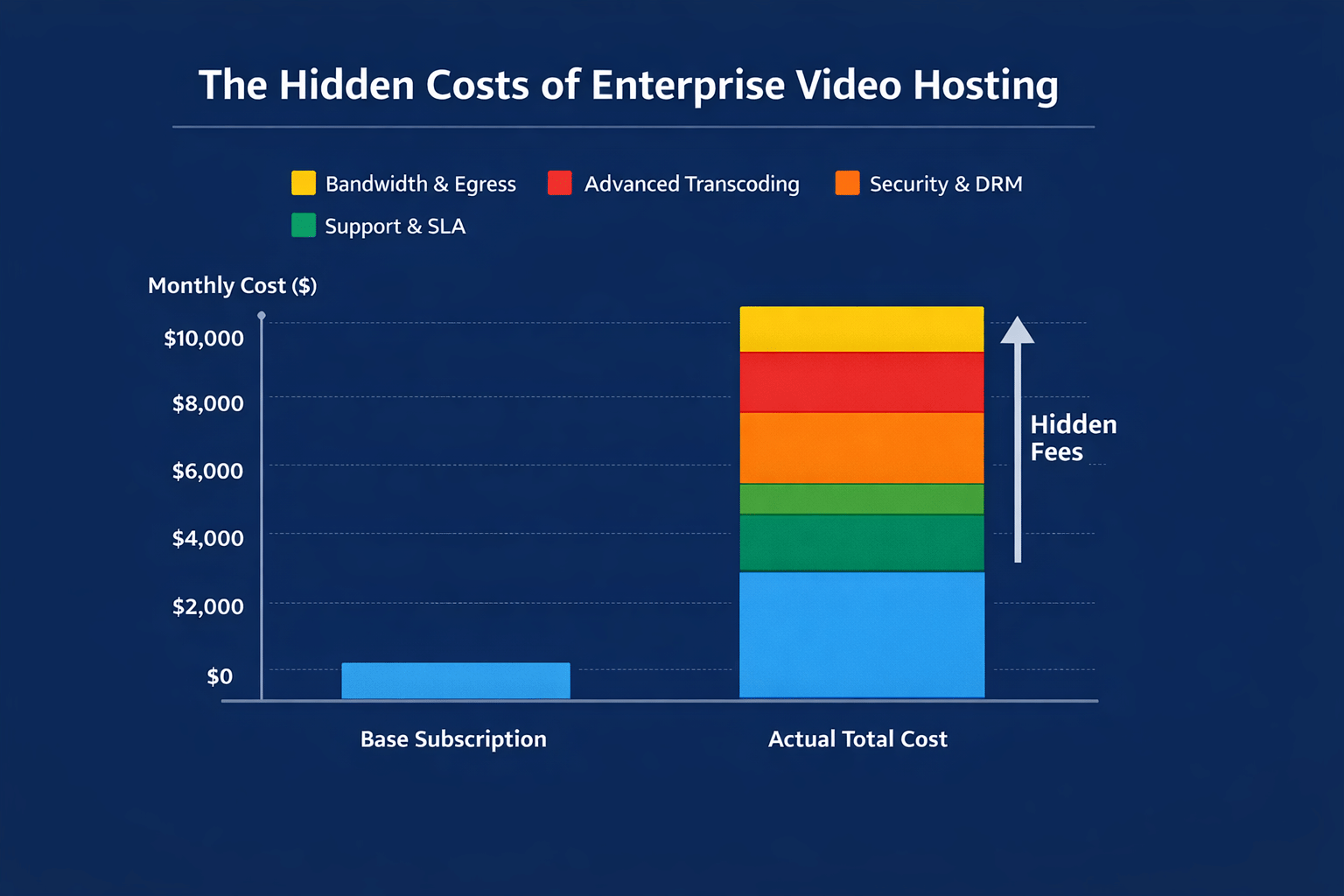
You can summarize the main drivers like this:
| Cost driver | What actually moves the number | Key questions to ask |
|---|---|---|
| Storage at rest | Total GB or TB stored, number of renditions, whether raw masters are retained | Are raw uploads billed like renditions? Is there cheaper archival storage for old content? |
| Bandwidth and CDN egress | Total watch time, average delivered bitrate, viewer regions, live vs VOD (Video on Demand) mix | How many GB or TB are included? What are the exact per-GB rates by region, including overage charges? |
| Transcoding and processing | New hours uploaded, number of renditions, resolutions like 1080p or 4K, and codec choices | Is processing included or per minute? Are higher resolutions or codecs priced differently? |
| Security and protection | Use of DRM, tokens, IP or geo restrictions, domain locks, watermarking, SSO, and RBAC | Which protections are included, and which are paid add-ons? Are any priced per asset or per play? |
| Support and services | Support SLAs, onboarding help, migration projects, and custom integrations | Do we need a higher tier for acceptable SLAs? Are migration or large import bills billable? |
| Internal ops and engineering time | Engineer hours on player and infra issues, manual workflows for content teams | How many tools are we stitching together? How often do non-technical teams need engineering help? |
The Fine Print That Changes Your Effective Price
Even when you understand the drivers above, three contract details often shift your effective cost per GB or per viewer:
Fair use and “unlimited” language
If “unlimited” storage or bandwidth is qualified by non-numeric fair use clauses, you can be throttled or pushed into upgrades after a successful event or campaign.
Region-based pricing
Delivery to India, Southeast Asia, or Latin America is often priced differently from North America and Europe. If you have significant traffic in those regions, you need those rates in writing.
Separate SKUs for live, VOD, and workspaces
Live streaming, extra workspaces, or multiple brands may be billed differently from your core VOD usage, and can quickly alter your invoice if you add them later.
Once you look at pricing through these lenses, you can see that two teams with similar traffic can pay very different amounts on the same platform purely because of how storage, bandwidth, security, and fine print interact.
The Hidden Costs You Only See After You Launch
Most problems with enterprise video hosting do not come from the base plan. They appear after real traffic, real security requirements, and real operations hit the platform. These are the costs that rarely appear on pricing pages but do on your second or third invoice.
| Hidden cost area | How it typically shows up | Why it matters for cost |
|---|---|---|
| Bandwidth Overages and Soft Caps | “Unlimited” claims with vague fair use, small included delivery pools, followed by steep per GB overages | Spikes from launches, webinars, or new programs suddenly multiply your bill, even if the subscription stays the same |
| Security and Compliance Sold as Extras | Separate SKUs for DRM, signed URLs, domain or geo locks, watermarking, SSO, and admin controls | For paid, gated, or internal content, these are mandatory, so treating them as add-ons inflates real platform cost and leaves you exposed if you skip them |
| Migration, Export, and Lock-in | Slow or throttled export tools, egress fees to pull content out, proprietary players, and embed formats | Makes changing vendors expensive in both cash and engineering time, which often hides the long-term cost of a “cheap” initial contract |
| Feature-gated Analytics and APIs | Basic view counts included, but heatmaps, event exports, APIs, and CRM or LMS integrations are locked to higher tiers | Forces you into more expensive plans just to answer core questions like which videos drive activation or compliance completion |
| Internal Ops and Engineering Time | Developers are debugging player and infra issues, content teams are doing manual uploads and permission changes, and support is handling playback tickets | Consumes expensive internal time that never appears on the vendor invoice, but is part of your true total cost of ownership |
| Poor Playback and Downtime | Slow start times, buffering, or errors on key flows and live events, especially in certain regions or networks | Reduces conversions, training completion, and trust, meaning you pay acquisition and production costs without getting the corresponding value back |
Two of these areas warrant more direct attention.
Security and Compliance Risk
The average global cost of a data breach was estimated at 4.45 million dollars in 2023. Running revenue-generating or sensitive content on weak protection is not a saving; it is a risk that can dwarf any hosting invoice. When you evaluate platforms, assume you will need DRM, tokenization, access controls, and auditability if your content is paid, internal, or regulated.
Playback Quality and Abandonment
Data from tens of millions of sessions on Akamai’s network showed that viewers start abandoning a video once startup time exceeds about two seconds, and each additional second of delay increases abandonment by roughly 5.8 percent. Those lost views do not appear as a separate line item, but they are wasted acquisition and production spend.
Taken together, these six categories explain why two teams with similar audience sizes can see very different effective video hosting costs. The next step is to make those costs explicit in a simple total cost of ownership model so you can compare platforms on real numbers instead of headline subscription prices.
A Simple TCO Model For Enterprise Video Hosting
To choose a platform realistically, you need to stop focusing only on “price per month” and instead consider the total cost of ownership (TCO). At a minimum, your monthly cost should be modeled like this:
Enterprise video hosting TCO (per month):
- Platform subscription
- Storage cost
- Bandwidth and streaming cost
- Transcoding and processing cost
- Security and compliance cost
- Support and services cost
- Internal ops and engineering time
- Cost of a poor experience
You do not need a complex spreadsheet, but you do need to treat each of these as a real line item.
TCO Components
| Component | What it includes | Inputs you should collect |
|---|---|---|
| Platform subscription | Base plan, extra workspaces, or brands | Contracted monthly/annual fee, included usage thresholds |
| Storage cost | Keeping all masters and renditions online | Number of videos, hours of content, average file size, and how many renditions you keep |
| Bandwidth and streaming cost | Data is delivered when viewers watch, for VOD and live | Monthly active viewers, average watch time, typical bitrate, audience regions |
| Transcoding and processing cost | Converting uploads into adaptive renditions | New hours uploaded per month, target resolutions (HD, 4K), codec choices, and how often you re-encode |
| Security and compliance cost | DRM, tokens, domain/geo/IP control, watermarking, SSO, auditability | Which protections you actually need for your use case, and how each is priced per asset, per play, or per month |
| Support and services cost | Premium support SLAs, onboarding, migrations, and custom integrations | Required SLA level, expected migration size, and any custom work you know you need |
| Internal ops and engineering time | The time your own team spends operating and debugging the video | Monthly hours engineers, content, and support spend on video tasks multiplied by a rough internal hourly cost |
| Cost of a poor experience | Lost value from buffering, failures, or downtime | Rough estimate of lost conversions, incomplete training, or churn when key videos or events perform badly |
How To Use This Model in Practice
You can keep the process simple:
Estimate volume
- Hours of content now and in the next 12 months
- Monthly active viewers and average minutes watched
- Regional mix (for example, India, SE Asia, Europe, US)
List mandatory protections and features
- DRM, secure links, domain and geo control, watermarking, SSO
- Required analytics, APIs, and integrations
Ask every vendor to fill these TCO buckets
- Get storage and bandwidth inclusions and overage rates in writing
- Ask how security, support, and migration are priced
- Ask what level of analytics and API access you get at the proposed tier
Add your own internal time and “cost of failure” estimates
- Engineering and content hours you expect to spend per month
- A conservative estimate of what it costs you if key onboarding, sales, or training videos underperform because of playback issues
The goal is not perfect precision. The goal is to compare platforms on the same TCO structure, rather than on isolated subscription numbers or per GB rates.
What A Cost-efficient Enterprise Video Hosting Platform Should Look Like
Once you look at hosting through a TCO lens, the question becomes simple: Which platform keeps your cost predictable and aligned with usage, while giving you the security and performance you actually need? Four pillars matter most: pricing, security, delivery, and operations.
1. Pricing That Maps Clearly to Usage
A cost-efficient platform makes it easy for finance and engineering to sanity check numbers.
- Few primary parameters: subscription, storage, delivery, and processing.
- Clear inclusions and overage rates in GB or TB, not vague “fair use”.
- Transparent regional pricing, especially for India, SE Asia, and other key regions.
- No forced upgrades just to unlock basic APIs, security, or analytics.
If you cannot plug their numbers straight into your TCO table, expect surprises later.
2. Security as Standard, Not as an Upsell
For paid, gated, or internal content, security is part of the product, not an optional extra.
A good platform treats at least the following as first-class features:
- DRM for protected content where needed.
- Signed or tokenized URLs.
- Domain, IP, and geo restrictions.
- Watermarking options for sensitive or premium assets.
- SSO and role-based access controls for admin and viewer management.
The Key Test: Ask vendors to show the incremental cost of the protections you need. If enabling DRM, tokens, and watermarking radically changes the unit economics, that’s a red flag.
3. Delivery Architecture That Reduces The “Buffering Tax”
Performance is a cost issue because poor playback wastes acquisition and production spend.
Look for:
- Adaptive bitrate streaming with encoding ladders tuned for real networks, not just maximum quality.
- Multi CDN or smart routing so issues in one network or region do not degrade global viewers.
- Concrete metrics and dashboards for startup time, buffering ratio, and error rates by region, device, and ISP.
If a vendor cannot show you these metrics, it is hard to believe they manage them.
4. Tooling and APIs That Reduce Internal Effort
A platform that offloads operational work is often cheaper overall than a “low price per GB” stack that burns engineering and content time.
Useful signs:
- Solid video library and CMS features: bulk upload, tagging, search, and permissions that map to your org.
- Clean ingest and management APIs, player SDKs, and webhooks that let engineers integrate once and move on.
- Analytics that connect to your CRM, LMS, CDP, or data warehouse, so you do not have to build brittle exports yourself.
When non-technical teams can manage 90 percent of day-to-day video work, and engineers are only involved for real integration changes, your internal cost drops sharply.
Snapshot: What “Good” Looks Like
You can use this quick table as a final filter when assessing vendors.
| Pillar | Good signs | Red flags |
|---|---|---|
| Pricing | Few clear meters, written thresholds and overages, and predictable regional pricing | “Unlimited” with fair use, missing numbers for overages, essential features only on the top tier |
| Security | DRM, tokens, restrictions, watermarking, and SSO treated as core | Security is bundled as a separate, expensive add-on or priced per asset in opaque ways |
| Delivery | Adaptive streaming, multi-CDN or smart routing, quality dashboards | Only a generic uptime SLA, no metrics for startup time or buffering by region or device |
| Operations | Strong library, APIs, integrations, analytics for non-technical users and data teams | Manual workflows, weak APIs, and critical analytics are gated to the most expensive plan |
With this picture of “good” in mind, the next section will focus specifically on where Gumlet sits: How an infrastructure-first platform changes your cost structure and what type of teams it is best suited for.
How Gumlet Fits Into This Cost Picture
At this point, the decision is not “Do we need video hosting?” but “What kind of video infrastructure keeps our total cost of ownership sane?” Gumlet sits in the infra-first category: it is neither a heavy portal nor a DIY cloud stack. It is a video infrastructure platform that exposes encoding, protection, delivery, and analytics through APIs and a modern dashboard, designed for teams that embed video inside their products and workflows.
Who Gumlet Is Built For
Gumlet is a fit if you recognise yourself in at least one of these groups:
- SaaS and product-led companies use video for onboarding, feature tours, help centers, and in-product education.
- EdTech platforms and course creators running paid or gated video libraries where piracy or sharing hurts revenue.
- OTT, streaming, and media brands that need a predictable video streaming infrastructure cost across regions.
- Membership communities, B2B academies, and customer education teams running private or paywalled content.
- Enterprises with internal video for training, leadership communication, and compliance, but who want infra-level control rather than a generic intranet portal.
In all of these cases, video is critical, but you do not want to build and operate your own encoding, multi-CDN, DRM, and analytics stack from scratch.
How Gumlet Aligns Pricing With TCO
Gumlet’s model is closer to the TCO structure you actually care about:
Usage-based at the core
Gumlet’s pricing aligns with storage, delivery, and processing rather than arbitrary “seat” counts or a monolithic portal license. That makes it easier to plug Gumlet into the TCO table you built earlier and see how costs scale with real usage.
Transparent separation of components
Platform fee plus clearly defined usage buckets, rather than bundling everything under a single enterprise label. This helps finance compare scenarios such as “traffic doubles” or “we add 4K for a subset of content” without guessing.
Focused on infra, not paid portal features
You are not paying for internal channels, portals, or social-style features you may never use. Most of your spend goes directly to the pieces that actually drive cost in any hosting setup: encoding, storage, delivery, and security.
In practice, this makes Gumlet easier to model alongside DIY cloud or another infra-first vendor than alongside an all-in-one portal that hides its unit economics.
How Gumlet Handles Security And Access For Paid/Private Video
Gumlet is built assuming many customers serve paid, gated, or internal content, so protection is treated as a first-class requirement, not an add-on.
Typical controls include:
- DRM and tokenised delivery for premium or high-risk assets.
- Signed URLs and access tokens so only authenticated users or valid sessions can view content.
- Domain, IP, and geo restrictions to control where videos can be embedded and accessed.
- Dynamic watermarking for leakage deterrence and traceability.
- SSO and role-based access so you can align admin and viewer rights with your existing identity systems.
From a cost perspective, this matters because you should not be bolting a separate security stack on top of your hosting, nor upgrading to a much higher tier just to unlock basic protections you always needed.
How Gumlet Reduces Operational Overhead
Beyond pricing and security, Gumlet aims to lower the internal time you spend operating video:
Video library and management
Centralised library, upload and replace workflows, metadata and search, and permission models designed so non-technical teams can manage most day-to-day tasks without engineering help.
Developer-friendly APIs and SDKs
Upload, management, and playback APIs, plus player SDKs for web and mobile. Engineers integrate Gumlet once rather than stitching together storage, encoders, DRM, multiple CDNs, and separate analytics.
Unified delivery and analytics layer
Multi CDN streaming and monitoring under one roof, with playback analytics, error and quality metrics, and event exports for your data stack. That reduces the time your team spends diagnosing where a problem sits in the chain.
When you run this through your TCO model, Gumlet’s value is not just “cheaper per GB” or “more features.” The value is that a greater share of your spend funds infrastructure that is directly tied to outcomes (secure, reliable playback and usable analytics), while shrinking the hidden buckets: overages, security upsells, fragmented tooling, and internal engineering time.
The Hidden Video Hosting Costs You Can Avoid
Enterprise video hosting cost is not just a plan price and a storage quota.
Once video ties into onboarding, paid content, customer education, or internal training, your real spend is driven by usage, security, and operations. Storage grows as your library expands. Bandwidth and CDN egress jump during successful launches, webinars, or cohorts.
Transcoding, DRM, watermarking, and SSO are often available under separate SKUs. Support, migrations, and integrations add more. On top of all that, engineers, marketers, and support teams spend time working around platform limits, while poor playback quietly kills conversions and completion rates.
A simple TCO model forces all of that into the open. Instead of comparing headline subscription prices, you add up subscription, storage, bandwidth, processing, security, support, internal time, and the cost of unsatisfactory experience.
When you look at all-in-one portals, DIY cloud stacks, and infra-first platforms through that lens, patterns become clear. Portals tend to hide unit economics and push you into higher tiers to unlock basic security and analytics.
DIY stacks look cheap on raw per GB cost, then consume significant engineering capacity. Infra-first platforms that tie pricing directly to storage and delivery, treat security as standard, and reduce operational friction tend to track your actual usage and value more honestly.
In that context, the job of a buyer is straightforward:
- Define your volumes and regions
- List the security and analytics you truly need
- Make every vendor fill the same TCO structure, with written numbers for thresholds and overages.
Ask how playback quality is monitored and what happens under spikes. Reject any offer that relies on unlimited language, vague fair use clauses, or separate security bundles for essential protections. If video is central to your product or internal operations, you cannot afford to discover the real price only after a few major events have run.
Infra-first platforms like Gumlet exist specifically to keep those costs aligned with reality. By focusing on encoding, secure delivery, and analytics, pricing around usage rather than portal licenses, and reducing the amount of tooling and operations you own, they change the cost equation without asking you to build everything on raw cloud. If you want to see how your current or planned volumes translate into a concrete bill and what it would look like to consolidate hosting, protection, and analytics into a single infrastructure-grade stack, you can schedule a demo. That conversation will give you a hard number to compare against your TCO model before you commit to any long-term contract.
FAQ
Do we actually need an enterprise video hosting platform?
You probably do if the video is tied to revenue, product use, or compliance, not just marketing. If you have gated or paid content, strict access controls, or need detailed analytics and SLAs, you are already in enterprise territory, even if you are still using basic tools. If your usage is only a few public marketing videos with low traffic, simpler hosting is usually enough.
How should we analyze the budget for enterprise video hosting?
Start with usage, not with vendor price pages. Estimate hours of content, monthly active viewers, average watch time, and key regions, then apply the TCO model from this article: subscription, storage, bandwidth, processing, security, support, internal time, and cost of poor experience. For most mid-sized SaaS, EdTech, or membership businesses, serious hosting usually runs in the low to mid four figures per month, including bandwidth and security, but the spread depends heavily on your viewer numbers and quality requirements.
Why not just use YouTube or Vimeo for everything?
Consumer platforms are fine for public-facing marketing content, but they do not provide the control or guarantees you need for enterprise use cases. You cannot reliably enforce access control, DRM, tokenized links, detailed analytics, or SLAs suitable for paid, internal, or regulated content. Once video touches revenue, security, or compliance, the hidden cost of using a consumer platform outweighs the savings from hosting.
What is the biggest mistake companies make with video hosting costs?
The biggest mistake is treating the base subscription price as the whole story. That usually leads to underestimating bandwidth and egress, ignoring how security is priced, and forgetting support, migration, and internal engineering time. A close second is locking into a portal that forces expensive plan upgrades to unlock basic APIs or analytics, rather than choosing an infra-first platform that maps costs directly to usage.
How do we compare vendors if enterprise pricing is not fully public?
Use your own traffic profile and a fixed TCO structure as the basis for comparison. Send the same numbers to every vendor for hours of content, viewers, watch time, and required security, then ask them to fill in storage, bandwidth inclusions, overage rates, and security and support costs in writing. If a provider cannot give you clear numbers for those buckets, or relies solely on vague unlimited language and custom quotes, treat that as a warning of future surprises.
tl;dr
- Enterprise video hosting cost is driven mostly by storage, bandwidth, processing, security, and internal operations, not just the visible subscription price.
- The main hidden costs include bandwidth overages, security sold as add-ons, feature-gated analytics and APIs, migration friction, internal engineering time, and the impact of poor playback on conversions and completion rates.
- A simple TCO model should include: subscription, storage, bandwidth, processing, security, support, internal ops time, and the cost of poor experience.
- All-in-one portals, DIY cloud stacks, and infra-first platforms have very different cost and risk profiles even at the same traffic level.
- A cost-efficient platform has usage-linked pricing, security as standard, a strong delivery architecture with real quality metrics, and tools and APIs that reduce internal work.
- Infra first platforms like Gumlet align pricing with actual usage, bundle the protections enterprises need by default, and lower operational overhead, which generally leads to a more predictable and defensible TCO.