Almost every team has done it at some point: upload a training recording, sales demo, or internal town hall to YouTube, mark it as “unlisted”, drop the link in Slack or email, and move on.
It feels harmless. YouTube is free, familiar, and “good enough” for streaming, so it quietly becomes the default video host for everything from onboarding to customer education.
The context has changed.
According to Wyzowl’s 2024 State of Video Marketing report, around 91 percent of businesses now use video as a marketing tool, and most say it delivers positive ROI. Video is no longer a side asset.
It underpins internal communication, product education, sales enablement, and even compliance training. Putting that kind of business-critical content on a consumer platform designed for public discovery and ads is a structural mismatch, not a minor shortcut.
YouTube is a discovery channel, not a secure backend for business video hosting. Its privacy model, analytics, and controls were never designed for internal communication, gated customer portals, partner enablement, or paid course delivery.
Yet those are exactly the use cases where many companies rely on unlisted links today. The result is a growing set of risks around privacy, governance, user experience, and control that only show up once your video library is already deeply entangled with YouTube.
In this article, we will break down why YouTube is a poor choice for corporate and internal video hosting, where it fails teams in concrete ways, what a proper private video hosting platform looks like, and how to keep YouTube where it belongs in your stack: a public marketing and reach channel, not your video infrastructure.
Key Takeaways
- YouTube is built for public discovery, watch time and ads, not for secure business video hosting. It optimizes for keeping viewers inside YouTube, not for keeping them inside your product, LMS, or help center.
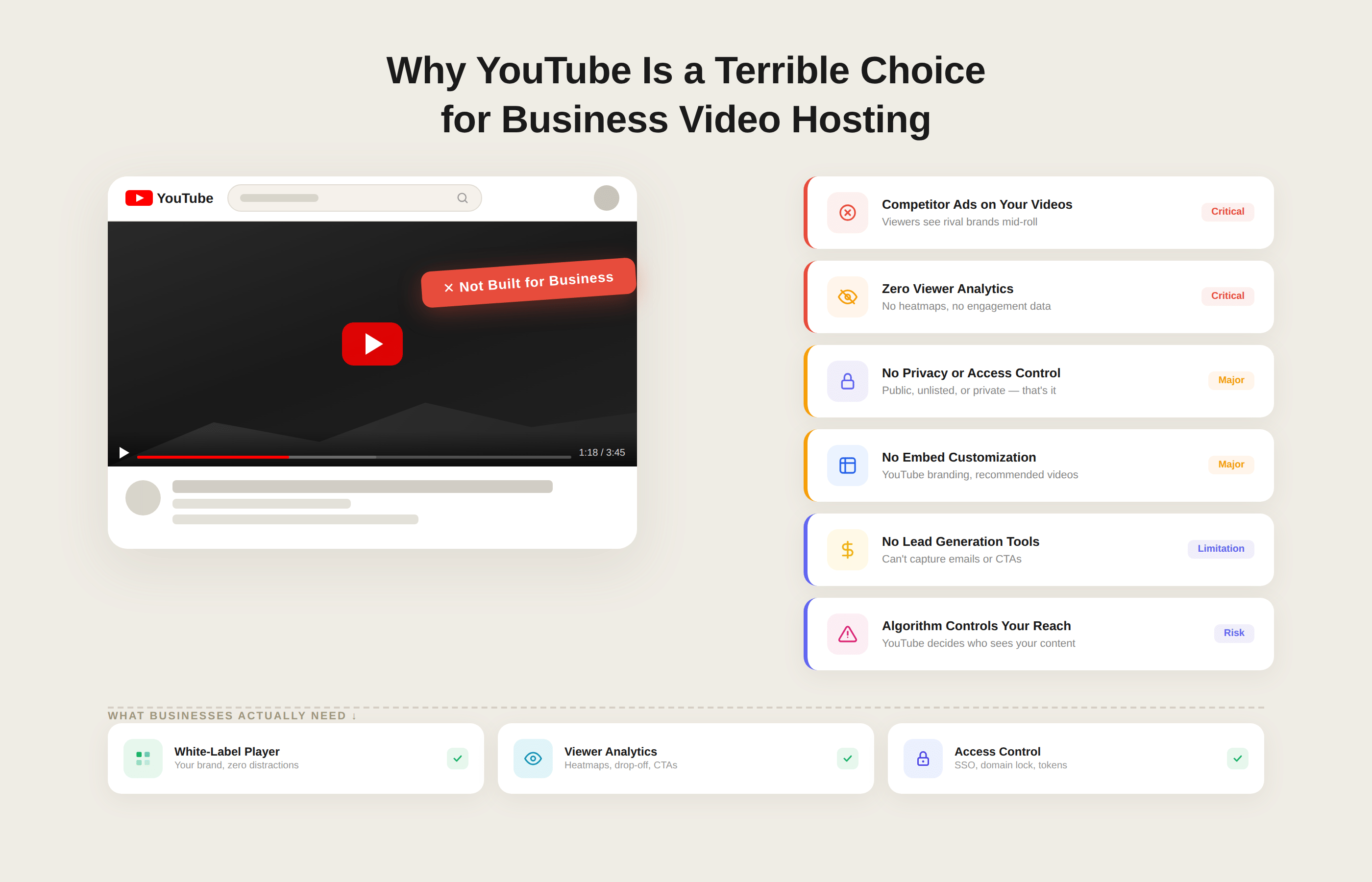
- Unlisted YouTube videos are not private video hosting. Anyone with the link can watch, share, or embed them, and there is no identity-based access control, no SSO, no role or group permissions, and no clean way to revoke access without breaking every embed.
- YouTube Analytics is fine for public marketing, but almost useless for internal training and customer onboarding. You get aggregate views and watch time, not per-user completion data tied to your HR system, CRM, or product analytics, so you cannot prove who watched what for audits or compliance.
- The YouTube player brings platform branding, recommendations, and potential ads into serious surfaces such as internal training, customer education, and investor updates. That undermines trust, can surface competitor content, and gives you little control over the viewing environment on your own domain.
- For sensitive, internal, or paid content, you have no real handle on governance. You cannot choose data residency, define retention policies, or get audit-grade access logs. This makes YouTube a poor fit for regulated industries or any team that has to defend its posture to security and legal stakeholders.
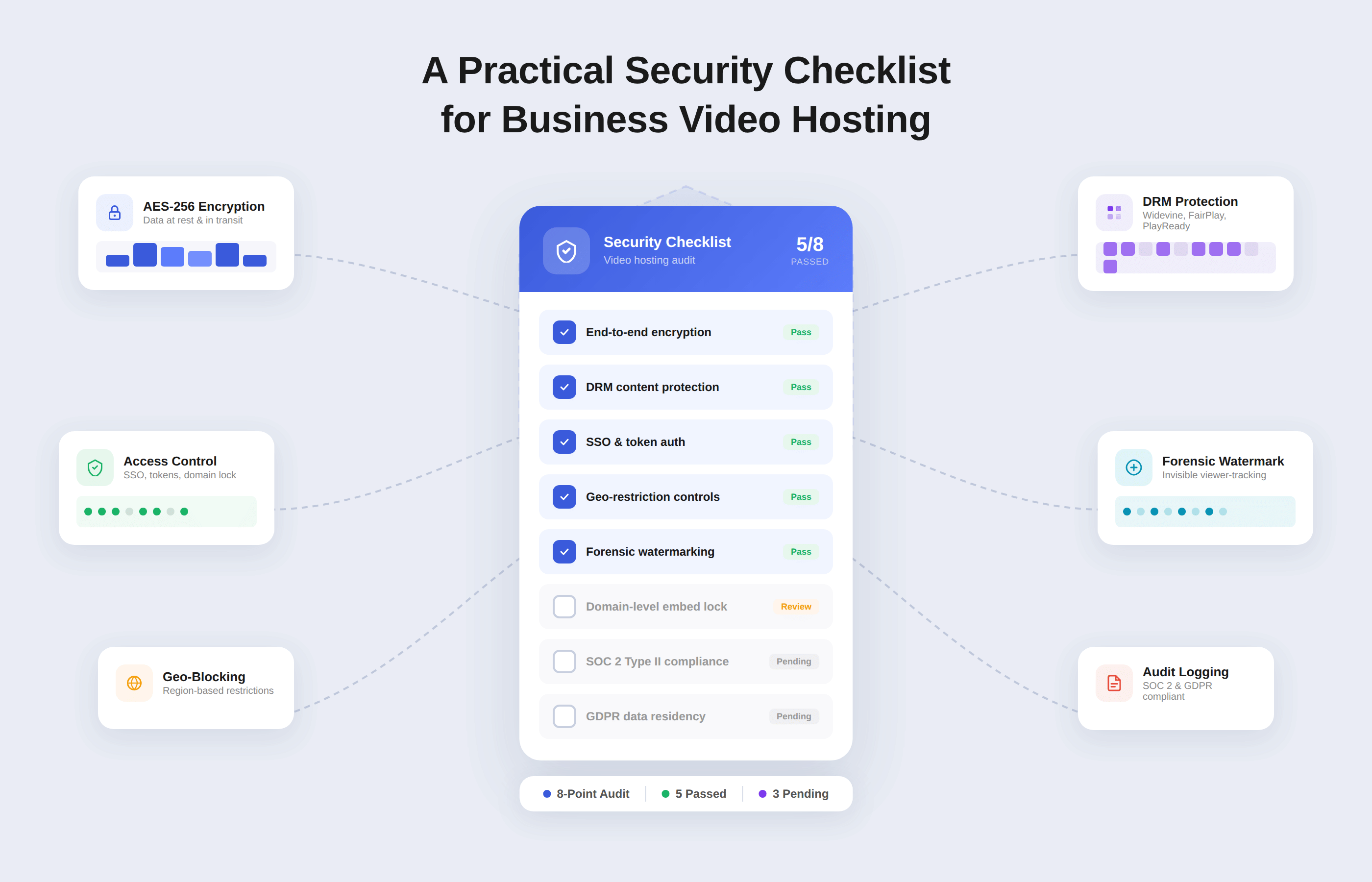
- A business video hosting platform, such as Gumlet, behaves like infrastructure. It gives you identity-based access controls, SSO, domain and IP restrictions, branded, distraction-free playback, viewer-level analytics that integrate with your stack, and APIs and bulk tools for managing a governed library at scale.
- The healthy model is a two-tier setup. Keep YouTube for public marketing, SEO, and social proof. Use a private, secure video hosting platform for internal communication, customer onboarding, partner enablement, and paid courses, and gradually migrate any unlisted YouTube content that clearly fails this test.
How Businesses Actually Use YouTube Today and Where it Goes Wrong
If you look inside most companies, YouTube is not only a marketing channel. It is quietly used as a catch-all video host for almost everything that is not strictly public.
The pattern usually starts with one team solving a short-term problem, then spreads informally across departments.
Typical use cases look like this:
1. Internal Training and Onboarding
HR or L&D teams record Zoom or Meet sessions, upload them to YouTube as unlisted videos, and share the links in email, Slack, or a wiki. Over time, these links become the de facto learning library for compliance training, onboarding, and internal product walkthroughs.
2. Customer Onboarding and Product Education
Customer success teams often upload feature demos, QBR recordings, and walkthroughs as unlisted videos and embed them in a help center, Intercom article, or customer portal.
The logic is that the YouTube player is easy to embed, and everyone assumes the videos will “just work” globally.
3. Town Halls, All Hands, and Leadership Updates
Company-wide meetings are recorded and then uploaded as unlisted videos so employees in other time zones can catch up. Links are posted in internal channels and then forwarded around whenever someone new joins or asks for historical context.
4. Partner Enablement and Sales Collateral
Sales and partnership teams rely on unlisted YouTube links for pitch decks with narration, roadmap previews, and co-marketing assets. These links often travel outside the company, into partner CRMs and email threads, with no visibility or control once they leave.
5. Paid Courses and Membership Content
Smaller education businesses and community platforms sometimes host entire paid courses on YouTube as unlisted playlists, then embed them behind a login in their own app or site.
They treat YouTube as a free video CDN with a player on top, assuming the “unlisted” flag is enough to protect their content.
The Shortcut That Looks Smart Until It Breaks
Individually, each of these decisions looks pragmatic. There is no procurement cycle. There is no integration work. No one has to ask engineering to set up a new service.
YouTube is already allowed on most networks, and unlisted videos keep the content out of public search results.
The problems show up later, when this pattern scales from 5 or 10 videos to hundreds or thousands of videos. A few consistent failure modes appear across companies:
1. Links Leak by Design
Unlisted URLs are copied into tickets, Slack threads, customer emails, and partner docs. Once a link exists in those systems, it can be forwarded to anyone. There is no way to restrict viewing to employees, paying customers, or specific partner accounts.
2. Access cannot be Revoked Cleanly
When an employee leaves or a customer churns, there is no identity-based control to revoke. As long as they have the link, they can still watch the video. The only way to lock them out is to delete or re-upload the video in full, which breaks every existing embed and reference.
4. No Separation Between Internal and External Surfaces
The same unlisted video may be embedded in an internal wiki, a customer help center, and a partner portal. Because YouTube has no notion of those contexts, you cannot apply different access policies or analytics. You see aggregate views, not which segment watched what.
5. Distracting or Unprofessional Viewing Experience
Even when you embed an unlisted video, YouTube branding, recommended videos, and end-screen elements remain unless you go out of your way to disable them and keep monitoring for changes. For onboarding, compliance training, or investor updates, this feels unprofessional and can even route viewers to competitor content.
6. Zero Audit Trail at the Person or Account-level
Once content is used for training or customer onboarding, teams start asking basic questions: Who watched the security training, and who did not? Did this account actually view the onboarding modules we sent?
With unlisted YouTube hosting, you cannot tie views back to identities in your HR system, CRM, or product analytics. You see total views and watch time, not which customer or employee is compliant.
7. Governance becomes impossible at scale
Over time, no one knows which unlisted videos exist, where they are embedded, or who has access to them. There is no central library with clear ownership and lifecycle rules.
Videos that should have been retired or updated stay live because no one wants to risk breaking links embedded in documentation and support macros.
None of this is YouTube malfunctioning. The platform is working exactly as intended: to host and distribute public video for as many viewers as possible.
The issue is that businesses are leaning on a consumer discovery platform to do the job of a private, governed video infrastructure.
The Fundamental Problem: YouTube Incentives vs. Business Needs
At a glance, YouTube and a business video platform look similar.
Both store and stream video, and both provide analytics dashboards. Underneath, they are optimizing for very different outcomes.
YouTube is built to maximize public watch time on its own platform. Businesses need a controlled, predictable video infrastructure that aligns with internal workflows, customer journeys, and compliance obligations. That misalignment is the core issue.
1. YouTube is Built to Maximize Watch Time, Not to Support Your Workflows
YouTube’s primary objective is to keep as many viewers as possible engaged on the Platform so it can serve ads and increase session length.
The recommendation engine is tuned for watch time, not for keeping viewers focused on a specific training module or onboarding path. The player interface is designed to encourage exploration of more YouTube content, not to keep users inside your app, LMS, or help center.
When you embed YouTube inside internal portals, customer help centers, or partner sites, you are still plugging into a product that is rewarded for sending viewers deeper into YouTube, not deeper into your product or documentation. That tension never goes away, even if the videos are unlisted.
2. Businesses Need Control, Predictability, and Alignment With Their Own Goals
A company using video for internal communication, sales enablement, or customer education has very different priorities from a public creator channel. You need to decide who can see each video, where they can see it, and how the experience reflects your brand.
In practice, this means:
- Strict access control for internal and customer content, not just link-based obscurity.
- A consistent, brand-safe player inside your own properties, without unexpected UI changes.
- Video behavior tuned to your goals, such as product activation, reduced support tickets, or employee completion rates, not only generic “views” and “watch time”.
With YouTube, you cannot version or test your own player behavior. You inherit whatever UX changes YouTube ships globally on its schedule and must adapt around them.
3. Aggregate YouTube Metrics are Not Enough for Internal and Customer Video
There is also a gap in how data is handled. YouTube provides channel-level metrics that are useful for public marketing campaigns: impressions, click-through rate, average view duration, traffic sources, and broad audience demographics. That helps when you care about reach and brand awareness.
For internal and customer-facing video, teams need something much more specific:
- Which employee, customer, or partner watched which video?YouTube is
- How far each person watched, and whether they completed mandatory modules.
- How viewing behavior correlates with outcomes such as time-to-value, feature adoption, support volume, or renewal.
Answering these questions requires identity-aware analytics tied to your SSO, HR system, CRM, product analytics, or LMS. Anonymous aggregate stats cannot tell you whether a particular account has actually consumed the content you rely on for onboarding or compliance.
That is why many teams end up stitching together CSV exports and manual reports when YouTube is their default host.
4. Governance and Compliance Expectations are Higher Than What YouTube Offers
Governance expectations for internal and customer-facing content differ significantly from those for a public marketing channel. YouTube is a global consumer service with its own moderation rules, storage locations, and retention policies.
You cannot dictate where your content is stored, how long logs are retained, or how content is prioritized for review.
In a business context, especially when screens contain internal dashboards, customer data, or unreleased product details, you are expected to maintain clear controls around:
- Data residency and regional storage
- Which users or groups can access specific videos?
- How long content and access logs are retained.
- How access, changes, and deletions are audited for compliance and incident response.
A corporate video platform is built with these requirements in mind. YouTube is not. When you rely on YouTube as the default host for internal, customer, or paid content, you inherit the incentives and constraints of a consumer platform that is not accountable to your contracts, SLAs, or regulatory obligations.
As video becomes more critical to how your business operates, this misalignment shifts from a tolerable compromise to an unacceptable risk.
Concrete Reasons YouTube is a Terrible Choice for Business Video Hosting
For businesses contemplating video hosting platforms, YouTube is not the problem. The problem is using a public, ad-driven platform as if it were a private, governed video infrastructure.
When you look at specific requirements around privacy, access, analytics, and control, the gaps are clear.
1. Link-based Privacy is Not Real Access Control
Unlisted YouTube videos are hidden from search, not protected in any meaningful security sense. Anyone who has the URL can:
- Watch the video without authentication.
- Forward the link to anyone else.
- Embed it in another site or portal.
- Download or screen record it with basic tools.
Unlisted is not private. It only removes the video from search and recommendations. It does not require authentication, bind playback to identity, or prevent redistribution. From a security perspective, it is a discoverability setting rather than an access control system.
In real teams, those links end up in tickets, Slack threads, customer emails, partner CRMs, and internal docs. Over a year or two, it becomes impossible to know who has access. There is no concept of:
- Tying access to an employee, customer, or partner identity.
- Restricting playback to a specific domain, network, or SSO (Single Sign-on) group.
- Issuing time-bound or tokenized links that expire automatically.
The only way to revoke access to an unlisted YouTube video is to delete it or change its visibility, which breaks every embed and link that depends on it. That is the opposite of what you want when the same video is used across onboarding flows, help center articles, and partner portals.
YouTube vs Business Video Hosting
| Capability | YouTube (Unlisted) | Business-grade Private Hosting (e.g. Gumlet) |
|---|---|---|
| Identity-based access control | No | Yes |
| SSO / SAML integration | No | Yes |
| Expiring access tokens | No | Yes |
| Domain & IP restrictions | Limited | Yes |
| DRM protection | No | Yes |
| Viewer-level analytics | No | Yes |
| Audit-ready access logs | No | Yes |
| White-label playback | Limited | Yes |
| Control over recommendations | No | Full control |
| Governance & compliance controls | Minimal | Built-in |
2. You Cannot Prove Who Watched What
YouTube Analytics is fine for public channels. You get views, watch time, traffic sources, and some demographics. That is not enough when the video is part of internal training, customer onboarding, or compliance.
Business teams need to answer questions such as:
- Which employees completed the security or compliance training this quarter?
- Whether a specific customer account watched the onboarding series you sent.
- Which partners actually viewed the latest roadmap or pricing enablement session?
With unlisted YouTube hosting, you only see aggregate metrics. There is no signed identity coming from your SSO, HR system, CRM, or product. You cannot reliably prove that a specific user watched a specific video. For HR, customer success, and compliance teams, that is a hard limitation, not a minor inconvenience.
A proper business video platform like Gumlet treats viewer identity as a first-class concern. It records views for authenticated users, exposes per-viewer watch histories and completion data, and lets you pipe those events into tools like Salesforce, HubSpot, your LMS, or product analytics. YouTube simply does not operate at that level.
3. Ads, Recommendations, and Platform Branding Undermine Trust
Even if you disable monetization on your channel, you are still at the mercy of YouTube’s UX decisions. By default, viewers are nudged toward more YouTube content through:
- Recommended videos are in the sidebar and below the player.
- “Up next” autoplay queues.
- End-screen elements and suggestion overlays.
- YouTube branding and controls that feel like a public video site rather than a focused learning or product surface.
For public marketing content, this can be acceptable. For internal training, serious customer education, or investor updates, it looks unprofessional and distracting.
In some cases, it introduces direct competitive risk by showing relevant competitors in the recommendation rail after viewers watch your video.
A business video host lets you remove third-party branding entirely, control exactly what appears around and after the video, and keep viewers in a clean, distraction-free environment inside your own product, intranet, or portal.
To make the contrast clearer:
| Aspect | YouTube (unlisted) | Business video hosting platform (for example Gumlet) |
|---|---|---|
| Branding and player UI | YouTube logo, standard controls, evolving UI | Fully branded player, configurable controls and UI per use case |
| Ads and recommendations | Platform-controlled, may surface competitors or noise | No third-party ads or recommendations, your CTAs and playlists only |
| Control over surrounding page | Limited when embedded, no control over YouTube chrome | Complete control over layout, copy, and components around the player |
| Post video behavior | Autoplay into other YouTube content by default | Configurable actions such as next module, Call-to-Action (CTA), form, or custom redirect |
When your video is supposed to support a focused task, such as completing onboarding or understanding a new feature, this level of control matters.
4. Compliance, Privacy, and Data Residency Blind Spots
Once videos show real customer data, internal dashboards, health information, financial details, or other sensitive content, they fall under the same compliance and privacy expectations as the rest of your systems. YouTube was not designed for that role.
In particular:
- You cannot choose data residency or enforce that content only lives in certain regions.
- You cannot define retention policies for logs and content in line with your internal standards.
- You have limited visibility into how access is logged and audited at the individual level.
Regulated industries, or any company that handles sensitive information at scale, are expected to demonstrate control over where data lives, who can access it, and how that access is recorded.
A consumer platform with global infrastructure and opaque moderation and logging is a poor fit for those requirements.
Business-focused platforms, including Gumlet, expose controls such as domain and IP restrictions, signed URLs, role-based access, and, in some cases, DRM (Digital Rights Management) and token-based playback.
They also provide clear DPAs (Data Processing Agreements), SOC (Service Organization Control) reports, and audit-friendly logging so you can show how access to sensitive video content is governed.
5. Limited Control Over Quality, Performance, and Experience on Your Own Properties
When you embed YouTube, you inherit its decisions about encoding, delivery, and player behavior. You do not control:
- Which codecs and bitrate ladders are used for your audience profile?
- How aggressively the platform trades off quality versus bandwidth.
- Which CDNs are used in which regions, and under what SLAs?
For public marketing videos, this might be acceptable. For core product education, training, or in-app video, teams often want tighter control: using newer codecs to reduce bandwidth costs, tuning bitrate ladders for low-connectivity regions, or using multi-CDN routing to meet latency targets.
You also cannot fully control the player features exposed to users. YouTube allows some customization via embed parameters, but you cannot define your own feature flags, conduct a structured rollout, or safely test new player behavior with a subset of users. With a dedicated video infrastructure provider, you can.
6. Your Content Strategy Becomes Hostage to Platform Changes
Finally, there is the strategic risk. Relying on YouTube for business-critical content means your video operations are tightly coupled to a platform you do not control. Changes in:
- Terms of service
- API behavior or limits
- UI design and recommendation behavior
- Monetization, age restrictions, or content policies
can all impact how your videos behave in production. In some cases, videos may be age-gated, restricted, or even removed without warning if they trip automated systems or violate updated policies.
For internal or customer-facing content that underpins onboarding, support, or training, an unacceptable level of uncertainty.
Business video infrastructure is expected to be boring and predictable. You choose when to change the player, when to update encodes, and how to phase out older content. When YouTube is your backend, that control sits with someone else.
Move Critical Video Off YouTube Before it Becomes a Liability
If your internal training, customer onboarding, or partner enablement already runs on unlisted YouTube videos, you are not alone. Many teams start there and only notice problems when a link leaks, a client questions the experience, or compliance requests an audit trail that does not exist.
A healthier pattern is to keep YouTube where it works best, as a public discovery channel, and move business-critical content to a private video hosting platform that gives you identity-based access, branded playback, and enterprise-grade analytics.
Platforms like Gumlet Video Hosting are built for this exact use case, so you can still embed video everywhere while keeping control over who sees what and how it performs.
What Business-grade Video Hosting Actually Looks Like
If YouTube is a public distribution channel, a business video hosting platform is closer to core infrastructure. It behaves more like your CRM, LMS, or product analytics stack than a social network. The goal is not to get “views” in the abstract, but to securely deliver the right video to the right audience, on your own surfaces, with measurable impact.
1. Identity-based Access Control Instead of Link-based Obscurity
In a business context, “anyone with the link can watch” is not a privacy feature. A proper business video hosting platform treats identity and access as first-class concerns. In practice, that means you can:
- Tie playback to logged-in users through SSO, SAML, or your own auth system, so internal training and client videos are only available to the intended audience.
- Use role and group-based permissions, for example, “only people in Engineering can see this security training” or “only customers on plan X can access this onboarding track”.
- Apply domain, IP, and geo restrictions so that videos load only on approved sites, networks, and regions.
- Issue expiring or tokenized URLs for cases where you do need shareable links, with automatic expiry and revocation instead of permanent access.
Gumlet, for example, combines tokenized links, domain and IP restrictions, and DRM-level controls so that access is governed at the same level as the rest of your infrastructure, not left to unlisted URLs.
2. Branded, Distraction-free Playback on Every Surface
Business video should feel like part of your product, not like an embedded social feed. A dedicated platform gives you:
- A white-label player on your domain, with your logo, colors, and typography, instead of YouTube branding.
- Fine-grained control over controls and UI, for example, hiding “watch later” or “share” buttons in internal portals while enabling chapters and transcripts in help centers.
- The ability to remove external recommendations completely and design your own end-states, such as “next lesson”, “book a demo”, or “view related docs”.
- Consistent behavior across marketing pages, in-app education, customer portals, and internal wikis, so users do not have to switch context between different player experiences.
This kind of distraction-free, ad-free video hosting is difficult to guarantee on a consumer platform. On a business platform, it is the default.
3. Viewer-level Analytics That Plug Into Your GTM and Internal Tools
For internal and customer-facing content, “this video has 2,300 views” is almost meaningless. Teams need to know which people and accounts actually watched what, how far they got, and whether that changed anything. Business video hosting platforms provide:
- Per-viewer watch histories and heatmaps, tied to authenticated identities from your SSO, LMS, or app.
- Events such as “video started”, “50 percent watched”, “completed”, and “CTA clicked” streamed into CRM and analytics tools like Salesforce, HubSpot, GA4, Segment, Mixpanel, or Amplitude.
- Dashboards that show engagement not just at the channel level, but by customer account, cohort, or internal team.
- The ability to answer practical questions, such as “which customers never finished onboarding”, “who skipped the new security policy video”, or “which video actually drives demo requests”.
This turns video from a black box into an attributable surface that you can optimize the way you already optimize product flows and campaigns.
4. Centralized Library, APIs, and Workflows That Scale
The last piece is operational. Once you have hundreds or thousands of business videos, you need a proper library and automation, not a folder of unlisted links. A business-grade platform provides:
- A central video library with folders, tags, search, and roles, so teams know which version is current and where it is used.
- “Instant replace” and versioning, so you can update a video without breaking existing embeds or having to update links in every document and help article.
- Upload, transcode, and metadata APIs so engineering can automate ingestion from tools like Zoom, webinar platforms, or your own product, instead of manual uploads to a YouTube channel.
- Bulk import and migration tools to pull content out of legacy hosts or unlisted YouTube playlists and into a governed library.
- Monitoring for playback quality, time to first frame, rebuffering, and errors, so SRE or platform teams can treat video like any other production dependency.
Gumlet sits in exactly this category of video infrastructure, with multi-CDN delivery, GPU-accelerated transcoding, and developer-friendly APIs layered under a marketer-friendly UI.
Taken together, these capabilities define “business video hosting” in a way YouTube simply does not try to match. You get secure video hosting for internal training, customer education, and sales enablement, with the branding, analytics, and governance you expect from other core systems in your stack.
When YouTube Still Makes Sense in Your Stack
YouTube is not the enemy. It is simply the wrong tool for hosting business-critical video. Used in the right place, it is still one of the most powerful distribution channels you have. The goal is not to remove YouTube from your stack, but to stop treating it as your only video backend.
1. Use YouTube for Reach, Awareness, and Community
YouTube excels at what it was built for: public discovery. It is still the right home for:
- Brand storytelling and thought leadership.
- Product teasers and launch videos.
- Educational content meant to attract new audiences.
- Clips and highlights you want people to share widely.
Here, the incentives line up. You want as many people as possible to find, watch, and share your content. YouTube’s recommendation engine, subscriptions, and search surface help you do exactly that.
2. Let YouTube Handle Social Proof and Top-of-funnel Search
Public product walkthroughs, webinar highlights, customer stories, and conference talks often perform well on YouTube because they answer questions people are already searching for. Publishing those videos publicly helps with:
- Brand visibility and discoverability around relevant terms.
- Social proof through views, likes, and comments.
- Easy embedding in blog posts, PR coverage, and community sites.
You can still repurpose these same assets in a governed library for internal and customer-facing use, but the YouTube version is optimized for search and social, not for gated experiences or fine-grained analytics.
3. Keep Sensitive, Internal, and Paid Content Off YouTube
The line is not “YouTube versus no YouTube.” The line is whether a video is:
- Internal, confidential, or subject to compliance.
- Customer-specific or account-specific.
- Part of a paid product, membership, or course.
- Embedded in surfaces that require identity-based analytics and audit trails.
Once a video falls into any of these buckets, it belongs on a private business video host rather than on YouTube, regardless of whether it is unlisted.
A simple way to think about it:
| Content type | Recommended home |
|---|---|
| Public brand, PR, and awareness content | YouTube + business host (for reuse if needed) |
| SEO and education for prospects | YouTube + business host (for in-product reuse) |
| Customer onboarding and in app education | Business video host only |
| Internal training and all hands | Business video host only |
| Partner enablement and roadmap previews | Business video host only |
| Paid course or membership content | Business video host only |
4. Design a two-tier? architecture from the start
The healthiest pattern is a two-tier setup:
- Treat YouTube as a public distribution and community channel.
- Treat a platform like Gumlet as your private video infrastructure for internal, customer, and partner content.
In practice, this means every new video gets a simple routing decision: “Is this meant for the public internet, or is it a business asset that needs access control, branded playback, and identity-level analytics.” If it is the latter, YouTube should not be part of the hosting decision at all.
Decision Checklist: When to Move Off YouTube
Most teams do not migrate away from YouTube in one step. They move specific use cases as the risk and friction become obvious. A simple checklist makes that decision less subjective. If a video meets any of the criteria below, it should live on a private business video hosting platform, not on YouTube, regardless of whether it is unlisted.
1. Start With the Content Itself
Ask these questions about each video or playlist:
- Does it contain internal dashboards, customer data, financial information, or unreleased product details?
- Is it part of mandatory internal training, compliance, security, or legal education?
- Is it tied to paid access, such as a course, membership, or premium feature?
- Would it create real damage or embarrassment if the link were shared publicly or with competitors?
If the answer is “yes” to any of these, YouTube’s link-based privacy is not sufficient. You need proper access control and auditability.
2. Consider how the video is used in your workflows
The more embedded a video is in your operations, the more you need predictable behavior and identity-level analytics. For each asset, ask:
- Is this video embedded in an intranet, LMS, help center, customer portal, or inside your product?
- Do you need to know exactly which employee, customer, or partner watched it and when?
- Is it referenced in SLAs, onboarding journeys, or partner enablement plans?
- Do different audiences see the same video in different contexts, for example, internal teams and external customers?
If you rely on the video to drive onboarding, retention, or compliance, YouTube's anonymous view counts are not enough. It belongs on a corporate video platform where identity and context are first-class.
3. Check for Governance, Compliance, and Brand Expectations
Some content is simply held to a higher standard. Use these questions as a filter:
- Do your security, legal, or compliance teams expect audit logs for access to this content?
- Do you have data residency or regional hosting requirements for the markets you serve?
- Would it be unacceptable for this video to include YouTube branding, suggested videos, or external comments?
- Do you need to update or replace this video over time without breaking existing embeds and documentation?
If you need to answer these questions confidently, you are already beyond what YouTube was designed to support. You need a secure video hosting solution with clear controls over where content lives, how it is accessed, and how it is updated.
A Practical Rule of Thumb
You can compress this checklist into a single rule:
- If the main goal is reach, discovery, and social proof, YouTube is appropriate.
- If the main goals are controlled access, reliable delivery within your own systems, and measurable business outcomes, move the video to a private host such as Gumlet.
In practice, teams that adopt this checklist end up with a clean split: public marketing and awareness on YouTube, and everything internal, customer-specific, or paid on an enterprise video platform. That separation makes audits, migrations, and long-term maintenance far easier than managing hundreds of unlisted YouTube links as if they were a secure library.
Separate Your Reach Channel From Your Video Infrastructure
YouTube remains the dominant public video platform, and you should keep using it where reach and discovery matter. But once video supports onboarding, training, or customer outcomes, you need infrastructure that meets your security, analytics, and reliability standards, not an ad-driven algorithm.
A straightforward next step is to map your current library into two buckets: public-reach content that belongs on YouTube and business-critical content that should move to a private platform.
As you do that, explore how Gumlet Video Hosting can take over the internal, customer-facing, and paid side of your video stack, while YouTube continues to do what it does best: bring new people in at the top-of-the-funnel.
Stop Treating YouTube as Your Business Video Backend
YouTube is excellent at what it was built for: public distribution, reach, and community.
It is not a secure or governed foundation for the videos that now carry your onboarding, internal communication, customer education, and compliance work. Unlisted links, anonymous view counts, and a consumer-grade player are not minor inconveniences.
They are symptoms of a structural mismatch between a public platform that optimizes for watch time and a business that needs control, accountability, and predictability.
Once video content contains internal information, customer data, paid curriculum, or material that will be referenced in audits, the bar changes. You need identity-based access instead of link sharing, branded and distraction-free playback in your own interfaces, and analytics that report on specific users and accounts.
You also need the confidence that a change in a third-party recommendation algorithm or policy will not suddenly affect your training library or customer onboarding flow.
The practical solution is not to abandon YouTube but to give it the role it is actually good at. Keep it for public marketing, social proof, and top-of-funnel education where reach matters most.
For everything internal, customer-specific, or paid, standardise on a business video hosting platform that behaves like infrastructure, with the access controls, APIs, and analytics you expect from the rest of your stack.
Platforms in this category, including Gumlet, exist precisely so you do not have to bend a consumer service into handling corporate video.
If today you have hundreds of unlisted YouTube videos powering internal training, customer onboarding, or partner enablement, the first step is not a drastic migration.
Start with an audit using the checklist from this article, identify the assets that clearly do not belong on a public platform, and move those to a private host.
Over time, you will end up with a clean separation between reach content and business-critical content, and YouTube will go back to being what it should have been all along in your stack: a powerful channel, not your only video backend.
FAQ:
1. Is YouTube a good choice for hosting internal business videos?
No. YouTube is designed for public discovery and advertising, not internal communication or controlled distribution. Unlisted visibility only hides videos from search and recommended feeds; it does not give you identity-based access, SSO integration, group permissions, or reliable audit logs.
For internal training, all hands, sensitive documentation, or anything subject to compliance review, you need a private business video host that treats access control and logging as core features rather than secondary options.
2. Are unlisted YouTube videos safe for client content and training material?
They are harder to stumble upon, but they are not “safe” in the sense most businesses expect. Anyone who knows or receives the URL can watch the video, forward it, or embed it elsewhere, and in practice, those links spread through tickets, email, and chat over time.
In Reddit discussions, you often see teams discover that former employees or clients still have access to “internal” unlisted content because nothing is tied to identity or SSO. If you would be uncomfortable with a screenshot or recording of the video leaking outside, it should not be hosted on YouTube as an unlisted video.
3. What is the risk of hosting paid courses or membership content on YouTube?
When you host paid courses or membership material on unlisted YouTube playlists, access control is effectively reduced to “whoever has the link can watch,” so any paying member can share URLs with non-customers who then get the same experience for free.
On top of that, you depend entirely on YouTube’s policies and moderation, so if automated checks or policy changes flag your content, a core module can be age-restricted, blocked in certain regions, or removed, and you have no SLA aligned with your commitments to learners or members.
Many creators start this way because it is quick, then eventually move to a private platform when they see pirated links circulating or realise they need branded, distraction-free playback and proper analytics.
4. What should I use instead of YouTube for business video hosting?
Instead of trying to stretch YouTube into a role it was not built for, you should pair it with a dedicated business video platform. A proper host for corporate and customer-facing video gives you identity- and role-based access control instead of link-based privacy, branded, ad-free, and recommendation-free playback on your own domain, viewer-level analytics that connect to your CRM, LMS, and product, and APIs and bulk tools for managing a governed library at scale.
Gumlet is one example of this category, focused on secure low latency video delivery with strong access controls, developer friendly APIs, and detailed analytics for internal training, onboarding, and customer education.
5. Can I use both YouTube and a private video host at the same time?
Yes, and in most cases that is the right approach. YouTube remains your public reach and awareness channel, where you publish content that should be found, watched, and widely shared. A private video host serves as the infrastructure layer for internal, customer-specific, and paid content, where you need identity-based access, clean branding, and audit-ready analytics.
In practice, you keep marketing and demand-generation videos on YouTube, optionally mirror some of them into your private library for in-product use, and route everything that's internal, confidential, or paid exclusively through the business video platform. Given that the vast majority of businesses already publish public content on YouTube, treating it as one channel in a two-tier setup is more realistic and safer than relying on it as your sole backend.
6. Is YouTube alright for customer onboarding and product education?
YouTube is acceptable for one-off public explainers that live on marketing pages or blogs, but it falls short once those videos become part of a structured onboarding flow or a core part of the product experience.
For proper onboarding and in-app education, you usually need identity-aware analytics to see which accounts are stuck or skipping modules, a distraction-free player with no external branding or recommendations, and a way to update or replace content without breaking embeds or losing history.
These requirements push you toward a business video host. Many SaaS and edtech teams, therefore, keep public explainers on YouTube for reach and SEO, but route all authenticated and in-product video through a platform like Gumlet so they can manage onboarding and education like any other product workflow.
7. Does using YouTube unlisted help with compliance or audits?
No. Switching a video to unlisted changes discoverability, not governance. You still cannot prove which specific user watched which asset, you cannot enforce policy by role or group, and you have no meaningful control over data residency or retention.
For audits, you remain limited to anonymous view counts and incomplete logs from a consumer service. If your training, security communication, or customer-facing content is in scope for compliance or regulatory review, it should live on an enterprise video platform that provides identity-based logs, configurable access policies, documented data handling, and clear DPAs.