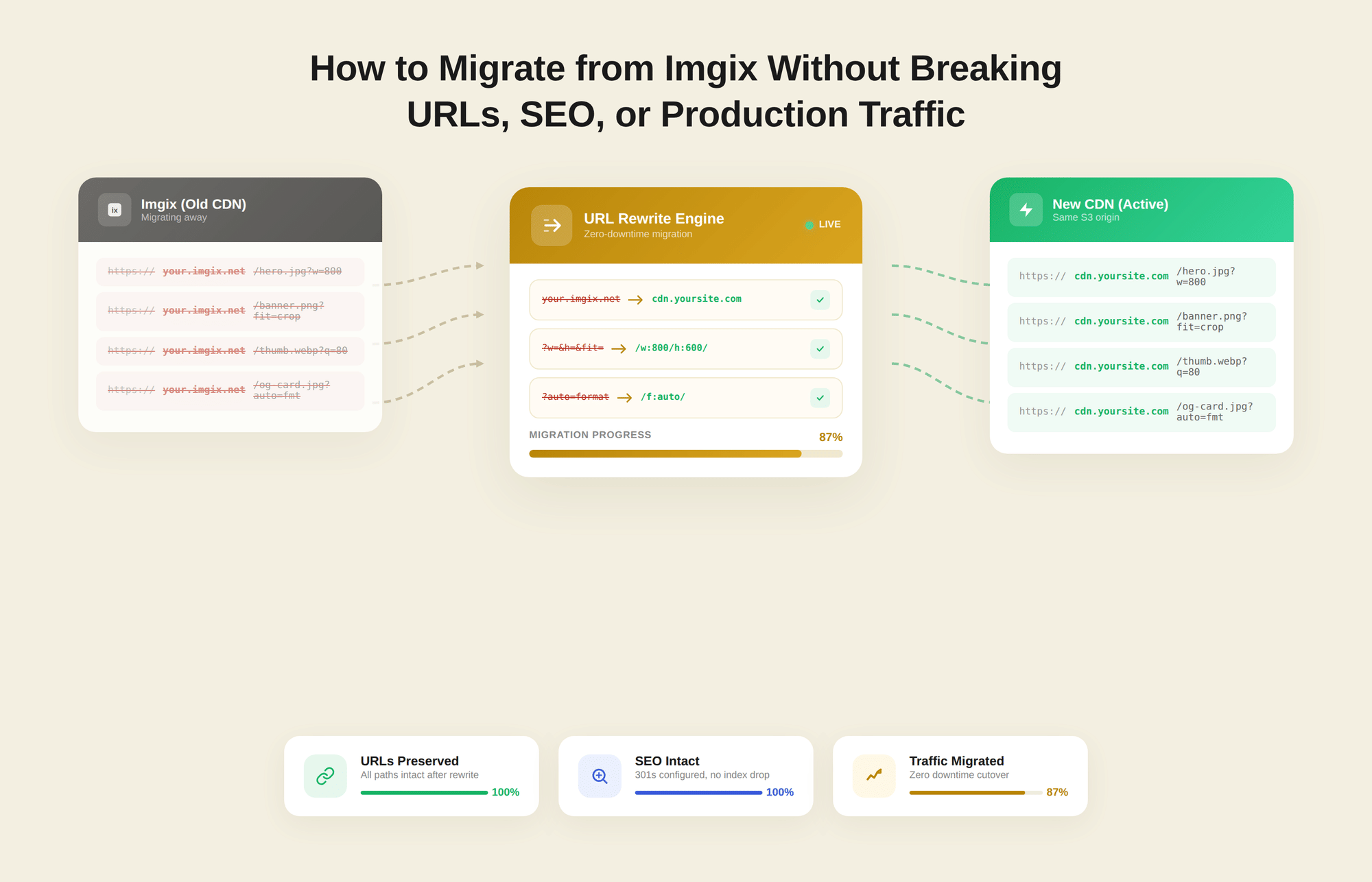
The concern engineers raise most often when evaluating an image CDN switch is predictable: what happens to the URLs?
Imgix hostnames get embedded in templates, hardcoded into CMS records, referenced in markdown files, and buried in React components. A broken image URL does not throw a visible error.
It produces a silent 404 that degrades your Largest Contentful Paint (LCP) score, stalls page load, and can drop images from Google Image Search results without a single monitoring alert firing.
That fear is valid. It is also based on an assumption that does not hold for this specific migration. Switching to Gumlet does not require a structural URL change. Gumlet occupies the same architectural position as Imgix: it sits between your origin storage and your users, fetches images from your existing S3, GCS, or web proxy origin, applies on-the-fly transformations through URL query parameters, and serves results through its CDN.
The transformation convention is identical. Most parameters map directly. For most stacks, the migration is a hostname swap plus an afternoon of careful validation.
Images represent the largest single contributor to page weight across both desktop and mobile, according to the HTTP Archive Web Almanac, making your image CDN a direct input into Core Web Vitals scores and, by extension, search rankings. A migration that introduces even a brief window of broken image delivery can move LCP in the wrong direction. The method in this guide is designed to keep that window at zero.
To be specific about scope: this migration does not require re-uploading or moving image files, changing your URL structure from query-string to path-based, rewriting how your application constructs image URLs beyond updating the hostname, or any production downtime if you follow the staged CNAME cutover method described in this article.
Key Takeaways
- Migrating from Imgix to Gumlet does not require re-uploading files, restructuring URLs, or rewriting your transformation logic.
- Gumlet uses the same query-string-based parameter convention as Imgix, and most parameters map directly with identical names.
- The migration is a hostname swap plus a parameter audit, staged safely through a CNAME cutover on a non-production subdomain first.
- Unsupported parameters are discarded gracefully. Images are still served.
- Done carefully, the full process takes one to two days of engineering time for most stacks.
How Imgix URLs are Structured
Understanding the anatomy of an Imgix URL is not introductory material here. It is the reference frame you need to verify transformation parity during staging, and it is the structure your Gumlet URLs will mirror almost exactly.
A standard Imgix URL looks like this:
https://your-source.imgix.net/path/to/image.jpg?w=800&h=600&fit=crop&fm=webp&q=80
The subdomain (your-source.imgix.net) is the only component that changes during the migration. The image path and every query string parameter remain the same. A post-migration Gumlet URL for the same image looks like this:
https://your-source.gumlet.io/path/to/image.jpg?w=800&h=600&fit=crop&format=webp&q=80
The only differences are the hostname and one parameter name (format instead of fm, though Gumlet accepts both). This is what separates a Gumlet migration from switching to a platform that uses path-based transformation syntax, where w=800&h=600&fit=crop needs to be rewritten as something like /c_crop,w_800,h_600/ embedded inside the URL path.
A path-based migration requires full URL restructuring, codebase refactoring, and carries meaningful SEO implications for any image URLs that have been indexed. With Gumlet, you change the hostname. That distinction determines whether this is one- to two-day engineering work or a multi-week refactoring project.
Imgix Parameter Mapping to Gumlet
Before touching DNS or your codebase, work through the table below to compare it with your actual parameter usage. Pull a representative sample of live Imgix URLs from your CDN logs or analytics, extract every unique parameter you are using, and cross-reference each one here.
This audit is the foundation of a clean migration, and it is the step most engineers underestimate.
| Imgix Parameter | Gumlet Equivalent | Notes |
|---|---|---|
| w | w | Identical |
| h | h | Identical |
| fit | fit | Identical. *Disclaimer: Verify value range during staging.* |
| crop | crop | Identical. Includes entropy, faces, edges, center. |
| fm | format | Both fm and format are accepted by Gumlet. |
| q | q | Identical. |
| dpr | dpr | Identical. |
| ar | ar | Identical. |
| rect | rect | Identical. |
| blur | blur | Identical. *Disclaimer: Verify value range during staging.* |
| sharp | sharp | Identical. |
| pad | pad | Identical. |
| trim | trim | Identical. |
| compress | compress | Identical. |
| enhance | enhance | Identical. |
| sat | sat | Identical. |
| bri | bri | Identical. |
| con | con | Identical. |
| gam | gam | Identical. |
| hue | hue | Identical. |
| invert | invert | Identical. |
| cs | cs | Identical. |
| chromasub | chromasub | Identical. |
| page | page | Identical. |
| txt | txt | Identical. |
| txt-align | txt-align | Identical. |
| txt-color | txt-color | Identical. |
| txt-font | txt-font | Identical. |
| txt-size | txt-size | Identical. |
| txt-pad | txt-pad | Identical. |
| txt-lead | txt-lead | Identical. |
When an unsupported parameter is passed to Gumlet, it is silently discarded. The image is still served with all supported transformations applied. Nothing breaks.
That said, if an unsupported parameter is doing meaningful work in your pipeline, such as generating a visual overlay or handling a specific color-extraction operation, you need to identify it before cutover, not after.
Gumlet adds parameters on request. If you are relying on a parameter not on this list, contact the team at hello@gumlet.com before committing to a migration date.
Your parameters are confirmed. Your origin is already compatible. The next step is to create your Gumlet source and point it at the same storage bucket that Imgix is using today.
Sign up for Gumlet and create your first image source
No files to move, no URL structure to change.
Step-by-Step Migration Walkthrough
The steps below are in execution order. Each one is designed to surface problems before they reach production traffic, which is the entire point of a staged migration. Do not skip ahead.
Step 1: Complete the Parameter Audit
Pull your Imgix request logs from the past 30 days and extract every unique parameter combination you are actively sending. A quick approach is to use grep (Global Regular Expression Print) on your access logs to find Imgix hostnames and parse the query strings.
Cross-reference every parameter against the table above. Note any parameters outside the supported set, and decide on each: remove it, find a Gumlet-native equivalent, or contact Gumlet support before proceeding. Keep the representative URL set from this audit. You will use it for staging validation in Step 3.
Step 2: Create a Gumlet Source
In the Gumlet dashboard, navigate to Sources under Images, click "Create New Source," select Imgix as the source type, and point it at the same origin Imgix is currently using. Your image files do not move.
If your origin is an S3 bucket, provide the bucket name and region. If Imgix is pulling from a web server or public URL, use Gumlet's web proxy source type with the same base URL. Gumlet will assign a delivery hostname in the format your-source-name.gumlet.io.
If your application uses signed URLs, configure Gumlet's signed URL feature at the source level in the dashboard security settings before moving to staging validation. Do not cut over signed URL flows without testing them independently.
Step 3: Set up a Staging CNAME and Validate Transformation Parity
Create a non-production subdomain, such as images-staging.yourdomain.com, and point it at your Gumlet delivery hostname as a CNAME (Canonical Name) with a TTL (Time to Live) of 300 seconds.
Take your representative URL set from the audit, substitute the hostname, and compare outputs directly. The fm to format substitution is the only parameter name change most stacks encounter:
Original Imgix URL:
https://your-source.imgix.net/hero/banner.jpg?w=1200&h=630&fit=crop&fm=webp&q=80
Gumlet staging URL:
https://images-staging.yourdomain.com/hero/banner.jpg?w=1200&h=630&fit=crop&format=webp&q=80
Pay particular attention to fit=crop combined with entropy or faces-based cropping values, format auto-detection behavior, and DPR handling. These are the most common points of divergence between image CDN implementations.
Run a Google PageSpeed Insights test on your most image-heavy page using staging URLs substituted into a local or preview build, and record the LCP score as your pre-migration baseline.
Establish Your Baseline Before You Cut Over
Gumlet's free Website Image Analyzer runs the same Lighthouse engine as PageSpeed Insights but produces an image-specific audit: format compliance, compression levels, sizing against viewport, lazy load coverage, and alt tag presence, all in one report.
Run it against your current Imgix-served pages now, and run it again post-cutover to confirm your optimization gains. It takes 30 seconds and requires no account.
Step 4: Execute the DNS Cutover
You have two options depending on your stack. If your application constructs image URLs from an environment variable or config value, update it to your Gumlet delivery hostname and deploy. This is the cleanest path and requires no DNS change on your main domain.
If image URLs are hardcoded in templates or stored as static strings in a CMS, you need to update the CNAME record for your production image subdomain. Lower the TTL to 300 seconds at least one hour before your cutover window, update the CNAME target to your Gumlet delivery hostname, confirm propagation, and restore the TTL to 3600 seconds once the migration is stable.
Schedule the cutover during your lowest-traffic window, typically overnight or early morning in your primary user timezone.
Step 5: Warm the Cache and Monitor for 24 Hours
Immediately after cutover, run a warming pass on your critical image paths at the viewport widths and DPR combinations most common in your analytics. Hit your top 10 to 20 image variants with curl(Client URL) and confirm 200 responses with decreasing response times on repeated requests.
Then monitor: image 4xx error rate, LCP on key pages against your baseline, CDN cache hit rate in the Gumlet dashboard, and format distribution confirming WebP and AVIF are serving to modern browser clients. Keep your Imgix source active for at least 72 hours before deprecating it. Rollback, if ever needed, is a single CNAME revert or environment variable change.
Keeping Existing Imgix URLs Intact During the Transition
The walkthrough above covers the standard case, where you control your image URLs and can update them through a config change or CNAME update. Some URLs have escaped that boundary. They are embedded in user-generated content stored in a database, referenced in email campaigns that have already been sent, linked from external sites, or indexed in Google Image Search.
For these, you need the old URL pattern to keep resolving correctly without manually updating every reference.
The most broadly applicable solution is a Cloudflare Worker, which gives you edge-level interception of image requests with no changes to your origin infrastructure. The following Worker rewrites the hostname and handles the fm to format parameter remapping in a single function:
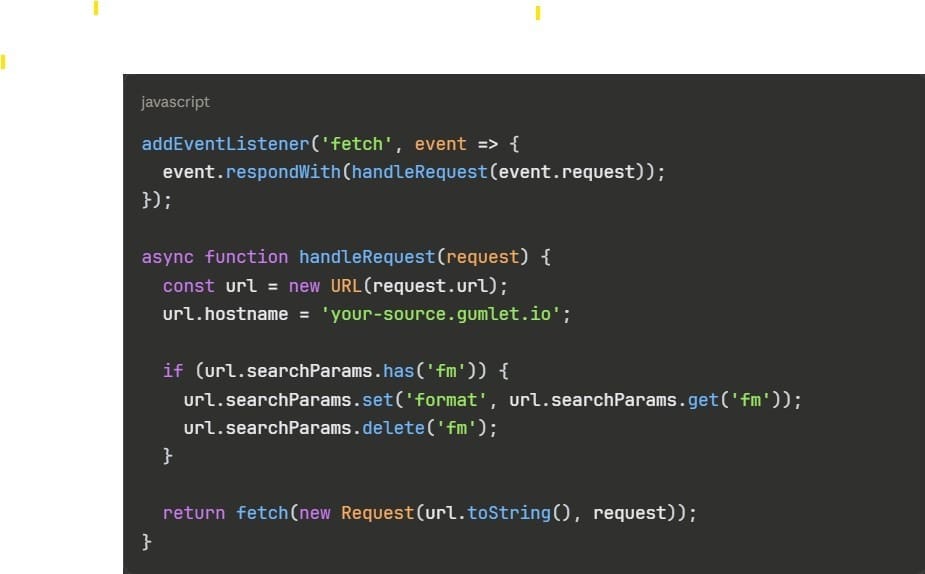
Deploy this Worker on the route matching your image subdomain, and every request hitting the old URL pattern is transparently proxied through Gumlet with no change required to the URL itself. If you are running Nginx and your images are served through a custom subdomain you control, a proxy_pass rule achieves the same result at the infrastructure level.
On SEO: image file URLs are not indexed by Google the same way HTML page URLs are. Changing your image CDN hostname does not create crawl errors on your indexed pages. If your images appear in Google Image Search, the source hostname in those results updates over a normal recrawl cycle of one to four weeks.
Update your image sitemap after cutover, then resubmit it in Google Search Console to accelerate the recrawl. That is the only SEO action required post-migration.
Why Migrating from Cloudinary is Structurally Harder Compared to Gumlet
Teams leaving Imgix often evaluate Gumlet and Cloudinary simultaneously. Both are capable image delivery platforms, but from a migration engineering standpoint, they are not equivalent destinations. The structural difference in how each platform handles transformations has a direct impact on how much engineering work the migration requires, how much SEO risk it carries, and how realistic a zero-downtime cutover is.
Cloudinary uses a path-based transformation syntax. Transformations are embedded directly inside the URL path, not passed as query string arguments. A standard Cloudinary delivery URL looks like this:
https://res.cloudinary.com/your-cloud/image/upload/c_crop,w_800,h_600,f_auto,q_80/products/shoe.jpg
Compare that with the equivalent Imgix URL:
https://your-source.imgix.net/products/shoe.jpg?w=800&h=600&fit=crop&fm=auto&q=80
Because transformations in Cloudinary are structural path components, you cannot do a hostname swap. Every URL in your codebase, CMS, and any external links referencing your images needs to be rewritten from query-string format to Cloudinary's path-segment format.
For applications that construct image URLs programmatically, this means refactoring the transformation-building logic. For a CMS where image URLs are stored as static strings, it means a database migration touching every image reference. For external links and user-generated content, it means either those URLs break or you maintain a permanent translation proxy layer.
The SEO exposure is also wider.
With Gumlet, the URL change is limited to the hostname. The path and query string remain identical, keeping the migration surface area minimal. With Cloudinary, the entire URL structure changes for every transformed image. This is what makes Gumlet the best Imgix alternative.
Cloudinary is a mature platform with genuine strengths in DAM workflows, AI-driven transformations, and multi-channel publishing, and for organizations that genuinely need those capabilities, the migration complexity is a justified one-time cost.
For teams whose primary goal is a reliable image delivery layer with a clean exit from Imgix and a zero-downtime cutover, the query-string compatibility between Imgix and Gumlet is the deciding factor.
Zero-Downtime Production Migration Checklist
Run through this checklist with the engineer executing the migration and the one on standby for rollback before the cutover window opens. Every item should be confirmed before moving to the next.
1. Pre-migration
- Parameter audit complete: All critical parameters confirmed as supported; decisions made for any unsupported ones.
- Gumlet source created: Origin fetch verified with a live 200 response through the Gumlet delivery hostname.
- Staging CNAME live: DNS propagation confirmed with dig or a DNS checker tool.
- Transformation parity verified: Top 20 production URL patterns tested through staging, output confirmed equivalent to Imgix.
- LCP baseline recorded: Google PageSpeed Insights test run on key pages using staging URLs.
- Signed URL configuration tested independently: If applicable, verified on staging source before production cutover.
- Rollback procedure documented: Original CNAME value or environment variable recorded and accessible.
2. Cutover Window
8. TTL lowered to 300 seconds: Done at least one hour before the cutover window opens.
9. Cutover window confirmed: Scheduled during the lowest-traffic period in your primary user timezone.
10. CNAME or environment variable updated: Deployment confirmed live and resolving to Gumlet.
11. Cache warming executed: Critical image paths hit at key viewport widths, 200 responses confirmed.
3. Post-Cutover Monitoring (24 hours)
12. Image 4xx error rate stable: Consistent with pre-migration baseline.
13. LCP post-cutover recorded: Within the acceptable range of the pre-migration baseline.
14. Format distribution confirmed: WebP and AVIF serving to modern browser clients in Gumlet analytics.
15. DNS TTL restored: Returned to 3600 seconds after 24 hours of clean data.
16. Imgix source kept active for 72 hours: Deprecated only after confirming no production traffic is still routing through it.
Before you execute the cutover, keep the official Imgix to Gumlet migration docs open for parameter compatibility reference and source configuration details. If you encounter a scenario not covered in this guide, Gumlet's support team is reachable at hello@gumlet.com.
Sign up for Gumlet and have your staging domain live for testing within the hour. Your origin stays exactly where it is.
Your Imgix Migration Is One Hostname Swap Away
For most stacks, an Imgix-to-Gumlet migration is one to two days of engineering work: an audit, a staging validation, and a hostname change.
The structural compatibility between the two platforms, specifically the shared query-string-based transformation convention and near-complete parameter overlap, keeps the migration surface area narrow and the staged cutover clean. Follow the steps in this guide in order, run the checklist on cutover day, and this migration carries no more production risk than a routine DNS update.
Frequently Asked Questions
1. Can I migrate from Imgix to Gumlet without changing my image URLs?
In most cases, yes. If your images are served from a custom subdomain you control, such as images.yourdomain.com, that points to Imgix via CNAME, updating that CNAME to your Gumlet delivery hostname leaves every image URL identical from the outside. The change is entirely at the DNS layer. If images are served directly from an imgix.net subdomain without a custom domain in front of it, you will need to update the hostname in your application code or CMS, since you do not control the imgix.net DNS.
2. Does Gumlet support all Imgix URL parameters?
Gumlet supports the large majority of Imgix transformation parameters, including all of the most commonly used ones. Some advanced parameters around face detection, palette extraction, and certain watermarking operations are not yet supported. When an unsupported parameter is passed, it is silently discarded and the image is still served. Gumlet adds parameters on request, so contact the team before migration if you are relying on a parameter not in the compatibility table.
3. Will my Google-indexed images break if I switch from Imgix to Gumlet?
No. Image file URLs are not indexed by Google the same way HTML page URLs are, so a CDN hostname change does not create crawl errors on indexed pages. If your images appear in Google Image Search, the source hostname in those results updates over a normal recrawl cycle of one to four weeks. Update your image sitemap after cutover, then resubmit it through Google Search Console to accelerate the process.
4. How long does an Imgix to Gumlet migration take?
For a typical production implementation, the full process, including parameter audit, staging validation, and production cutover, takes one to two days of engineering time. Teams with very large CMS datasets or complex signed URL configurations may take longer using the gradual transition approach with a proxy layer. The cutover itself, once staging is validated, takes under an hour.
5. What happens to Imgix parameters that For a typical production implementation, the full process, including parameter audit, staging validation, and production cutover, takes one to two days of engineering time. does not support?
They are silently discarded. Gumlet does not return an error when it encounters an unsupported parameter. The image is served with all supported parameters applied and the unsupported ones ignored. The implication for migration is straightforward: complete your parameter audit before cutover so you know in advance which parameters, if any, will be discarded, and decide whether the result is acceptable or whether you need to request support for them first.
6. Can I run Imgix and Gumlet simultaneously during the migration?
Yes, and this is the recommended approach. The staged CNAME method in this guide is designed for exactly this. Your staging subdomain points at Gumlet while production continues pointing at Imgix. Validate parity on staging, cut over production when confident, and keep your Imgix source active for at least 72 hours after cutover in case you need to roll back quickly.