A US-based course creator launches a $497 leadership training program. The launch goes well. Enrollments come in from the US, and the platform looks healthy.
Then, six weeks later, their analytics dashboard shows 1,400 plays from countries where the course was never listed, marketed, or priced. The embed code had no restrictions. Anyone, on any continent, with the link could watch the entire program for free.
This is not an unusual story. It's one of the most predictable ways online educators, membership site operators, and SaaS teams lose value from video content they spent real money producing.
The fix isn't complicated, and it doesn't require a developer. Two controls, configured from a dashboard, change the entire picture: country-level geo-blocking and IP address restrictions. Together, they define precisely who can access your video content and from where.
This article explains how both mechanisms work, when to use each, how to combine them for stronger protection, and how to set them up on Gumlet, a video infrastructure platform built for businesses that take content access control seriously.
Key Takeaways
- Geo-blocking restricts video playback based on the viewer's country, enforced at the CDN layer using a GeoIP database before any video segment is delivered.
- IP restrictions let you allowlist specific networks (corporate offices, partner organizations) or blocklist known bad actors at the IP address or CIDR range level.
- Geo-blocking alone does not stop VPN users. Pairing it with signed URLs closes that gap for licensing-critical or compliance-critical content.
- Both controls are configurable from Gumlet's dashboard without writing any code.
- U.S.-based platforms subject to OFAC regulations need geo-blocking as the operational enforcement mechanism for sanctions compliance at the video delivery layer.
How to Restrict Video Access by Country and IP Address
Restricting video access by geography or IP address requires three decisions and one platform capable of executing them. Here is the general process, regardless of which video hosting platform you use.
Step 1: Choose Your Restriction Type
Country-level geo-blocking and IP-based restrictions solve different problems and are configured separately. Geo-blocking controls which countries can access your content. IP restrictions control which specific networks or devices can access it. Most use cases need both.
Step 2: Decide on Allowlist or Blocklist Logic
For geo-blocking: an allowlist specifies which countries are permitted and blocks everywhere else. A blocklist specifies which countries are blocked and allowed everywhere else. For IP restrictions: an allowlist locks access to known, trusted networks. A blocklist targets identified bad actors.
Step 3: Apply Rules at the Right Level
Most video hosting platforms like Gumlet let you apply access rules globally across your entire video library, or per individual video. Global rules are the right default for teams with a consistent access policy. Per-video overrides handle exceptions, a publicly accessible trailer on an otherwise gated library, for example.
Step 4: Verify Enforcement Architecture
The restriction needs to run at the CDN edge, before any video data is transmitted. If your platform checks location after a request reaches the origin server, blocked viewers still create origin load and your content is more exposed. Ask your platform explicitly where geo-enforcement runs.
Step 5: Test Before Going Live
Connect through a VPN set to a blocked country and confirm a blocked response. Then test from a permitted location to confirm clean playback with no added latency.
The rest of this article covers how each mechanism works technically, what it can and cannot protect against, and how to configure both controls specifically on Gumlet.
What is Video Geo-Blocking?
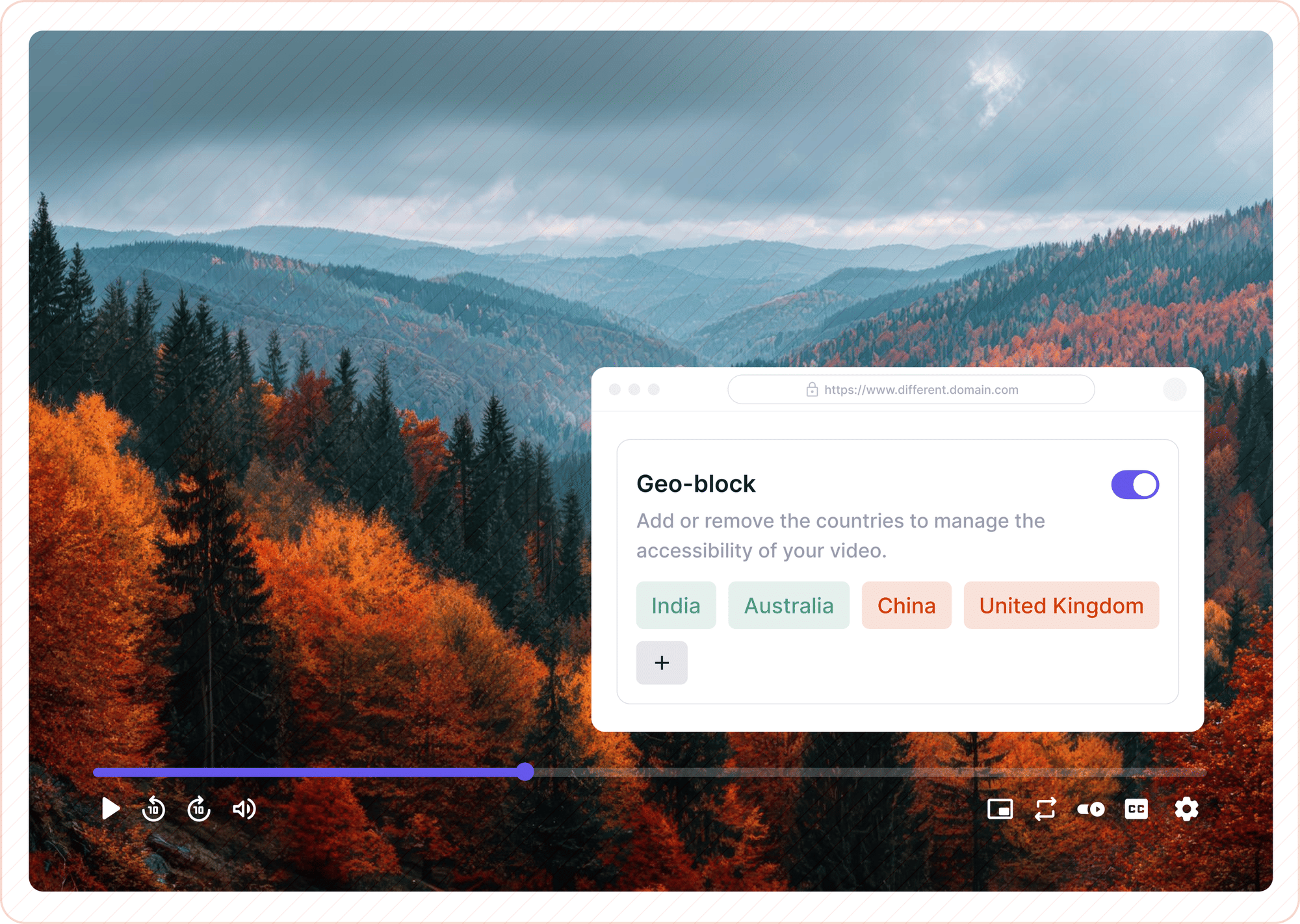
Geo-blocking is a mechanism that restricts video playback based on the viewer's geographic location, determined by mapping their IP address to a country or region using a GeoIP database.
The restriction executes at the CDN layer, before any video segment is delivered, which means a blocked viewer never receives content. They receive an access error response instead, and the video never leaves the server.
The technology has existed in enterprise infrastructure for years. What has changed is accessibility. Configuring country-level video restrictions once required either a CDN engineering team or a costly enterprise contract.
Today, it's a dashboard setting on modern video hosting platforms, including Gumlet, and takes minutes to configure.
Why Course Creators and Membership Sites Can't Afford to Skip This
Content access control isn't a topic most course creators think about until they notice something wrong. By that point, the damage has usually been accumulating for weeks.
There are three distinct business reasons that make geographic video restriction a core operational requirement, not an optional upgrade.
Regional Pricing Enforcement
Most professional course creators price their programs differently across markets. A $497 productivity course targeting U.S. professionals might be listed at $49 for markets in Southeast Asia or Latin America.
Without geo-restriction enforcing those price boundaries, buyers or third parties in one region can access, share, or resell content licensed for another. The pricing model collapses without the enforcement layer behind it.
Territorial Licensing Compliance
Creators who have sold exclusive distribution rights for their content in specific markets are contractually required to enforce geographic limits on access.
Distributing outside a licensed territory isn't just a security gap, it's a breach of contract, and a lawsuit waiting to happen for creators who've signed distribution agreements.
Regulatory Obligations
U.S.-based platforms and businesses operating under OFAC (Office of Foreign Assets Control) regulations are legally required to block access from sanctioned countries. Geo-blocking is the operational tool that makes that legal requirement enforceable at the video delivery level.
For creators or platforms in any of these situations, geographic access control is the enforcement mechanism that makes the business model viable.
How Geo-Blocking Actually Works
The mechanics behind country-level video restriction are easier to understand than most documentation makes them sound, and the architecture choices your platform makes here matter more than any marketing copy suggests.
When a viewer requests a video, their IP address is checked against a geolocation database that maps IP ranges to countries and regions. MaxMind GeoLite2 is the industry-standard database that most CDNs and video platforms use for this lookup.
The check happens at the CDN edge node closest to the viewer, before any content moves. If the viewer's IP maps to a permitted country, playback proceeds. If it maps to a blocked country, the CDN returns an error and the origin server never receives the request.
CDN-Level vs. Origin-Level Enforcement
Where the geo-check runs is a detail that separates well-designed platforms from those cutting corners on infrastructure.
CDN-level enforcement runs the check at the network edge, close to the viewer's physical location. A blocked request never reaches the origin. This approach is faster, scales to any request volume, and adds under 5 milliseconds to a denial response. Gumlet runs geo-blocking at the CDN edge through Fastly, which is why the restriction adds no measurable latency for viewers in permitted regions. The platform's multi CDN delivery infrastructure handles the enforcement before the viewer even registers a playback attempt.
Origin-level enforcement allows the request to travel all the way to the hosting server before the location is checked. This is slower, exposes origin infrastructure to unnecessary load, and introduces a latency gap between request and denial that CDN-level enforcement eliminates entirely.
For any platform serving video at scale, CDN-level enforcement is the only architecture that holds up.
Two other geo-blocking methods exist and are worth understanding. GPS-based blocking, used in some mobile and smart TV apps, reads device location directly and provides city-level precision, but requires the viewer to grant location permissions and only functions inside native app environments.
DNS-based restriction operates at the name-resolution stage, controlling which IP addresses a video domain resolves to based on the requester's location. For web-based video delivery, neither approach replaces CDN-edge IP blocking.
GPS requires client-side permissions that browser-embedded video players cannot access. DNS-based controls are easily bypassed by Smart DNS services and don't enforce at the content layer.
CDN-edge IP-to-GeoIP enforcement works across all browsers and devices, requires no client permissions, and enforces before content moves, which is why it is the standard implementation for any platform delivering video over the web.
Allowlist vs. Blocklist: Choosing the Right Configuration
There are two ways to structure a geographic restriction rule, and the right choice depends entirely on the specific use case.
An allowlist specifies the countries where playback is permitted and blocks all others by default. This is the right approach when content has defined licensed territories or a specific target market.
A U.S.-only corporate training program, a North America-only subscription library, or an EU-licensed media series all benefit from an allowlist model. It forces a deliberate decision about which regions are authorized, which is cleaner to audit than a blocklist that must constantly grow.
A blocklist specifies which countries to block and allows all others by default. This model fits scenarios involving targeted risk management, blocking regions identified as high-abuse sources, enforcing OFAC-mandated country restrictions, or excluding jurisdictions where the platform has no legal basis to operate.
For most U.S.-based course creators and membership platforms, the allowlist is the safer default. It removes ambiguity about what's permitted.
IP Address Restrictions: A Second Layer of Control
Geo-blocking works at the country level. IP restrictions go further by operating at the level of specific addresses or CIDR ranges (network blocks). They answer a different question entirely: not "which countries can access this?" but "which specific networks or devices are authorized, or explicitly prohibited?"
Both controls can and should be active simultaneously for content that warrants it.
When to Use IP Allowlisting
Allowlisting specific IP ranges is the right choice when the intended audience operates on a known, defined network rather than a broad geographic region.
The most common US use case is corporate training and compliance programs. A company rolling out mandatory compliance training for 500 employees might allowlist only the IP ranges associated with its offices and corporate VPN.
That ensures the content is only accessible from company-managed infrastructure, regardless of which country an employee is working from that day.
For teams that need both network-level restrictions and audience-gated access in one setup, private video hosting combines both controls under a single access management layer.
Other scenarios where IP allowlisting adds value include pre-launch content previews restricted to a partner organization's known IP block, internal QA reviews where only the product team should see a video before it goes public, and access management for content sold through enterprise licensing agreements where the buyer's network is documented at purchase.
When to Block Specific IP Addresses
IP blocklisting is a reactive control suited for known, identified threats rather than broad prevention.
Typical triggers include analytics flagging repeated unauthorized playback attempts from the same IP range, a scraping tool or content redistribution bot identified at a specific address, or a terminated account holder who retains playback access that hasn't fully propagated through the system.
The critical framing: IP blocklisting addresses problems after they have been identified. Geo-blocking is proactive. For a complete access control posture, the two work in combination, not in isolation from each other.
What Geo-Blocking Cannot Do on its Own
Geo-blocking is a powerful and effective first layer of access control, but it has one well-documented limitation that every platform operator should understand before treating it as a complete solution.
VPNs allow viewers to route their traffic through servers in permitted countries, bypassing IP-based geo-checks in the process. A viewer blocked from a U.S.-only video who connects through a VPN with a U.S. exit node will pass the allowlist without any friction. Consumer VPN services are widely available, easy to use, and this limitation is not going away.
Geo-blocking reliably stops casual, unsophisticated unauthorized access. It does not stop a viewer who has decided to get around it.
For content where geographic compliance is a legal or licensing requirement, not just a best practice, geo-blocking should be paired with signed URLs.
Signed URLs bind each playback session to a cryptographic token with a set expiry window. Even if a viewer manages to obtain a playback link through a permitted-region VPN, that link becomes useless once the token window closes.
The combination of geo-blocking and signed URLs raises the effort required to bypass geographic restrictions to a level that is impractical for the vast majority of unauthorized access scenarios.
For a broader picture of how geo-blocking, signed URLs, domain locks, and DRM work as a layered security stack, the complete guide to secure video hosting covers the full architecture in detail.
How to Set Up Geo-Blocking and IP Restrictions on Gumlet
Gumlet is a video infrastructure platform that lets businesses host, protect, and deliver video at scale, including dashboard-configurable country-level geo-blocking, IP restrictions, and Gumlet's video protection features such as signed URLs and DRM.
No code is required to configure geographic or IP-based access controls. Rules can be set globally at the workspace level (applying to the entire video library) or overridden for individual videos, depending on how granular the requirements are.
- Log in to the Gumlet dashboard and navigate to the specific video you want to restrict, or go to Workspace Settings to apply rules across your entire video library in one step.
- Open the Security or Access Control panel for the selected video or workspace.
- Enable geographic restrictions and choose between allowlist mode (specify permitted countries, block all others) or blocklist mode (specify blocked countries, allow all others).
- Select the countries for your rule. For a U.S.-only course library, set the United States as the permitted country in allowlist mode. For OFAC compliance, select all sanctioned countries for blocklisting.
- Save the configuration. Requests from blocked regions will return an access error immediately. No video data is transmitted to blocked viewers.
- For IP-level restrictions: locate the IP access control setting within the same security panel. Enter the specific IP addresses or CIDR ranges to allow or block.
- Test the setup by connecting through a VPN set to a blocked country and attempting playback. Confirm a blocked response. Then test from a permitted location to verify that permitted viewers experience no disruption.
For teams managing large libraries, workspace-level settings apply a single rule to all videos, which is far more practical than configuring each video individually.
GrowthSchool, an e-learning platform serving 6.5 million+ learners and hosting over 50 TB of video content on Gumlet, secured its entire course library with DRM and access controls after migrating from Vimeo.
After the switch, they saw a 52% increase in video completion rates and 150% growth in video consumption, with piracy protection active from day one of the migration.
Geo-Blocking and Compliance: What U.S. Platforms Need to Know
Access controls and legal compliance are related, but they are not the same thing. Getting this distinction right matters before you configure anything.
Geo-blocking is not a GDPR compliance tool. The EU's General Data Protection Regulation governs how personal data is collected, processed, and stored. Geo-blocking prevents access to content but does not, by itself, control what data is collected during a blocked request.
U.S.-based platforms that block EU viewers should still have a privacy posture that accounts for GDPR's extraterritorial reach, including what happens when a request hits the CDN from an EU IP address, even if the content is never delivered.
For most U.S.-based platforms, the more pressing compliance driver is OFAC. The Office of Foreign Assets Control requires U.S. persons and entities to block access from sanctioned countries, currently including Iran, North Korea, Cuba, Syria, and certain regions of Ukraine (verify the current OFAC country list at the time of publishing, as the list is subject to regulatory updates).
This is not a discretionary best practice. It is a legal obligation with civil and criminal penalties for non-compliance, and geo-blocking is the operational mechanism that enables enforcement at the video-delivery level.
One practical note: when implementing country-level blocks for any compliance purpose, document the configuration and maintain access logs. Gumlet includes access logging functionality that can serve as part of that audit trail.
The Three-Layer Video Access Stack
Geo-blocking, IP restrictions, and signed URLs are three distinct controls, each addressing a different layer of the access problem. Used in combination, they form a complete video access posture.
Layer 1 - Country (Geo-blocking): Maps the viewer's IP address to a country using a GeoIP database and enforces the decision at the CDN edge before any content is delivered. Handles broad regional audience control. Stops unsophisticated unauthorized access at scale.
Layer 2 - Network (IP restrictions): Controls access based on specific IP addresses or CIDR ranges, independent of geographic location. Used to allowlist known networks, such as corporate offices, partner organizations, internal QA environments, or blocklist identified bad actors. Operates as a precise overlay on top of the country-level rules.
Layer 3 - Session (Signed URLs): Binds each individual playback session to a time-limited cryptographic token. The only layer that addresses VPN bypass. A signed URL becomes invalid once its token window closes, regardless of where the viewer routes their traffic from.
Each layer closes a gap left by the others. Geo-blocking alone stops casual access. IP restrictions address known network-level threats. Signed URLs close the VPN gap. A complete access control posture for licensing-critical or compliance-critical content deploys all three.
Which Platforms Support Geo-Blocking and IP Restrictions?
Not all video hosting platforms treat geographic access control as a first-class feature. Some reserve it for enterprise pricing tiers. Others require API configuration rather than dashboard settings.
The table below reflects publicly documented platform capabilities as of early 2026. Verify current accuracy against each platform's official documentation before making a platform decision, as features and tier availability change.
| Platform | Country-Level Geo-Blocking | IP Allowlist / Blocklist | CDN-Level Enforcement | Dashboard (No Code) |
|---|---|---|---|---|
| Gumlet | Yes | Yes | Yes (Fastly) | Yes |
| VdoCipher | Yes | Yes | Yes | Yes |
| Sprout Video | Yes | No | Yes | Yes |
| Vimeo | Yes (paid tiers) | No | Yes | Yes |
| Brightcove | Yes | Yes (API required on most tiers) | Yes | Partial |
The key differentiator in the table above is not feature presence but implementation model. Dashboard-native controls without API requirements matter considerably for teams without dedicated engineering resources, which describes the majority of course creators and small- to mid-size content businesses operating in the U.S. today.
Frequently Asked Questions
1. Can I restrict my video to play only in the US without writing any code?
Yes. Gumlet and several other modern video hosting platforms include country-level geo-blocking as a dashboard setting.
Select the United States as your only permitted country in allowlist mode, save the configuration, and the platform enforces the rule at the CDN edge. No API access or code is required.
2. What does a blocked viewer actually experience when they try to play the video?
Their request is stopped at the CDN layer before any video content is delivered. Depending on how the platform is configured, blocked viewers see an access error message or a custom blocked-content page. No video segments are ever transmitted to the blocked viewer's device.
3. Does geo-blocking stop someone from small- toa VPN?
Geo-blocking stops viewers whose IP addresses resolve to blocked countries at the time of the request. A viewer using a consumer VPN with an exit node in a permitted country will bypass a geo-only restriction.
For content where legal or licensing compliance is the driver, pair geo-blocking with signed URLs. Signed URLs bind each playback session to a time-limited cryptographic token that becomes invalid after it expires, regardless of where the viewer routes their traffic from.
4. What is the practical difference between geo-blocking and IP allowlisting?
Geo-blocking operates at the country level by mapping IP addresses to geographic regions using a GeoIP database such as MaxMind GeoLite2. IP allowlisting operates at the level of specific addresses or network ranges.
Use geo-blocking to control a broad regional audience. Use IP allowlisting to restrict access to a specific, known network, such as a corporate office, a partner organization, or an internal QA environment.
5. Will turning on geo-blocking slow down video load times for viewers in permitted countries?
No. CDN-level geo-blocking adds no measurable latency for viewers in permitted regions. The geo-check only affects blocked requests. Permitted viewers receive their video content through the CDN without any additional processing delay.
Bottom Line
Whether the goal is regional pricing integrity, territorial licensing compliance, OFAC adherence, or simply preventing an embed link from working on every continent at once, the controls covered in this article are available today on platforms built for individual creators and growing teams, without a six-figure contract or a dedicated engineering backlog.
Gumlet includes geo-blocking, IP restrictions, signed URLs, and DRM in a single configurable dashboard. Start your free trial and configure your first geographic access rule in minutes.
For a full audit of your current video security stack, the video security checklist is a practical next step.
And if you're thinking beyond access controls toward how creators can protect their video content with DRM and watermarking, that guide covers the next layer of protection.