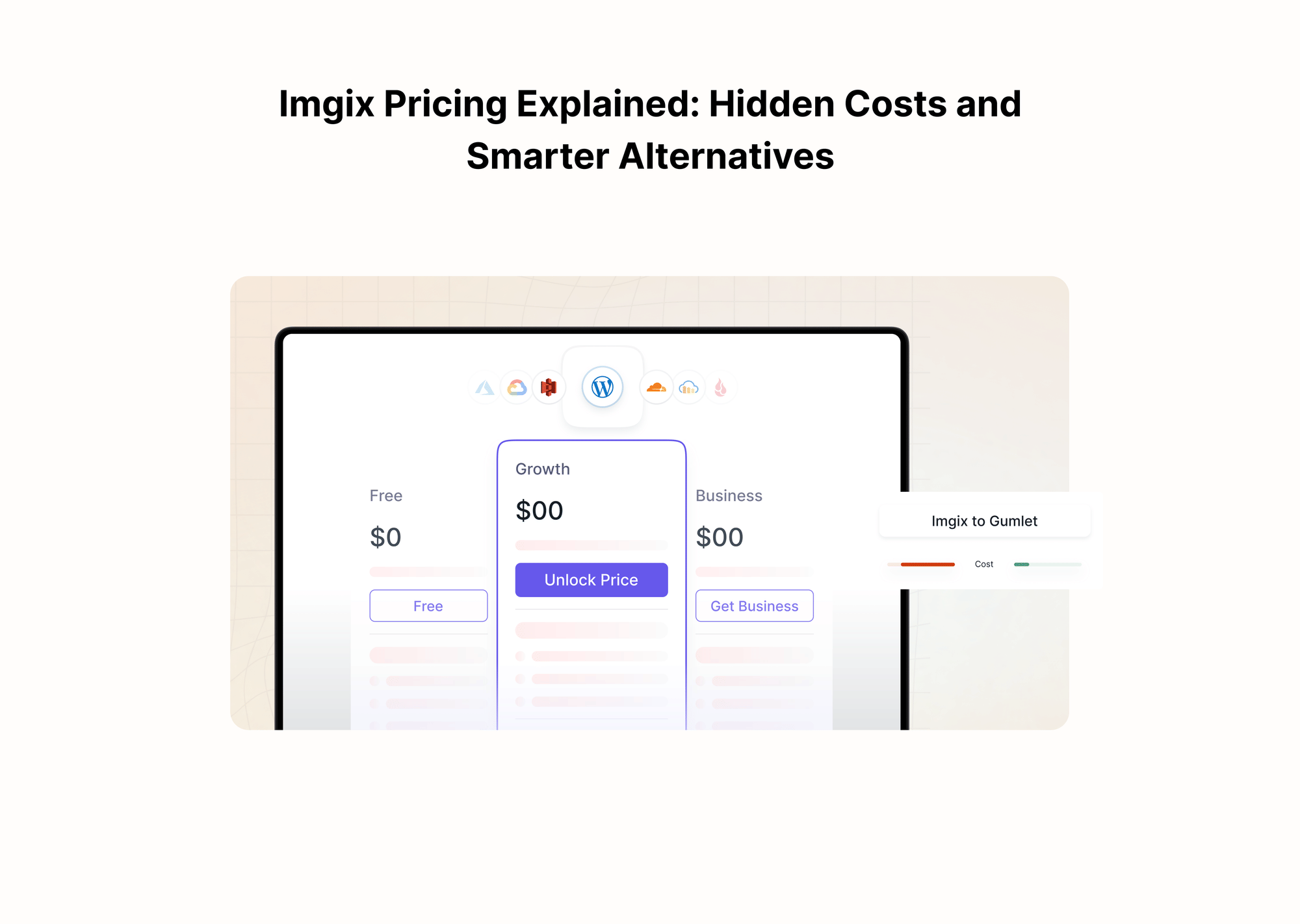
If you are evaluating Imgix for image or video delivery, the pricing page looks straightforward at first: pick a credit bundle, plug it into your stack, and let the CDN handle the rest.
In practice, teams often discover that predicting those credits is the hard part.
Media management, delivery, and transformation all draw from the same prepaid pool, and small estimation errors can compound into overages or wasted capacity.
This matters because visual content is no longer a side concern. Images and video can account for more than half of a typical web page’s weight, and poorly optimized media is a common cause of slow loads and dropped conversions. At the same time, finance leaders expect predictability in cloud spend, especially when infrastructure costs can directly impact margins.
Imgix has also shifted from its older image-based plans to a credit-based model, but many public reviews and pricing summaries no longer accurately reflect this. That gap between what the pricing actually is and how it is described in older content is a major source of confusion. Buyers see legacy screenshots, then look at the current plans, and are left guessing how the real bill will behave as traffic scales.
This guide is for SaaS and product teams, e-commerce and media businesses, and non-technical decision-makers evaluating Imgix pricing or seeking more predictable image CDN alternatives, such as Gumlet.
We will break down the current Imgix pricing model, focusing on how credits are consumed in real workloads. You will see where the hidden cost drivers sit, how to estimate the total cost of ownership once you include cloud storage and engineering time, and in which situations Imgix is a reasonable choice. You will also see how alternatives like Gumlet use simpler, more transparent pricing structures that are easier to budget for at scale.
Whether you are already on Imgix and worried about creeping invoices or comparing Imgix against other image CDN platforms, the goal is to give you a concrete framework. After reading, you should be able to pressure-test an Imgix quote, identify risks early, and decide whether a different pricing model would better serve your business.
Key Takeaways:
- Imgix now sells capacity using a credit-based pricing model. Credits are consumed by media management, media delivery, and image or video transformations as defined in their billing documentation.
- Credits are purchased in bundles with a fixed monthly or annual fee. The effective price per credit usually falls as you commit to higher bundles, but you move to overage pricing if you exceed your bundle.
- Overages are billed at a premium to your standard bundle rate, so underestimating usage results in a higher marginal cost per unit than the headline price suggests.
- Credits expire instead of rolling over. Unused trial credits, monthly self-serve credits, or contract credits reset at the end of their period and cannot be carried forward or refunded.
- The main hidden costs include paying for storage twice, absorbing overage premiums when traffic spikes, and trying to forecast transformation and AI usage, which is often driven by design and experimentation rather than by stable baselines.
- Imgix pricing can be workable for smaller, relatively stable workloads, but it tends to become unpredictable and expensive for high-traffic e-commerce, content-heavy SaaS products, and media sites that run frequent tests.
- Alternatives like Gumlet use a more direct, usage- and bandwidth-driven pricing model for image optimization and delivery, which often results in more predictable, and sometimes lower, total cost of ownership for growth-stage and enterprise workloads.
Quick Primer on Imgix and Where Pricing Bites
Imgix is a media processing and delivery platform built around URL-based image and video transformations.
At its core, it acts as an image optimization API and CDN that sits in front of your origin storage. You point Imgix at a bucket such as S3 or GCS, then control format, size, quality, cropping, overlays, and similar operations through query parameters. More recently, Imgix has expanded into video encoding and AI-powered features such as background removal and generative operations, which are all billed through the same underlying system.
The key pricing shift is that Imgix is moving all customers to a unified credit model. Credits are a measure of capacity that is consumed across three categories: media management, delivery, and transformations. Management covers cache storage and metadata, delivery covers bandwidth and cache reads, and transformations cover image, video, and AI operations. Every billing period, your chosen bundle gives you a fixed pool of credits, which then gets drawn down by all three types of activity.
Most of the older content you find on review sites still describes Imgix in terms of initial image-based plans, where pricing was anchored to the number of original images, promised “infinite transformations,” and included bandwidth.
Imgix has now stated that all current plans will be transitioned to credit-based bundles at renewal, which means those legacy descriptions are effectively obsolete for anyone signing or renewing a contract in 2025 and beyond.
Where buyers feel pain is not the basic concept of credits, but the way real workloads cut across all three buckets. A single product detail page might increase cache storage, drive significant delivery bandwidth on mobile and desktop, and trigger multiple transformations per image for responsive variants and new formats.
When traffic grows or the team experiments with new layouts, those combined effects can push you through your included credits faster than expected. That is why it is essential to understand not just what Imgix is technically, but exactly how your usage pattern translates into credit consumption and, ultimately, into monthly spend.
How Imgix Pricing Works Today (Credit-based Model)
Imgix now prices almost everything through a single credit-based system. Instead of paying separately for storage, CDN bandwidth, and transformations, you commit to a bundle of credits, then every operation consumes a slice of that pool. Understanding how those bundles are structured and what actually burns credits is the key to predicting your bill.
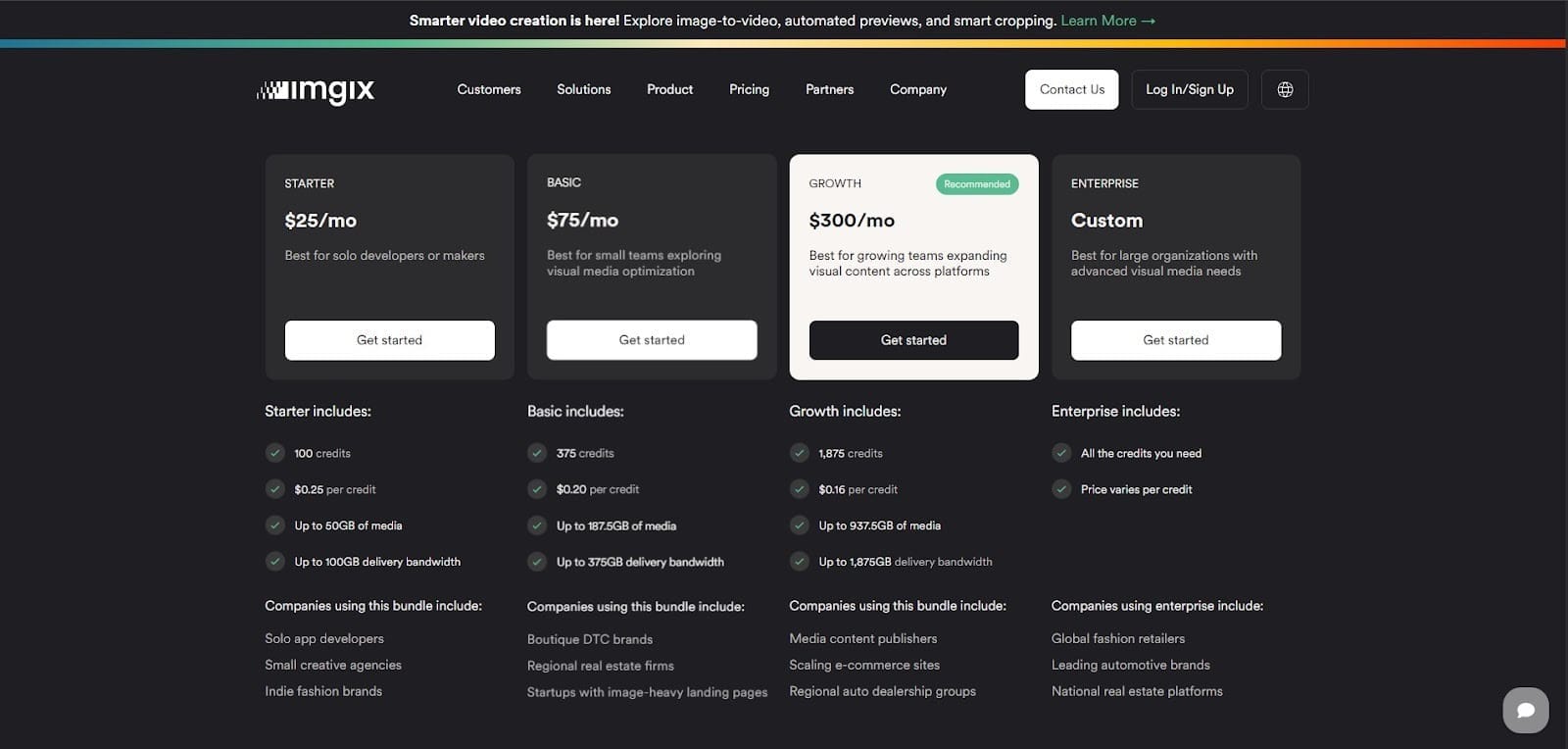
Imgix Credit Bundles in Practice
On the public pricing page, Imgix offers multiple tiers, with each plan providing a defined number of credits per month and access to different parts of the platform. The exact names and numbers can change over time, but the pattern remains consistent: you pay a fixed subscription fee, and in return, you receive an allowance of credits shared across media management, delivery, and transformations.
Two important characteristics of these bundles:
- The effective price per credit usually drops as you move up through larger plans. In other words, if you commit to a higher monthly spend, your average cost per unit of capacity tends to fall.
- Once you exhaust the included credits in your bundle, you do not stop serving traffic. Instead, Imgix starts charging you overage rates for additional credits, priced higher per unit than the credits in your bundle.
From a budgeting perspective, that means you must pick a bundle size that balances two opposing risks:
- If you choose a bundle that is too small, you save on the base subscription but expose yourself to overage pricing whenever traffic, content, or experiments spike.
- If you oversize your bundle, you reduce the chance of overages but risk buying credits you never use, which will eventually expire.
This is very different from a classic “pay as you go” image CDN model that bills linearly for GB delivered and basic transformations. Here, the bundle itself is a financial bet on your future consumption.
What Imgix Credits Actually Pay For
Every credit in Imgix is a common currency. The platform tracks your usage in three buckets, then converts that usage into credits according to internal rules:
1. Management
This covers how Imgix stores and manages your media in its own systems. It includes edge cache storage and associated metadata for your assets. The more unique images or videos that Imgix keeps warm in cache, and the longer they are retained, the more management credits you consume.
2. Delivery
This bucket covers the actual content delivery to end users via the CDN. It is tied to bandwidth and cache reads. High traffic to image-heavy pages, users in multiple regions, and large media formats all drive delivery credit consumption.
3. Transformations
This is where image processing and video processing sit. Resizing, cropping, format conversion, quality adjustments, and similar operations consume transformation credits. Advanced or AI-powered features, such as smart cropping or background removal, typically consume more credits per operation than simple transformations.
What makes this structure tricky is that one piece of content can touch all three categories. For example, a high-resolution product image:
- Increases cache storage at Imgix and therefore uses management credits.
- Generates delivery credits every time users request it around the world.
- Consumes transformation credits when rendered at different sizes or in different formats across devices.
From a pricing standpoint, you are not just asking “how many GB do we deliver” or “how many images do we have”. You are asking how each asset moves through management, delivery, and transformation across the entire lifecycle of your product.
Imgix’s Legacy Image Plans and The Transition to Credits
Older documentation and many third-party pricing pages still describe Imgix as an origin-image-based model. Under that structure, you paid based on the number of original images in your source, with messaging about unlimited transformations and included bandwidth. That model was easier for some teams to reason about because the primary driver was catalog size rather than a combined usage measure.
Imgix has publicly stated that customers on legacy image plans are being transitioned to the credit-based system as they renew. In practice, this means two things:
- If you are still on an image plan today, you should treat the credit model as your future reality, not an optional upgrade you can ignore.
- Much of the public commentary on pricing on review sites is now misleading. It describes how Imgix used to price media delivery, not how new contracts and renewals are billed.
For a buyer coming in fresh, the relevant pricing model is the current credit system. For an existing customer, the question is how your historical usage profile maps onto credits and whether that mapping leads to a stable or volatile bill over time.
Hidden Costs Inside Imgix Pricing
Once you understand the basic credit model, the real question is where the money actually leaks. On paper, Imgix offers a single pool of credits that you can spend on media management, delivery, and transformations. In reality, the way modern sites use images and video means you can easily pay twice for storage, hit expensive overages, lose unused credits, and burn far more transformation capacity than you expected.
The intention of this section is to walk you through the main cost traps so you can sanity check any Imgix quote or existing invoice.
1. Cache Storage and Effectively Paying for Storage Twice
Imgix presents its cache as a way to reduce origin egress and speed up content delivery. In Imgix’s pricing FAQ, “image cache storage and metadata” is explicitly defined asmanagement usage, with credits charged per GB in this bucket. That sounds reasonable until you remember that almost every Imgix customer is already paying a cloud provider for object storage.
In a typical setup, you have:
- Original images and videos are stored in S3, Google Cloud Storage, Azure Blob, or a similar service.
- CDN or origin egress charges when Imgix fetches those originals.
- Imgix cache storage, billed again based on the amount of media Imgix keeps on its own servers.
For a large ecommerce catalog, learning platform, or media archive, the “hot set” in cache can be substantial. You are effectively paying your cloud provider to store and serve the objects, then paying Imgix to store a derivative copy in its cache. From a “total cost of ownership” perspective, this double storage is not always obvious until you map out all the line items.
This double-charging matters once you have a real scale. You are already paying your cloud provider for object storage and egress, and then you add a second bill for Imgix cache storage on top of that. When you are serving terabytes of images each month, even a few extra cents per GB quickly adds up to thousands of dollars a year in costs that deliver no additional value.
2. Overages: When Credits Run Out
Credit bundles are sized assuming you will stay roughly within your expected usage. If your media management, delivery, or transformation usage exceeds the credits in your bundle, Imgix does not stop serving traffic. Instead, you move into overage pricing.
Imgix’s public documentation is clear on two points:
- You buy credits in preset bundles or through a contract. There is no current option to top up credits “a la carte” without being on a subscription.
- If you run out of credits in your current package, you are expected to upgrade to a higher plan or negotiate a different bundle with sales.
This means any traffic spike, successful campaign, new region launch, or unplanned experiment can push you beyond your included credits for the period. The extra credits you consume are then billed at the overage rate, which is higher per unit than the rate implied by your core bundle.
Consider a simple scenario. A direct-to-consumer brand picks a bundle that comfortably covers typical traffic and a modest growth forecast. Midway through the year, they run a seasonal sale, launch in a new geography, and roll out a new design with more imagery. Those changes drive a 20 to 30 percent increase in image requests and bandwidth usage. The brand now has three choices:
- Accept overages at the premium rate for the rest of the term.
- Upgrade the bundle mid-contract and start paying a higher base fee each period.
- Aggressively cut media usage, which usually conflicts with growth and UX (User Experience) goals.
None of those are attractive outcome. This is where comparing Imgix to a more linear, usage-based image CDN pricing model becomes valuable.
If you want to know how your current or projected workload would behave under a simpler structure, it is worth plugging the same traffic and storage assumptions into Gumlet’s Image CDN pricing and running a short trial. Gumlet’s image optimization and delivery is billed in a more straightforward way, so you can compare “credits and overages” on the Imgix side with “bandwidth and requests” on the Gumlet side using real numbers instead of guesses.
3. Expiring Credits and the Lack of Rollover
The other subtle trap is expiry. Imgix is explicit that credits represent access to the platform and that they expire on a fixed schedule:
- Trial credits expire 30 days after the trial begins or when the 100 trial credits are consumed.
- For self-serve subscriptions, credits expire at the end of each monthly billing cycle.
- For contract subscriptions, credits expire at the end of each 12-month license term.
Unused credits do not roll over and do not qualify for refunds. If you overestimate and buy more capacity than you need, the extra capacity simply disappears when the period resets.
For a finance or procurement team, that has a few implications:
- You are effectively prepaying for a block of usage that you must then “use or lose” each month or year.
- If your product roadmap changes, if you delay a feature that would have driven more transformations, or if traffic comes in below forecast, the spare credits turn into pure waste.
- Any expansion in usage that occurs late in a term is now reducing the remaining credits on a depreciating asset.
This is very different from metered billing, where you pay in arrears for the usage you actually had. With Imgix, you are managing prepaid, expiring entitlement. That is not necessarily bad, but you need to treat it as a risk when choosing a bundle.
4. Transformation and AI Usage are Hard to Forecast
Delivery and storage are at least somewhat predictable. Transformation and AI usage are not.
Imgix counts “all visual edits and enhancements” as transformations, with credit costs varying by feature. That covers everything from standard resizing and format conversion through to AI-powered operations like smart cropping or background removal.
Transformation volume is driven by:
- Number of templates and components that use images or video.
- Number of responsive sizes and formats you serve per asset.
- How often designers and developers tweak layouts, run experiments, or roll out new variants.
- Any adoption of AI features tends to be more expensive per operation.
Most growth teams do not want to freeze their design system just to keep credit usage flat. They keep iterating. They add more variants. They enable formats like AVIF for performance. All of that is good for speed and engagement, but it means the transformation portion of your Imgix bill is inherently noisy.
The broader context reinforces this. HTTP Archive’s State of Images research estimates that images account for roughly 45 percent of the average page weight on the web. When almost half of your page weight is tied to images, any new experiment in media is going to have a measurable impact on both performance and transformation usage.
With a credit-based pricing model, that impact is both financial and technical. Unless you have very tight coordination between product, design, and finance, transformation usage will be one of the hardest parts of your Imgix bill to forecast.
5. Total Cost of Ownership, Not Just the Imgix Invoice
Finally, there is the overall cost picture. Imgix is one part of your media infrastructure, not the whole thing. A realistic total cost of ownership model for image and video delivery should include:
- Imgix subscription and credit consumption across management, delivery, and transformations.
- Cloud object storage and egress from S3, GCS, Azure, or similar.
- Any additional CDN services you run alongside Imgix?
- Engineering and DevOps time spent integrating, monitoring, and troubleshooting media delivery and credit usage.
- Business impact of performance issues if you underinvest in optimization to keep credits under control.
That last point is often understated. Slow media delivery is not just a technical problem. It affects engagement, conversion rates, and even SEO.
The HTTP Archive reports that median image payloads for web pages are in the hundreds of kilobytes on both mobile and desktop, and those numbers have been trending upward. As assets get heavier, the value of predictable, efficient optimization and delivery increases.
At the same time, the cloud CDN market itself is expanding rapidly, which means the competitive baseline for performance is rising. If your competitors are investing in high-quality media and fast delivery, trying to save money through guesswork on a credit system can be a false economy.
For many teams, this is where alternatives with simpler image CDN pricing become attractive. Gumlet, for example, prices image optimization and delivery more directly around usage and bandwidth. Instead of tracking prepaid credits across three categories, you are tying your cost curve to metrics you already monitor: traffic, media volume, and storage. That tends to make both budgeting and long-term TCO analysis easier.
Is Imgix Pricing a Good Fit For You?
Once you understand the credit model and its hidden costs, the next step is to ask whether Imgix aligns with your specific workload and constraints. The same pricing structure that feels painful for a high-traffic retailer can be acceptable for a smaller, relatively stable SaaS product. The answer depends more on your traffic patterns, experimentation culture, and financial tolerances than on any single headline price.
When Imgix Can Be a Reasonable Fit
There are scenarios where Imgix’s credit-based model is workable, and sometimes even convenient.
First, smaller or early-stage products with modest traffic and a constrained media library can comfortably live within a well-chosen bundle. If your site or app serves a limited number of templates, has a predictable content cadence, and does not run constant experiments, then management, delivery, and transformation usage will not fluctuate wildly month-to-month. In that context, a prepaid credit pool can behave much like a traditional subscription.
Second, teams that treat Imgix as a central media platform and actively manage it can leverage the model's strengths. If you have someone who understands the differences among management, delivery, and transformation usage, regularly reviews credit reports, and is comfortable adjusting cache policies or transformation strategies, you can reduce waste. In other words, if credit optimization is a known responsibility rather than an afterthought, the pricing system is less risky.
Third, some organizations explicitly accept prepaid, expiring capacity in exchange for access to a broad feature set. If Imgix-specific capabilities, such as AI tools, analytics, or workflow integrations, are strategically important, then managing credits can be treated as part of the cost of doing business.
Where Imgix Tends to Get Expensive
The problems begin when your usage profile exceeds the boundaries of a fixed credit pool.
1. High Traffic, Image-heavy Businesses
E-commerce stores, marketplaces, real estate portals, user-generated content platforms, and news or entertainment sites all serve large catalogs to large audiences. Their cache footprint is big, their bandwidth usage is significant, and their transformation needs are often complex. Put simply, they are likely to consume a lot of credits in all three buckets. Any growth in catalog size or audience can quickly push them toward higher bundles or recurring overages.
2. Experimentative Teams
Next, consider teams where experimentation is a core part of the culture. If your product and marketing teams are constantly running A/B tests, redesigning key flows, adding new personalization rules, or rolling out new regions, transformation usage and delivery patterns will move around. You may start the year with a safe buffer between your bundle and your expected consumption, then see that buffer disappear as the design system evolves. Because credits expire and overages are priced at a premium, that volatility translates directly into financial risk.
3. Finance and Engineering Teams
Finally, Imgix becomes hard to justify when finance and engineering both need proven predictability. If you report to a board, manage cost of goods sold tightly, or have contractual obligations around margins, then a pricing model that combines expiring prepaid credits, premium overages, and hard-to-forecast transformation usage is a structural headache. It is still manageable, but it requires time and discipline that could otherwise be spent on product and growth.
In those situations, buyers usually start looking for Imgix alternatives like Gumlet and, ImageKit, which offer similar performance and features with a simpler, more linear pricing structure.
Smarter Alternatives to Imgix (With a Focus on Gumlet)
If Imgix’s credit model feels like more work than it is worth, you are not short of options. Several image CDNs and media optimization platforms use clearer pricing tied directly to bandwidth, storage, and features rather than prepaid credits that can expire. Gumlet sits squarely in that camp, with a focus on simple pricing, strong performance, and developer-friendly tooling for both images and video, making it a notable Imgix alternative.
Gumlet Image: Transparent Pricing and Full Feature Access
Gumlet Image is an image optimization and delivery platform that automates resizing, compression, and format conversion, then serves assets through a global CDN. The service sits between your origin storage and end users, fetches originals from S3 or similar, transforms them in real-time, and caches optimized versions at the edge.
Key characteristics that matter from a pricing perspective:
1. Usage-driven Billing, Not Credits
Gumlet’s pricing is structured around real usage, such as bandwidth and projects, with a clear free tier and paid plans that scale as you grow. There is no concept of a shared credit pool that expires at the end of the month or year.
2. Core Optimization Features Included From the Start
Automatic responsive resizing, visually lossless compression, WebP and AVIF conversion, lazy loading, and CDN delivery are treated as baseline capabilities rather than locked behind top-tier bundles.
3. End-to-end Performance Focus
Gumlet emphasizes measurable improvements in page weight and Core Web Vitals, by reducing page weight by more than 40 percent for many sites and cutting CDN costs by up to 30 percent in some cases.
For teams that just want a predictable way to serve optimized images and are not interested in managing a complex credit currency, this model is easier to explain to finance, monitor, and forecast.
Conceptual Pricing Comparison: Imgix vs. Gumlet
At a feature level, Imgix and Gumlet overlap heavily. Both offer URL-based image transformations, format conversion, compression, caching, and delivery over a global CDN. The real difference is how they translate usage into invoices.
You can think of the contrast in four dimensions:
| Dimension | Imgix | Gumlet |
|---|---|---|
| Unit of billing | Credits consumed by media management, delivery, and transformations that share a single pool. | Usage-based pricing tied to familiar units such as bandwidth, traffic, and projects or domains. |
| Feature access | Some advanced or newer capabilities are tied to specific bundles or enterprise contracts. | Core image optimization and delivery features are available from early plans, not locked in top tiers. |
| Overage behavior | Exceeding the bundle pushes usage into overage credits that are billed at a premium rate. | Charges scale more linearly with bandwidth and usage, so invoices track visible traffic growth. |
| Forecasting and TCO | Forecasting requires estimating cache size, traffic, and transformation or AI usage as credits. | Forecasting maps directly from traffic and media volume, which is easier for non-specialists to model. |
For a small site that rarely changes, both approaches can be made to work. For a growth-oriented SaaS product, e-commerce brand, or media company where experimentation is continuous, the simpler model tends to produce fewer billing surprises and more stable gross margins.
Migration from Imgix to Gumlet
Moving away from an established image CDN can sound risky, but in practice, a well-planned migration from Imgix to Gumlet is manageable for most stacks.
At a technical level, Gumlet sits in a similar place in the architecture. It fetches assets from your existing storage, applies on-the-fly transformations, and serves them over its CDN. The main migration tasks are:
- Repointing DNS or integration settings so that future image requests go through Gumlet rather than Imgix.
- Updating image URLs where you rely on provider-specific query parameters, replacing Imgix-style parameters with the equivalent Gumlet parameters. Gumlet already supports a rich transformation API, so many common patterns can be replicated one-to-one.
- Validating edge-cases such as signed URLs, private content, and SEO-sensitive assets, where you need URL stability and consistent caching behavior.
Because Gumlet offers tooling like the Website Analyzer and Image Optimization Report, you can also run a proof-of-concept that mirrors a subset of your traffic before cutover. That allows you to compare not just performance and image quality but also projected spend across models, using your own real traffic and content rather than synthetic benchmarks.
If you want structured help with this, the pragmatic way to proceed is to book a technical session with the Gumlet team, share your current Imgix usage pattern and invoices, and have them model equivalent delivery on Gumlet. That gives you a concrete side-by-side view of the total cost of ownership and a migration plan that you can take back to stakeholders with fewer unknowns.
How to Estimate Your Imgix Bill and Compare it With Gumlet
The next step is turning your own numbers into a concrete forecast. The good news is that you can do this with a simple worksheet and a few realistic assumptions. The goal is not to be perfect to the decimal, but to get close enough to recognise whether Imgix’s credit-based model or a usage-based alternative like Gumlet is more forgiving for your workload.
Step 1: Map Your Current Media Usage
Start by capturing a basic usage profile from your existing stack or analytics tools:
- How many GB of original images and video do you store in S3, GCS, or similar today?
- Roughly how many distinct media assets are actively used in your product or site templates?
- Monthly bandwidth you currently serve for images and video, ideally broken out by device type if you have the data.
- How many variants do you typically serve per asset, for example, thumbnails, medium, large, retina, and different formats such as JPEG, WebP, or AVIF?
If you are already on Imgix, you can also pull reports from their dashboard that show your current cache storage, bandwidth, and transformation activity over a representative period. If you are evaluating Imgix from scratch, use logs or CDN stats to approximate media traffic-based on your existing origin or CDN.
The aim here is to describe your media workload in simple, countable terms: GB stored, GB delivered, and the typical number of transformations per request.
Step 2: Convert That Profile Into Imgix Credits
Next, translate that usage profile into the three Imgix buckets:
- Management: What proportion of your catalog is likely to sit in cache, and how large is that working set in GB?
- Delivery: The monthly GB of traffic that would flow through Imgix as your image and video CDN.
- Transformations: The average number of transformations per asset per view, taking into account responsive sizes, formats, and any AI features you plan to use.
Then map those into credits using Imgix’s billing rules and the guidance from the pricing and FAQ pages. The exact multipliers live in Imgix’s documentation and may change, but the method stays the same: apply their published conversion rates to your management, delivery, and transformation usage to estimate total credits per month.
When you have that number, compare it with the included credits in each relevant bundle on the Imgix pricing page:
- Identify the smallest bundle that covers your estimated monthly credit usage with a reasonable buffer for growth and experiments.
- Estimate what happens if you exceed that bundle by 10 to 20 percent to understand the potential overage exposure.
- Consider seasonality, upcoming launches, and experiments that could temporarily spike any of the three buckets.
This gives you a first pass at your expected Imgix subscription plus a realistic range for overages and wasted credits if your forecast is off in either direction.
Step 3: Add the Rest of the Media Infrastructure Cost
An Imgix line item is not the full picture. Extend your worksheet to include:
- Origin storage and egress charges from your cloud provider.
- Any additional CDN costs if Imgix is not the only delivery layer.
- Internal engineering time for integration, monitoring, and emergency fixes when media issues occur.
At this stage, you should have a simple total cost of ownership snapshot that includes both Imgix-specific costs and the surrounding infrastructure. That snapshot becomes your baseline for comparison.
Step 4: Model the Same Workload on Gumlet
Now take the same usage profile and apply it to Gumlet’s pricing.
Because Gumlet prices around usage and bandwidth instead of prepaid credits, your media profile maps more directly:
- Use your estimated monthly bandwidth for images and video to determine which Gumlet tier you would fall into.
- Factor in the number of projects or domains you intend to serve through Gumlet.
- Include origin storage and egress costs, just as you did on the Imgix side, since these costs apply to both designs.
If possible, run a short proof of concept by mirroring a slice of production traffic through Gumlet using staging domains. Gumlet’s Website Analyzer and reporting tools can then show you real, optimized payload sizes and actual traffic, making it easier to validate your bandwidth assumptions and check the impact on Core Web Vitals at the same time.
By the end of this step, you have two comparable views:
- A credit-based Imgix scenario, including the risk of overages and expiring unused credits.
- A usage-based Gumlet scenario in which cost tracks more linearly with bandwidth and traffic.
Step 5: Decide Based on Volatility as Much as Price
Finally, compare the two not only on absolute cost but also on volatility and operational overhead.
If Imgix looks slightly cheaper on paper but only if you thread the needle on credit sizing, avoid overages, and tightly control experimentation, the apparent saving may not be worth the risk. On the other hand, if Gumlet’s usage-based pricing is within a reasonable range but removes expiring credits, simplifies forecasting, and gives finance a clearer story about how media costs scale with traffic, that predictability often has real value.
For most growth-focused SaaS, e-commerce, and media companies, the decisive questions are:
- Which model will behave predictably when traffic doubles or triples?
- Which provider makes it easier for design and product teams to keep iterating without finance constantly policing credit usage?
- Which total cost of ownership profile are you comfortable explaining to stakeholders over the next two or three years?
Choosing Predictable Image CDN Pricing
Imgix’s shift to a credit-based model improves internal platform consistency, but it also shifts financial risk to customers. Instead of paying a straightforward rate for storage and bandwidth, you manage a shared pool of credits that can be consumed for cache storage, delivery, and transformations simultaneously. Credits expire, overages are priced at a premium, and transformation or AI usage is inherently hard to forecast for any team that experiments aggressively with design and content.
For smaller sites with stable traffic and modest media needs, that trade-off can be acceptable. With careful monitoring, a conservative buffer, and limited experimentation, it is possible to live comfortably inside a well-chosen bundle. The moment you add scale, frequent tests, regional variants, or large catalogs, the same structure starts to feel brittle. You either overspend on capacity you never fully use, or you accept the risk of overages and volatile invoices when growth exceeds expectations.
That is why it helps to think in terms of total cost of ownership rather than looking only at Imgix’s price table. The real bill for media infrastructure includes origin storage, CDN egress, engineering time, and the business impact of slow images or video. In that wider context, a pricing model that is easier to explain and easier to predict is often worth more than a headline discount tied to a complex credit system.
Gumlet positions itself on that simpler side of the spectrum. It offers image optimization and delivery with transparent, usage-based pricing and access to core features without locking them behind top-tier plans. For many SaaS, e-commerce, and media companies, aligning product usage with billing reduces surprises and provides a cleaner story for stakeholders.
If you are evaluating Imgix today or planning a renewal, the practical next step is to run your own numbers through the framework mentioned in this article, then model the same workload on Gumlet. From there, comparing an Imgix quote with a Gumlet plan and an internal estimate of the total cost of ownership will tell you which option is more likely to stay predictable as your product, content, and traffic grow.
FAQ:
1. Why do image optimization services like Imgix sometimes become unexpectedly expensive?
The main reason is that usage grows in ways that pricing pages do not make obvious. Imgix’s credit model charges for three things at once: cache storage, bandwidth, and every transformation or AI enhancement. As your catalog grows, as you add more variants for performance, and as traffic increases, all three move together. In one real-world example from a Next.js user, replacing Imgix with a simple in-house pipeline on Google Cloud cut their monthly cost from about 1,000 dollars to roughly 10 dollars by removing the premium that came with the commercial pricing model. That kind of gap is an extreme case, but it illustrates how quickly costs can compound when every gigabyte and every transformation is tied to a shared credit pool rather than straightforward bandwidth pricing.
2. Is Imgix pricing predictable enough for a growing business?
Imgix can be predictable if your traffic and content patterns are very stable and you are comfortable managing prepaid credits. The challenge for most growing businesses is that traffic, campaigns, and design changes do not stay flat. Credits are bought in bundles, they expire on a fixed schedule, and overages are priced at a premium once you exceed your allowance. When a marketing push performs better than expected, or you roll out a richer visual design, credit consumption can jump in ways that are hard to forecast in advance. By contrast, a usage-based model such as Gumlet’s ties spend more directly to bandwidth and projects, which are metrics most finance teams already track and understand.
3. Do Imgix credits really expire, and what does that mean for budgeting?
Yes, Imgix credits expire and do not roll over, which has direct budgeting implications. Imgix’s own documentation states that trial credits last for 30 days, self-serve subscription credits reset every month, and contract credits reset at the end of each 12-month term. Any unused credits at that point do not carry forward and do not qualify for refunds. That means you are prepaying for access that you must either fully consume or accept as sunk cost. If you underestimate usage, you risk overages at a higher effective rate per credit. If you overestimate, you pay for capacity that simply disappears at the end of the period. From a finance perspective, this is very different from a pure pay-as-you-go bill, where you only pay for what you actually use in a given month.
4. Are we effectively paying twice for storage when we use Imgix?
In many cases, yes. A typical setup stores original assets in a cloud bucket such as Amazon S3 or Google Cloud Storage, and you pay your cloud provider for that storage and any egress. Imgix then pulls those originals into its own cache and bills “image cache storage and metadata” as management usage, which consumes credits per gigabyte stored. The result is a hot set of content that is being charged in two places: once in your cloud bill and once in your Imgix bill. That might be acceptable if the business value is clear, but it is a real cost that often does not appear in simple side-by-side comparisons that only look at subscription tiers.
5. Is Imgix overkill for smaller sites compared with simpler services like Gumlet?
For a smaller site or an early-stage product, what matters most is avoiding a structure that makes a small change suddenly trigger a high fixed cost. In the Next.js thread you shared, the original question came from someone who had unknowingly optimised 1,000 remote images on a free tier and was looking for something that wouldn't lead to unexpected costs. The same dynamic applies to Imgix: a lower tier can seem reasonable at first, but as you cross certain thresholds, the bill can change faster than the business does. Gumlet and other usage-based platforms tend to be easier to justify at this stage because you can start on a free or low-tier plan and see your bill move in a straight line with bandwidth usage and projects. For many small and mid-sized companies, simplicity matters more than having every possible feature from day one.
6. How does Gumlet compare to Imgix from a cost and value standpoint for non-technical stakeholders?
From a business perspective, the key difference is how each provider links value to cost. Imgix provides a wide feature set through a credit system that requires you to think in terms of management, delivery, and transformations. Gumlet focuses on image and video optimisation, with pricing that maps to familiar units such as bandwidth, traffic, and domains. In the Reddit discussion you shared, Gumlet is recommended specifically because it offers a generous free tier and is described as cheaper than Cloudinary and ImageKit at scale, both of which are common Imgix alternatives. Combined with public reviews highlighting reduced hosting and CDN spend when adopting Gumlet, this positions Gumlet as a transparent platform: stakeholders can see how costs scale with audience size rather than having to interpret an internal credit ledger.
7. Is Gumlet a realistic alternative if we are already invested in Imgix?
Yes, for most teams that have already integrated Imgix, moving to Gumlet is more about planning than about re-engineering the entire product. Both platforms sit between your storage and your users, and both rely on URL-based transformations. That means the primary tasks are mapping your current usage and cost profile, configuring Gumlet to fetch from your existing storage, and updating templates so that image and video URLs point to Gumlet rather than Imgix. The Reddit comments you provided show that many teams are already comfortable switching image platforms when costs become misaligned with value, whether that is a move from Imgix to a homegrown pipeline or from one SaaS platform to another that has more suitable pricing. For business leaders, the important point is that Gumlet is already in the consideration set on these “what should we use instead” threads, not an untested niche option.
8. Should we consider building our own image optimization stack instead of using Imgix or Gumlet?
Building in-house can look attractive on paper because you have direct control over infrastructure and can sometimes achieve a much lower raw cost. The Next.js example, where a team moved from Imgix to an Imaginary-based pipeline on Google Cloud and reduced monthly spend from about 1,000 dollars to around 10 dollars, is a clear illustration of that upside. However, that saving comes with ongoing responsibilities: operating and securing the service, handling scaling, managing outages, and keeping up with best practices for formats and performance. Hosted platforms like Gumlet exist partly because many businesses prefer to pay a predictable fee for that reliability and evolution rather than carry it as in-house engineering overhead. The right decision depends on your scale, your internal capabilities, and whether your engineering team should be focused on media infrastructure or on core product work.
9. What is the most practical way for a business stakeholder to decide between Imgix and Gumlet?
The most practical approach is to compare them using your own numbers instead of relying on marketing statements. Start by collecting data over a few months on real media usage, including storage usage, bandwidth, and typical traffic patterns. Translate that into an Imgix scenario by applying their published credit rules and noting how many credits you would need, how quickly they would expire, and what overages would look like. Then map the same usage to Gumlet’s pricing, which is based on bandwidth, projects, and feature needs rather than credits. If you can, run a short trial with Gumlet on a subset of traffic to validate performance and costs with live data. At the end of this exercise, you will have two concrete pictures: a credit-based model that can be efficient but has structural volatility, and a usage-based model that may be easier to explain to your finance team and board. For most SaaS, ecommerce, and media businesses that care about predictable margins, the model that aligns costs linearly with growth is the safer long term choice.